AI Service Agreements + a Jobsite Service Log: Stop Losing Unbilled Work
Let AI draft your service contract and customize it, then log every visit — notes, readings, and photos — so it all lands on an invoice.
In this article
Two things quietly cost service businesses the most money: work that was never put in writing, and work that was done but never billed. Daily Invoice Maker fixes both with a pair of features that live right next to your invoices: Service Agreements — professional contracts the AI drafts for you and your customer signs in the app — and the Service Log — a jobsite notebook that keeps your notes, readings, and photos with every visit so nothing slips through unbilled. In this guide we’ll build a real agreement with AI and customize it, then log a real service visit with photos — with a screenshot of every step and a narrated video for each feature.
As always, we’ll use our sample business, Crystal Clear Pool Service, but the same flow works for lawn care, HVAC, cleaning, pest control, handyman work, and any recurring service business.
Part 1 — Service Agreements: let AI write your contract, then make it yours
A signed agreement protects your schedule, your pricing, and your liability. The problem is nobody wants to write one. Daily Invoice Maker’s agreement wizard does it in four steps: pick the customer, choose how to write it, edit, and review.
Step 1 — Pick the customer and the terms
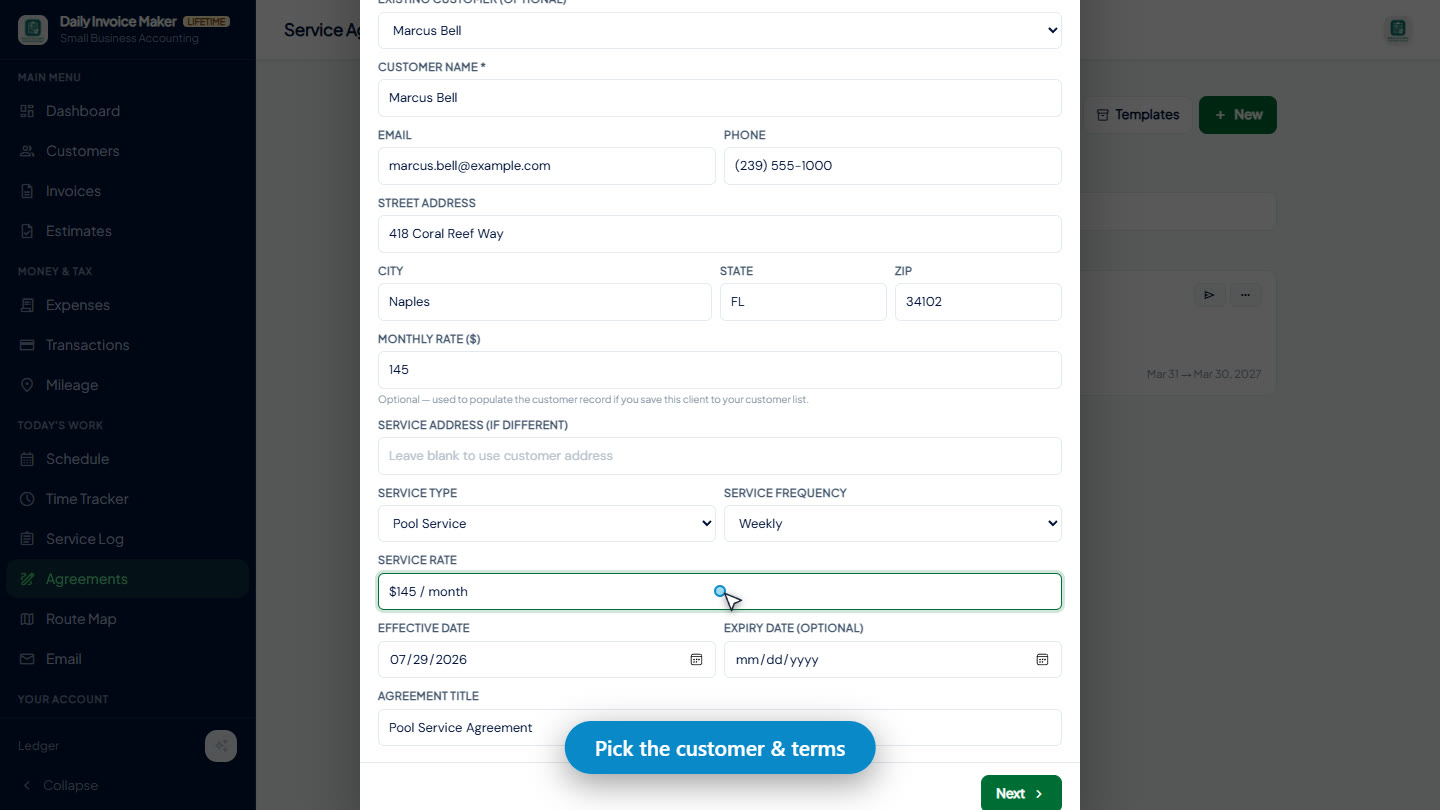
Open Agreements and click New. Choose an existing customer and their name, address, and contact details fill in automatically. Set the service type (pool, HVAC, landscaping, cleaning, and more), how often you visit, and the rate — here, weekly service at $145 / month.
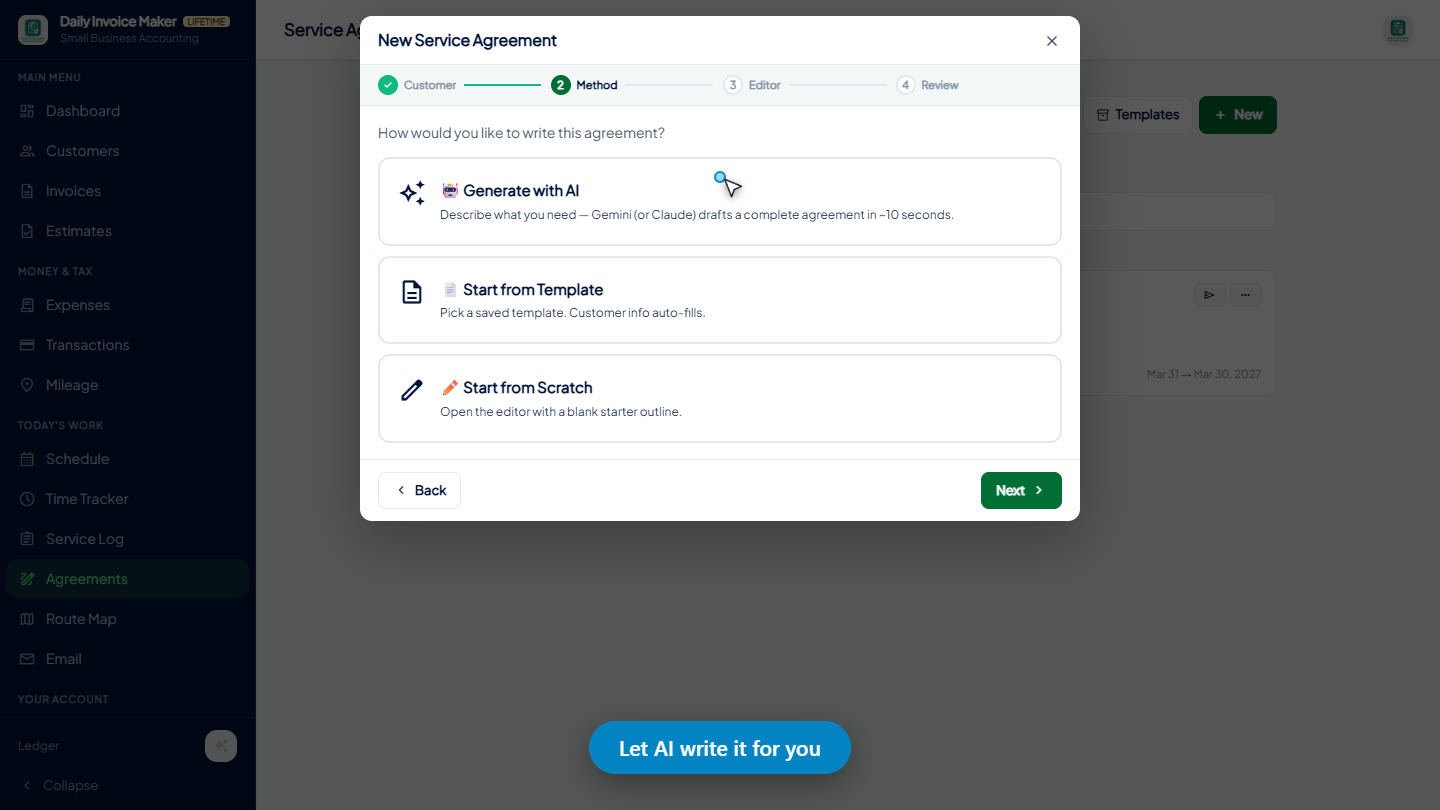
Step 2 — Choose "Generate with AI"
Next, pick how the agreement gets written: start from a saved template, start from scratch — or choose 🤖 Generate with AI and let Gemini (or Claude) draft the whole thing from a plain-English description.
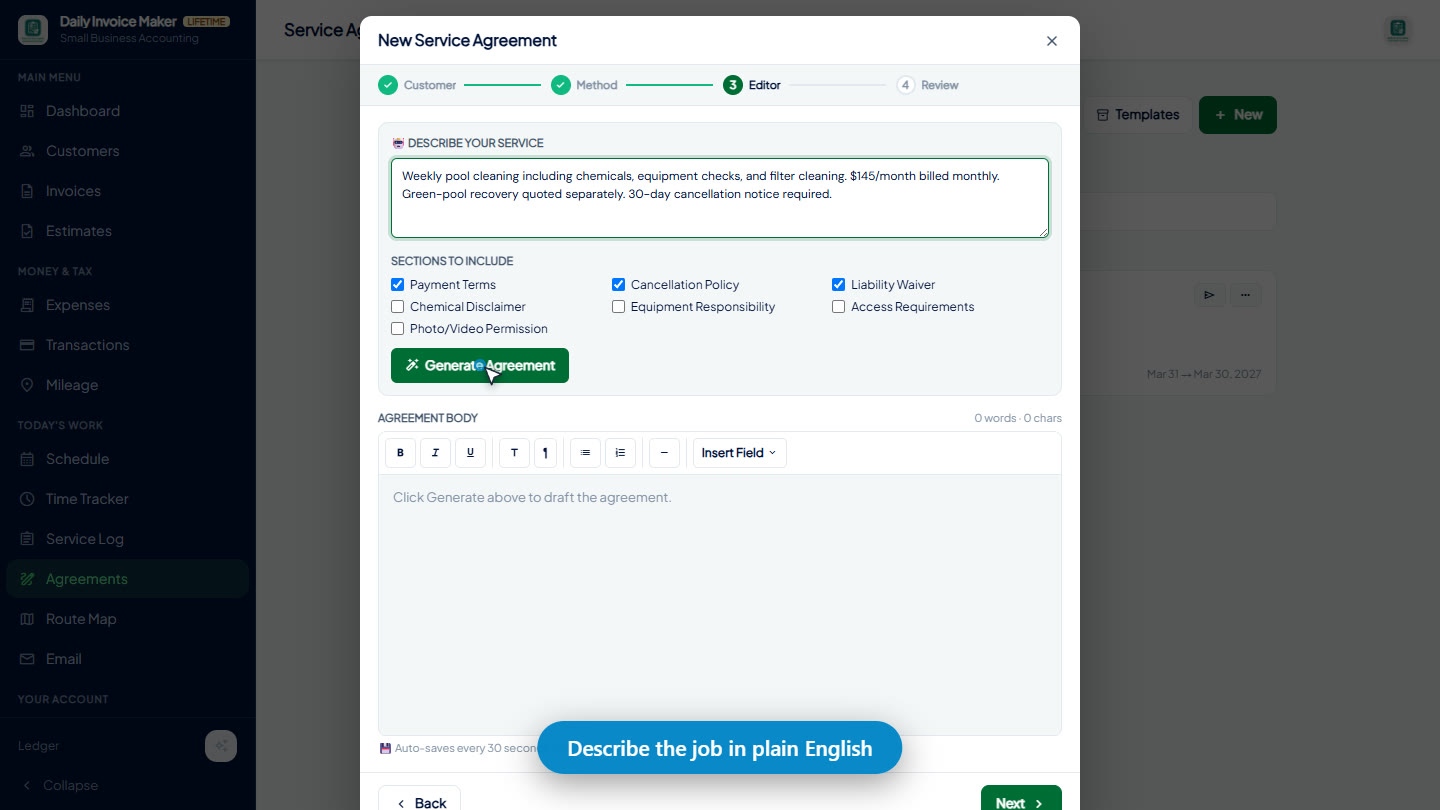
Step 3 — Describe the job in plain English
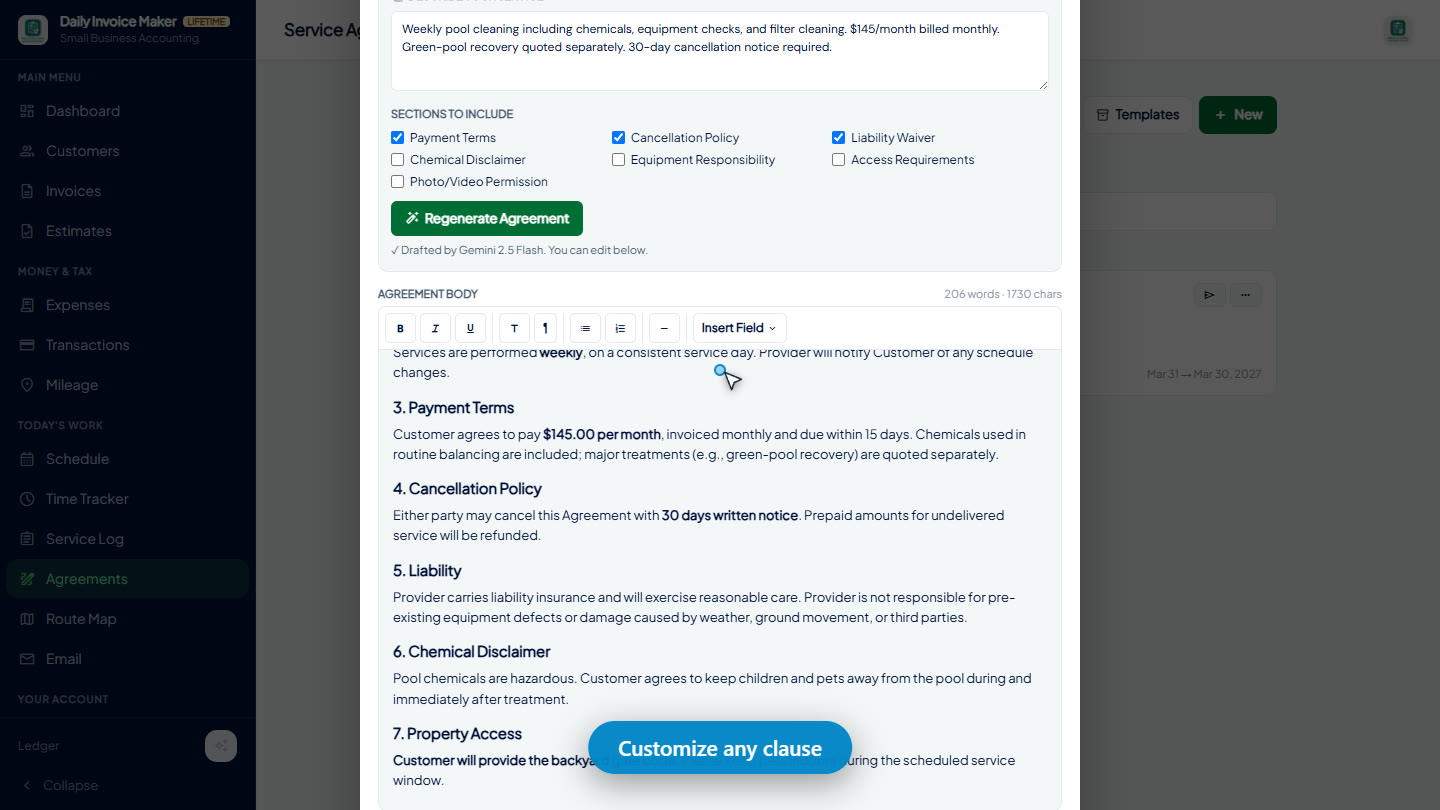
Type what you do the way you’d say it out loud — “Weekly pool cleaning including chemicals, equipment checks, and filter cleaning. $145/month billed monthly. Green-pool recovery quoted separately. 30-day cancellation notice required.” Tick the sections you want included (payment terms, cancellation policy, liability waiver, chemical disclaimer, and more) and click Generate Agreement.
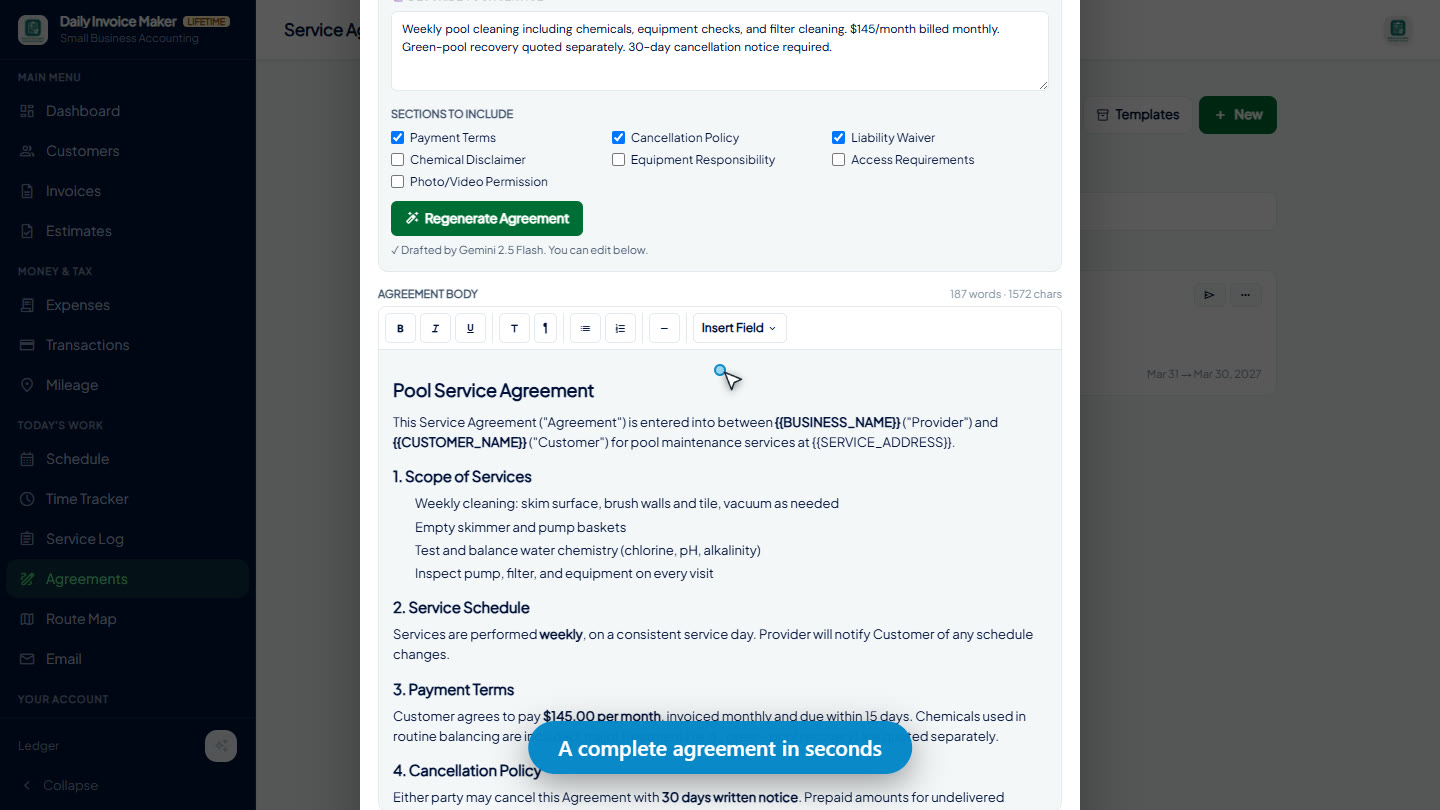
Step 4 — The AI drafts a complete agreement in seconds
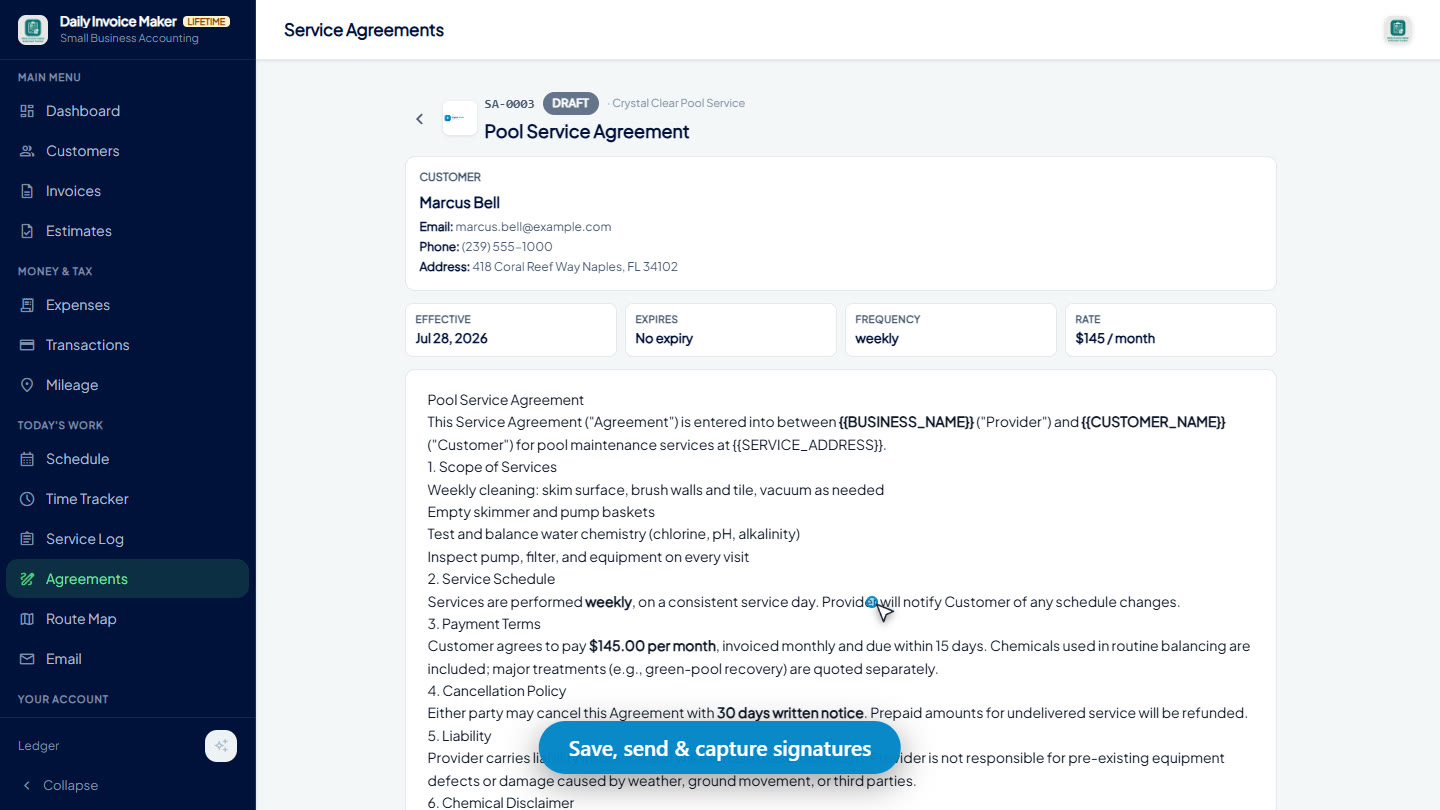
Seconds later you have a full contract: scope of services, service schedule, payment terms, cancellation policy, liability, and a chemical disclaimer — laid out in numbered sections with your rate and terms already baked in.
Step 5 — Customize any clause with the editor (and the AI’s help)
The draft is a starting point, not a cage. The built-in rich-text editor lets you bold, restructure, insert {{TOKEN}} fields that auto-fill customer details, and add your own clauses — here we added a “Property Access” section about the backyard gate code. Don’t like the draft? Change your description or tick different sections and hit Regenerate Agreement — the AI rewrites it as many times as you want.
Step 6 — Save, send, and capture the signature
Review the finished contract exactly as your customer will see it, then save. The agreement gets its own number (like SA-0002), lives on the customer’s record, and is ready to send by email or SMS, export as a PDF, and sign right in the app on a phone or tablet — with a full audit trail of every view, edit, and signature.
Watch it happen (video)
Here’s the whole flow — customer to signed-ready contract — narrated in about a minute:
Part 2 — The Service Log: your jobsite memory (and your billing safety net)
You treated the algae, swapped a part, added extra chemicals… and three weeks later, at invoicing time, you can’t remember which house it was. The Service Log is a per-visit notebook built for the field: readings, materials, notes, and photos — filed by customer and month.
Log the visit in seconds
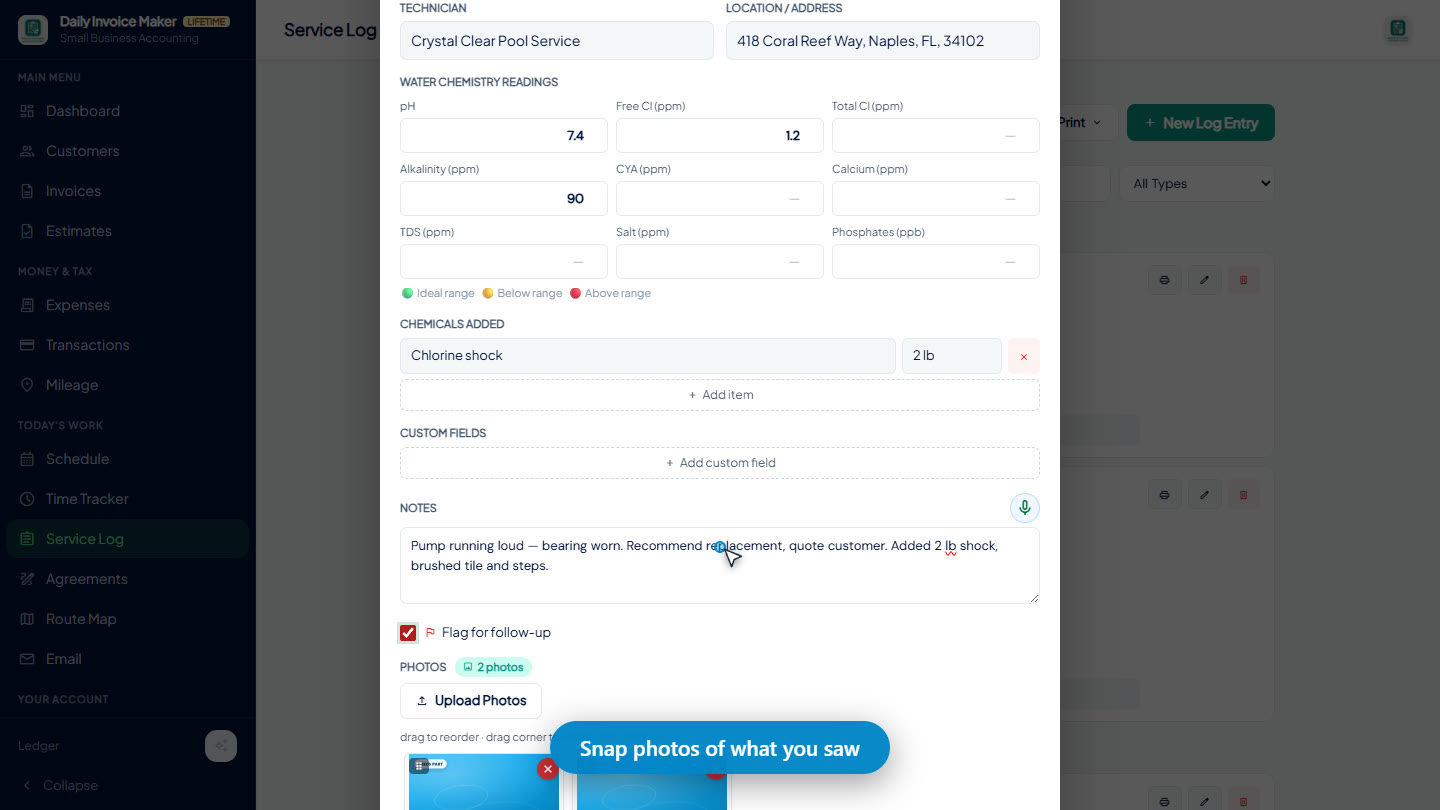
Tap New Log Entry, pick the service type and customer (their address auto-fills), and record what you did: water-chemistry readings with color-coded in-range hints, chemicals or materials used with quantities, and custom fields for anything else — filter PSI, gate codes, whatever your trade needs.
Notes, follow-up flags — and photos of what you saw
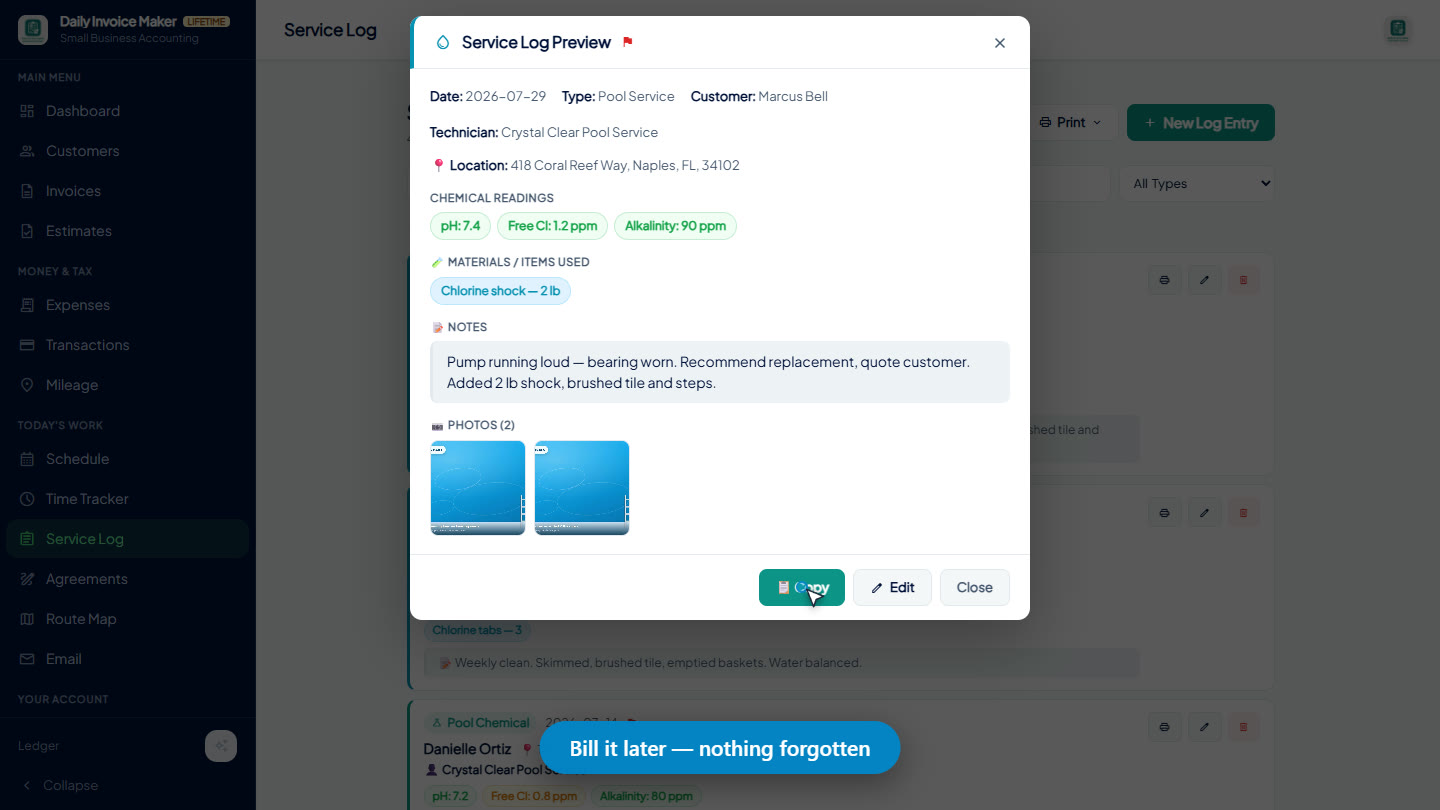
Write what you found in the notes — “Pump running loud — bearing worn. Recommend replacement, quote customer.” — and tick Flag for follow-up so it stands out in the list. Then attach photos straight from the jobsite: the worn pump, the chemical readings, the before-and-after. On your phone you can shoot straight from the camera; every photo is compressed and stored with the entry.
Every visit on file, by month and customer
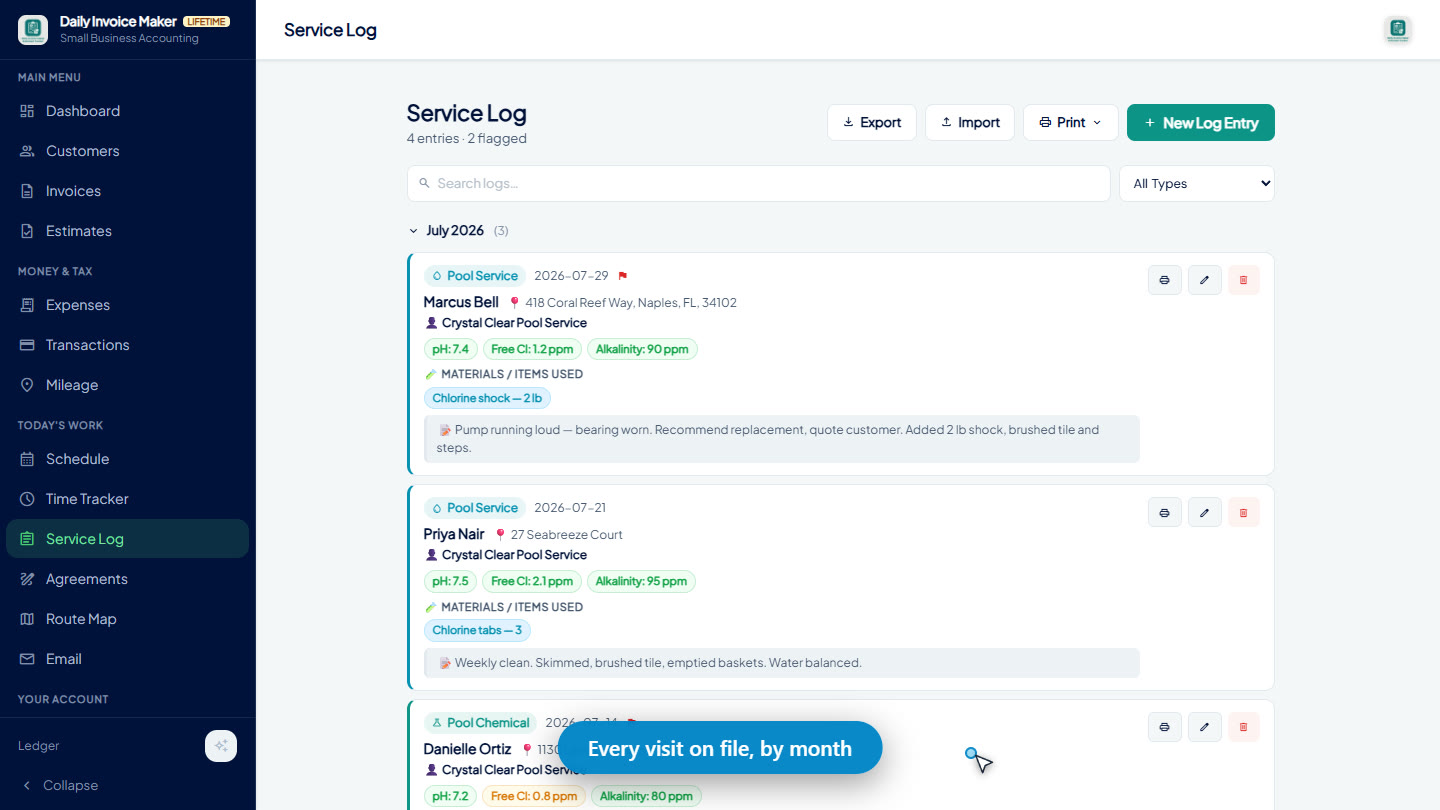
The log groups entries by month with the customer, location, technician, readings, and notes visible at a glance — flagged items highlighted so follow-ups don’t get lost.
Bill it later — so nothing goes unbilled
This is where the Service Log pays for itself. When it’s time to invoice, open any entry and hit Copy — the app builds a clean summary of the visit (readings, materials, notes) you can paste straight into an invoice line item, an email, or a text. The photos are saved with the entry too, so you can pull them onto the invoice as proof of work. That extra 2 lb of shock, the repair part, the second visit — it all gets remembered, and it all gets billed.
Watch it happen (video)
Here’s a full jobsite visit — logged, photographed, and ready to bill — in 40 seconds:
Why these two features belong together
- The agreement sets the expectation — what’s included in the monthly rate, and what gets quoted separately.
- The service log catches the exceptions — the extra chemicals, parts, and repairs that fall outside the agreement.
- The invoice collects both — the monthly rate from the agreement, plus the logged extras, with photos as proof.
Written scope, documented work, complete invoices. That’s the loop that stops revenue leaks.
Frequently Asked Questions
Can AI really write a service agreement for me?
Yes. Describe your service in plain English, tick the sections you want (payment terms, cancellation policy, liability waiver, and more), and the AI drafts a complete agreement in seconds. You review, edit, and approve everything before it’s used — and you can regenerate as many times as you like. As with any contract, have a legal professional review terms that matter to your business.
Can I customize the AI-generated agreement?
Completely. The built-in editor lets you rewrite any clause, add your own sections, format text, and insert placeholder fields that auto-fill each customer’s details. You can also save the result as a template and reuse it for every new customer.
Can customers sign the agreement electronically?
Yes — there’s a built-in signature pad, so the customer can sign on your phone or tablet on the spot (or you can capture a photo of a paper signature). Signed agreements are stored with an audit trail of every view, edit, and signature.
What is a service log and why do I need one?
A service log is a per-visit record of what you did at a job: readings, chemicals or materials used, notes, and photos. It’s how you remember — weeks later — what to bill, what to follow up on, and what the site looked like. Without one, extra work routinely goes unbilled.
Can I attach photos to a service log entry?
Yes. Attach multiple photos per entry — from your phone’s camera at the jobsite or from your computer. They’re compressed automatically and stored with the visit, and you can save them back out later to attach to invoices or estimates.
How do I turn a service log entry into billing?
Open the entry and use the Copy button — it builds a clean text summary of the visit you can paste directly into an invoice line item. Pair it with the entry’s photos on the invoice, and the customer sees exactly what they’re paying for.
Do these features work on both desktop and mobile?
Yes. Daily Invoice Maker runs on Windows, Mac, Android, and iPhone, and your agreements and service logs sync between devices through your own Google Drive.
Put your paperwork on autopilot
An AI-drafted contract in a minute, and a jobsite log that makes sure every bit of work lands on an invoice. Download Daily Invoice Maker for desktop or mobile and try both features today.
Daily Invoice Maker keeps all your data on your device. This article is for general information only and is not legal advice — have important contract terms reviewed by a professional.
Run a service business?
Daily Invoice Maker handles invoices, estimates, expenses, route maps, agreements, and tax reports — offline, on Windows, Mac, Linux + Android. Free demo, lifetime license available.
Download free →