Electrician Billing and Invoicing Software: Service Calls, Panel Upgrades, Change Orders and Permits
How an electrical contractor prints the rate card on every invoice, quotes a panel upgrade in sections, gets change orders signed before the work, and records permits and inspections.
In this article
- Key takeaways
- Problem 1: the service call
- Problem 2: the panel upgrade or EV charger quote
- Problem 3: the change order
- Problem 4: permits and inspections
- Problem 5: contractors and property managers
- Problem 6: materials receipts and year-end
- A checklist before you send an electrical invoice
- The bottom line
- FAQ
- Try it on your next job
An electrician gets paid for four different kinds of work, and a generic invoice handles none of them well. There is the service call, where the customer wants to know what the trip and the first hour cost before you arrive. There is the panel upgrade or EV charger install, a quote with equipment, labor, a permit and a utility appointment in it. There is the change order, the extra circuit the homeowner asks for once you are already in the wall. And there is the contractor or property manager who pays net 30 and wants their PO number on every line. This guide walks through each one in Daily Invoice Maker.
The app runs on Windows, Mac and Linux ($149.95 once, $59.99 a year or $5.95 a month), with a separate Android app on Google Play, and it works offline, which is the normal condition in a basement next to the main panel.
Key takeaways
- Print the service call fee and your hourly and after-hours rates in the terms of every estimate and invoice. The trip charge is the line customers dispute when they did not see it first.
- Quote panel upgrades and EV chargers with Materials, Labor, and Permit & inspection as separate sections, and give the estimate a short validity, because breaker and copper prices move.
- Write change orders as their own section and get the customer's signature on the phone before you pull the new circuit.
- Put the permit at cost on its own line and the inspection date and result in the notes. The customer, the inspector and the next electrician will all ask for it.
- Bill contractors and property managers monthly, with the PO or work order number on each line, on net 30.
Problem 1: the service call
Most residential service calls start with a phone call and a question: what does it cost for you to come out? Whatever you answer on the phone has to match what the invoice says. Put the service call fee (or diagnostic fee), the first-hour rate, the hourly rate after that and the after-hours rate in the terms section of your estimate and invoice template, so every document carries the same rate card.
On the job, the invoice then reads like the conversation: the service call fee, the hours, and each part on its own line with its own price, such as a GFCI receptacle, a 20 A breaker or a length of 12/2. If you price the job flat-rate instead of time and materials, use one line per task with a clear description ("Replace 2 GFCI receptacles, kitchen") so the customer can see what each part of the price paid for.
Problem 2: the panel upgrade or EV charger quote
A 100 A to 200 A panel upgrade or a Level 2 charger install is a quote the customer compares against two other bids, usually line by line. The bid that names the equipment, separates the permit and spells out what is and is not included is the one that looks like it came from a real company. Build the estimate in sections:
- Materials: the panel, the main breaker, branch breakers, the meter base if it is part of the job, wire and conduit, each on its own line.
- Labor: hours at your rate, or a fixed price for the install.
- Permit & inspection: the permit fee at cost, plus any inspection fee your jurisdiction charges.
- Utility coordination: a line or a note for the disconnect and reconnect appointment, so the customer knows why there is a date in the schedule they do not control.
Give the estimate a validity of 14 or 30 days, because equipment prices change, and put the deposit term in writing (for example, a deposit due on acceptance to order the panel). When the customer approves, they can sign the estimate on your phone, and when the job is done the estimate converts to the invoice with the same sections, so nothing is retyped.
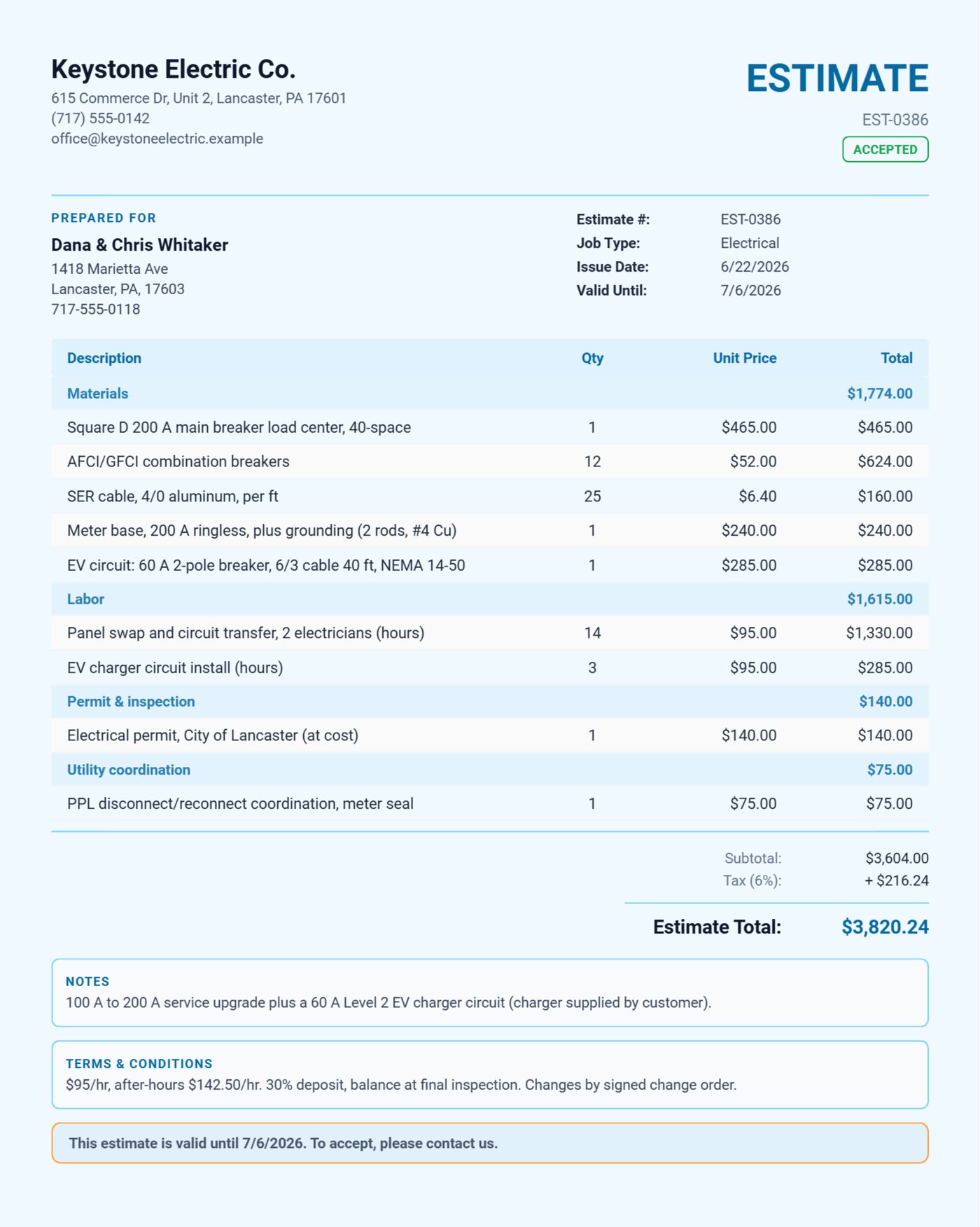
Here is how that looks for Keystone Electric Co., a two-van shop in Lancaster, Pennsylvania, quoting a 100 A to 200 A service upgrade with a 60 A circuit for the homeowners' Level 2 charger. The Square D panel, breakers, SER cable, meter base and grounding sit under Materials; 14 hours of two-electrician labor and 3 hours for the EV circuit under Labor; the city permit at cost and the PPL disconnect each in their own section. The terms carry the rate card and the 30 percent deposit, and the estimate is valid for 14 days.
Problem 3: the change order
You are in the wall for the panel job and the homeowner asks for a dedicated circuit for the garage freezer, or two more recessed lights. If it is not written down before you do it, it becomes an argument on the final invoice. Add a section called Change order to the job, price the extra work there, and have the customer sign on the phone before you start it. The final invoice then shows the original scope and the signed change order separately, and the total is never a surprise.
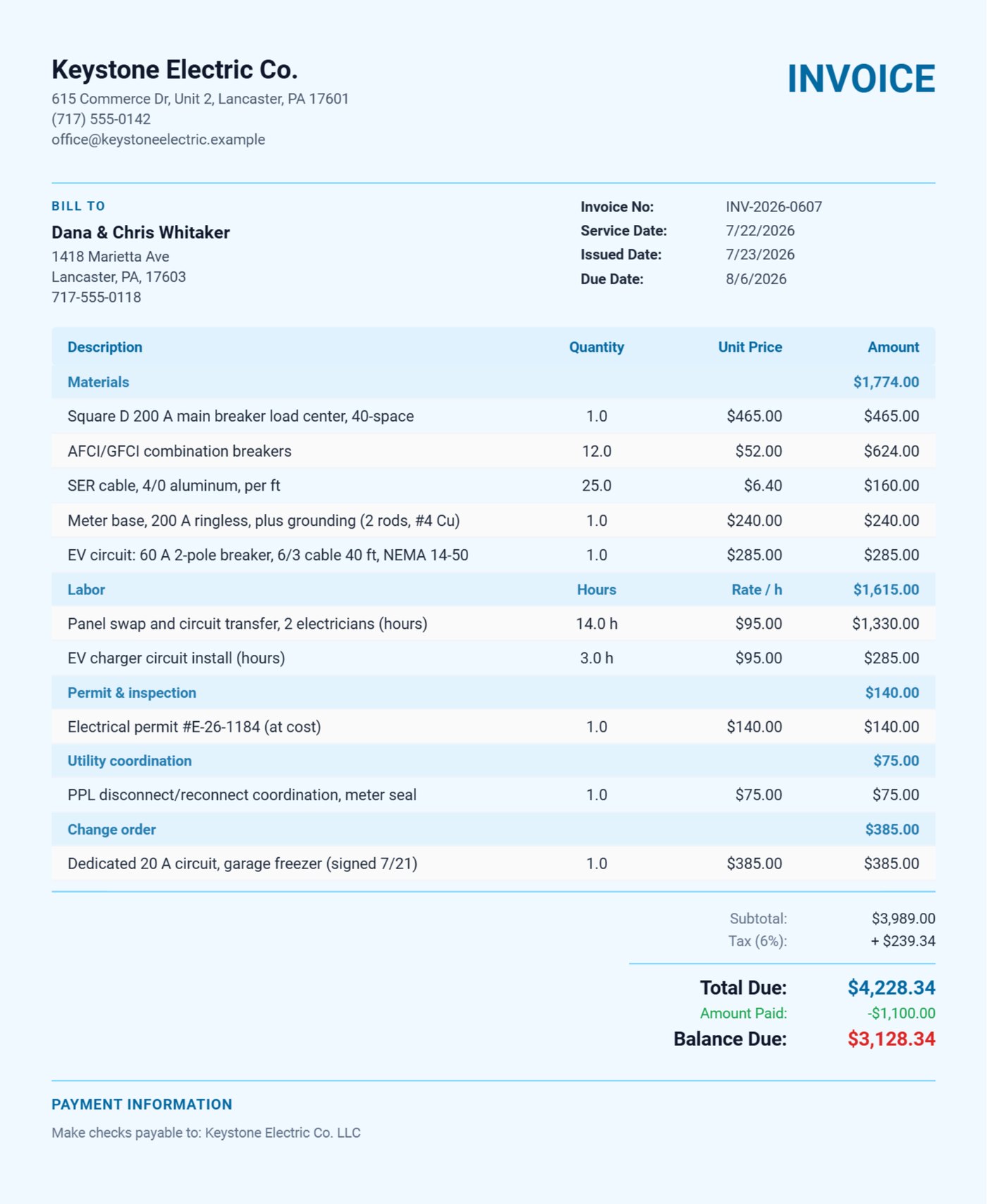
On the Keystone job the homeowners asked for a dedicated 20 A circuit for the garage freezer the day before the final inspection. It was signed on July 21 and appears on the invoice as its own Change order section. The $1,100 deposit taken when the estimate was accepted is recorded as a payment, so the invoice shows the total, the amount paid and the balance due, and the permit number and inspection result are in the notes.
Problem 4: permits and inspections
A permit is a pass-through, not your margin, so put it at cost on its own line. Record the permit number, the inspection date and the result (and any correction the inspector asked for) in the invoice notes. Years later, when the house is sold or something on that circuit fails, that invoice is the record of what was done and that it passed.
Problem 5: contractors and property managers
A general contractor or a property manager with several buildings pays differently from a homeowner: net 30, one invoice a month, and their PO or work order number on every line so their accounts payable can match it. Set the payment terms on that customer's record so every invoice carries them, and put the unit, address or work order number in each line description. The customer list then shows at a glance who owes what and how overdue it is.
Problem 6: materials receipts and year-end
Supply-house runs are where electrical margin leaks: a cash purchase for a box of connectors, a breaker picked up on the way to a job. Snap each receipt into an expense as you buy it, with the job or customer in the description, so it can be billed through and counted at tax time. At year end the expense categories roll up into the Schedule C summary report for your accountant, and the data can be exported to XLSX or CSV if your accountant works in another program.
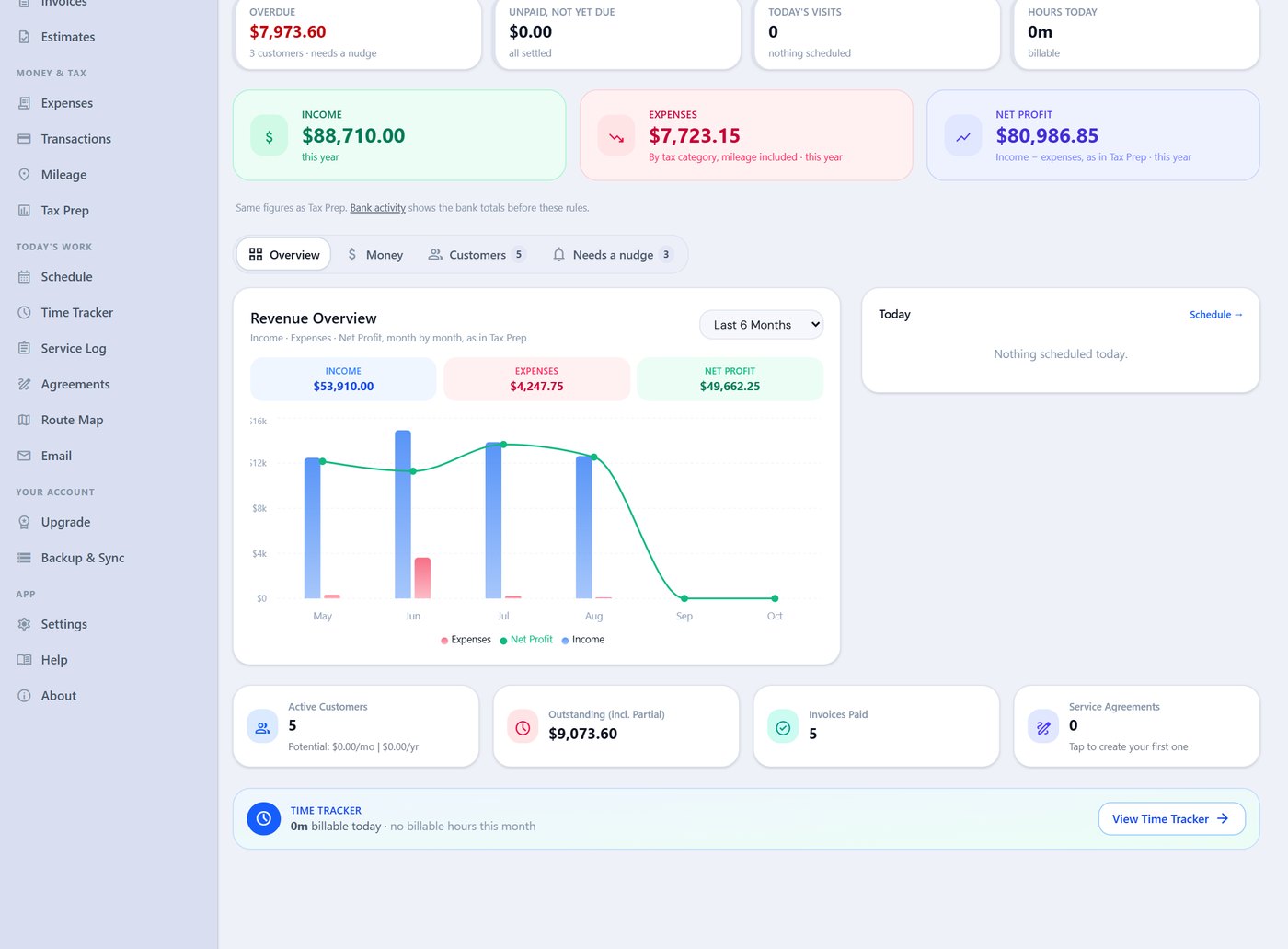
Keystone imports its bank statement every month, and Tax Prep is set to count income from bank deposits only, so a paid invoice and the deposit that paid it are not counted twice. The dashboard then shows the year's income, expenses and net profit, the month-by-month chart, and the three customers with overdue invoices who need a reminder.
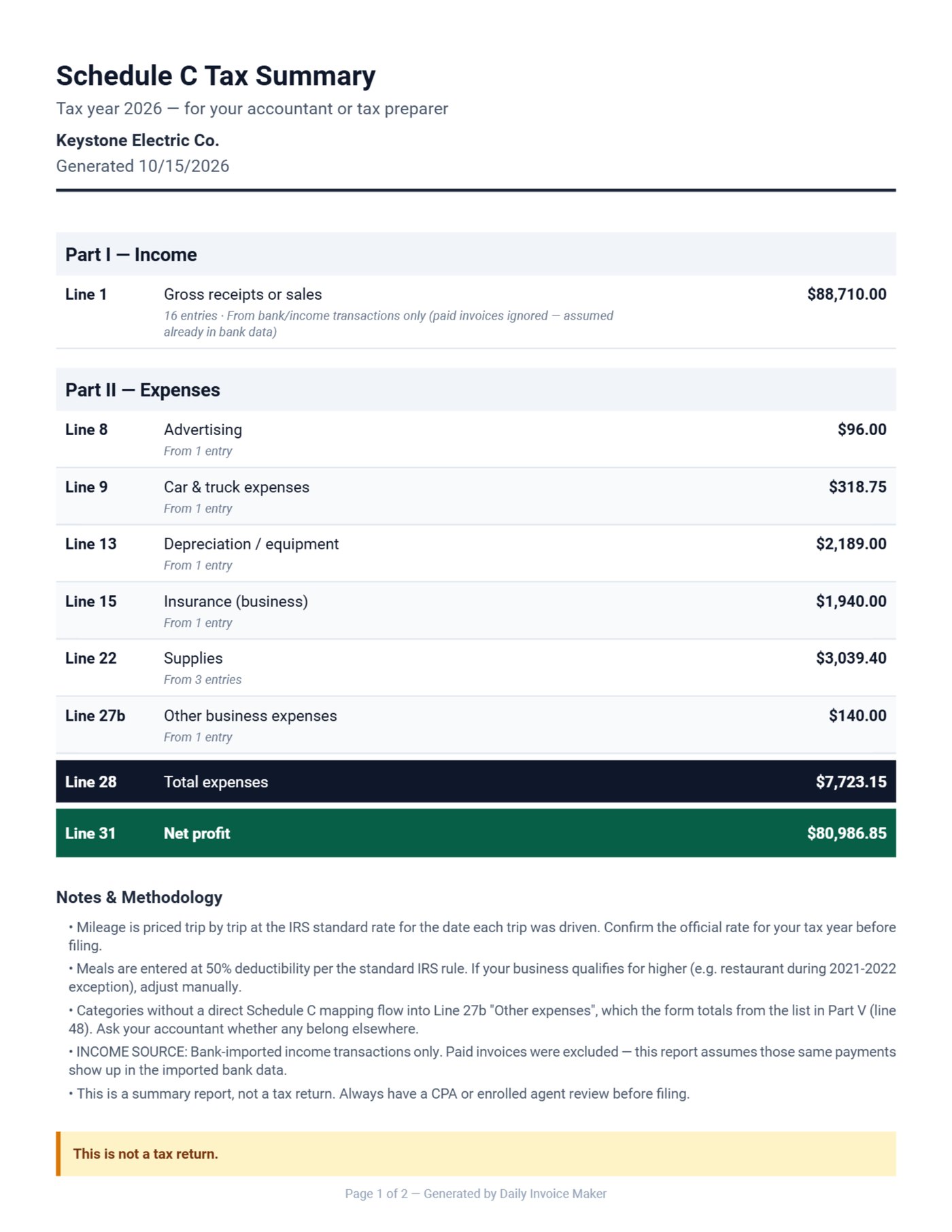
The supply-house receipts land on supplies, the press tool on equipment, the permit fees on other expenses and the fuel on car and truck in the Schedule C summary.
A checklist before you send an electrical invoice
- Service call fee and rates printed in the terms.
- Parts and labor on separate lines, each part with its own price.
- Permit at cost, with the permit number and inspection result in the notes.
- Any change order in its own section, signed.
- Deposit recorded as a payment, so the balance due is right.
- For contractors: PO or work order number on each line, net 30 in the terms.
The bottom line
Rates in the terms, the quote in sections, change orders signed before the work, and the permit and inspection on the record. Do those four things and the electrical invoice stops being where disputes start.
FAQ
Can I show materials taxable and labor not?
Keep materials and labor on separate lines or in separate sections, so the split is visible. Sales tax on electrical work depends on the state and on how the job is classified, so ask your tax preparer how to report it where you work.
Does it work in a basement with no signal?
Yes. Everything is stored on your computer or Android phone; you only need the internet to email the document.
Can the customer sign on site?
Yes. Hand them the phone or tablet, they sign on screen, and the signature is saved on the estimate or invoice PDF.
Can two of us use it?
The lifetime desktop licence covers two computers, and Google Drive sync keeps them in step.
Try it on your next job
Download the free demo for Windows, Mac or Linux and write your next panel upgrade quote in it. The demo is the full app with caps (7 invoices, 7 customers, 2 estimates). Paid plans are $149.95 once, $59.99 a year or $5.95 a month.
Run a service business?
Daily Invoice Maker handles invoices, estimates, expenses, route maps, agreements, and tax reports — offline, on Windows, Mac, Linux + Android. Free demo, lifetime license available.
Download free →