Invoicing Software for Plumbers: Emergency Rates, Permits, Water Heater Quotes and Property Managers
How a Columbus plumbing company prints its after-hours rate card on every invoice, quotes a water heater with a 14-day validity and a permit line, and bills a property manager monthly by unit.
In this article
- Key takeaways
- Problem 1: the water heater quote that has to expire
- Problem 2: the invoice with the permit and the inspection date
- Problem 3: Saturday, 6:40 am, grease trap
- Problem 4: the property manager's nine units
- Problem 5: knowing whether the jetter paid for itself
- Problem 6: tax time for a van full of fittings
- What a plumbing invoice needs
- What we changed after watching plumbers use the app
- Common mistakes on plumbing invoices
- The bottom line
- FAQ
- Try it on the next service call
Plumbers get paid for three things that never fit on a generic invoice: the emergency, the permit, and the part that changed price since the quote. A Saturday 6 am grease-trap call is billed at a rate the customer must have seen before they dialed. A water heater replacement carries a city permit that is a pass-through, not your margin, and a tank price that moves monthly, so the estimate has to expire. And the property manager with nine units wants one invoice a month with their work order numbers on it. This is the paperwork that keeps a plumbing company paid, and it is the paperwork most software makes you improvise.
This guide shows how Riverbend Plumbing in Columbus, Ohio handles a season of it in Daily Invoice Maker: a water heater estimate with a 14-day validity and a permit line, the invoice it became, an emergency invoice with the after-hours rate card, the property manager's monthly invoice, the profit picture and the Schedule C summary. All of it is the app's real output. The app runs on Windows, Mac and Linux ($149.95 once, $59.99 a year or $5.95 a month) and works offline in a basement with no signal.
Key takeaways
- Print the service call fee and the after-hours rate card in the terms of every invoice; the emergency rate is the line customers dispute unless they saw it first.
- Quote fixture and equipment jobs on an estimate with Materials, Labor and Permits sections and a short validity, because tank prices change.
- Put the permit as its own line at cost and the inspection date in the notes; the customer and the city both need it.
- Bill property managers monthly with unit and work order numbers in each line, on net 30.
- Track van inventory purchases and the jetter as expenses; the Schedule C summary sorts equipment from supplies at year end.
Problem 1: the water heater quote that has to expire
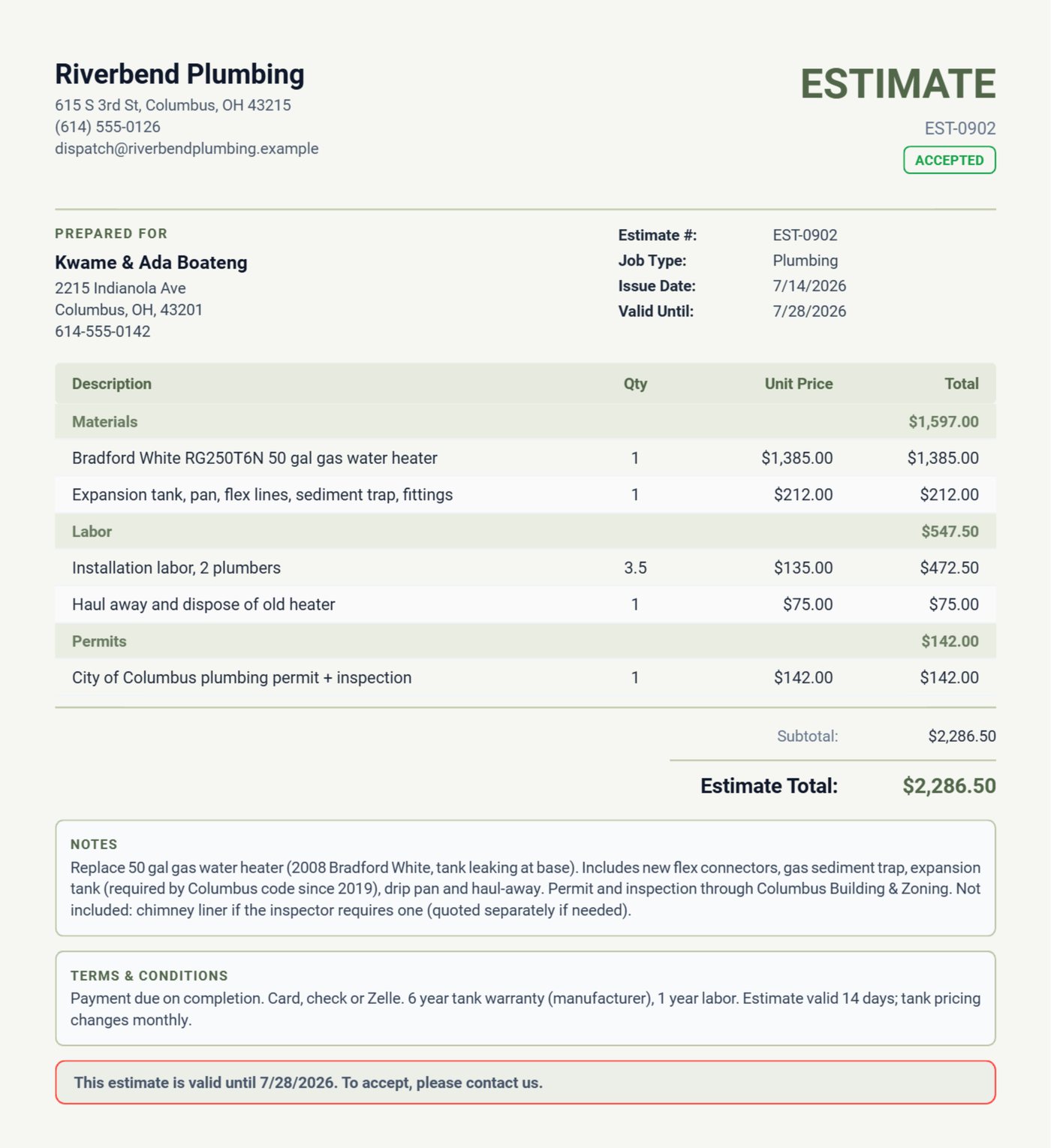
The Boatengs' 2008 tank is leaking at the base. The estimate lists the Bradford White replacement under Materials, the expansion tank the city has required since 2019, the pan and fittings, 3.5 hours of two-plumber labor, haul-away, and the Columbus permit and inspection as its own line at $142. The terms say the estimate is valid 14 days because tank pricing changes monthly, and the notes exclude the chimney liner in case the inspector calls for one. That exclusion is the sentence that stops a $1,900 job from becoming a $2,700 argument.
Problem 2: the invoice with the permit and the inspection date
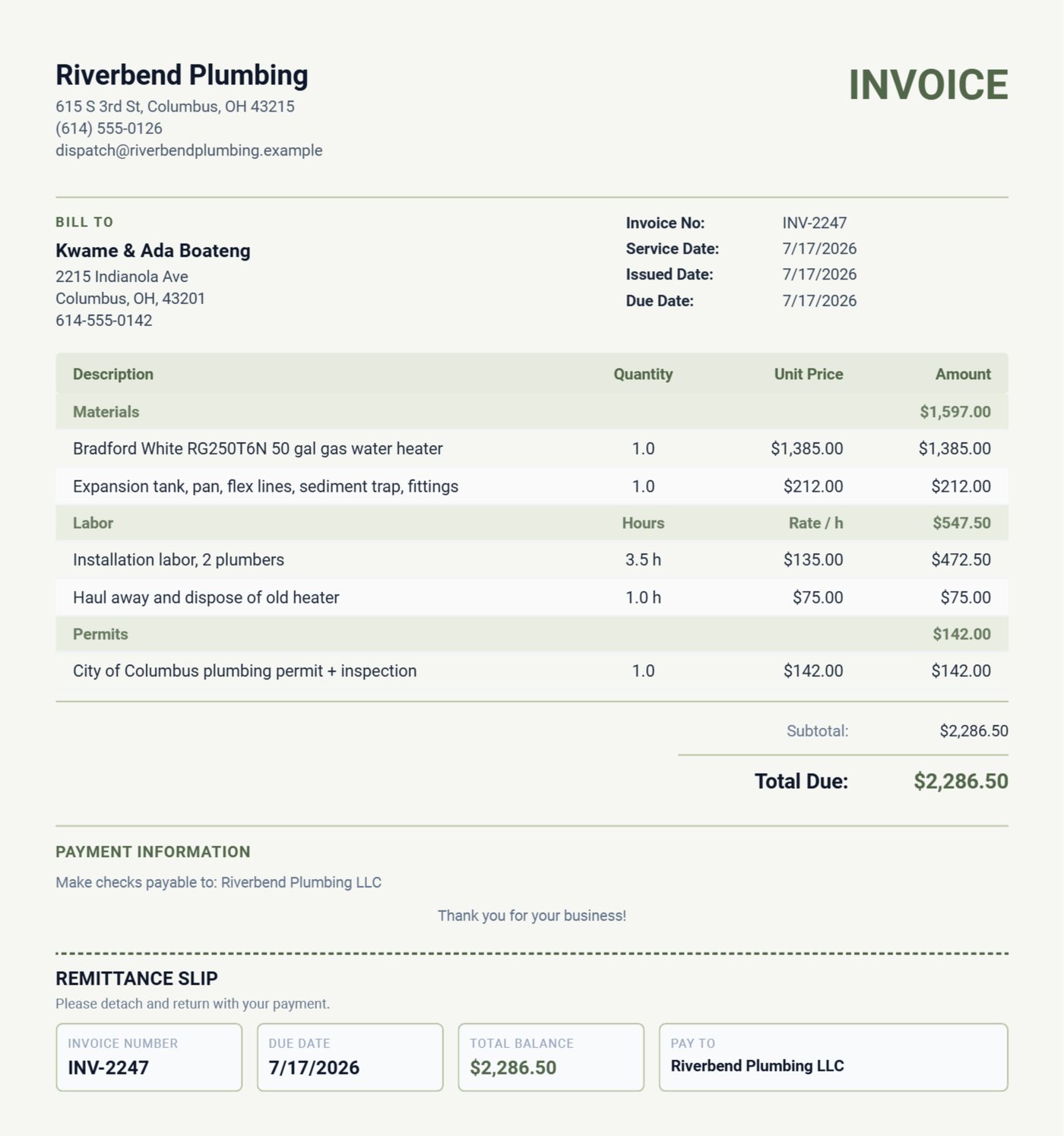
When the heater is in, the estimate converts to the invoice in one tap and the notes get the facts that matter later: installed 7/17, inspection scheduled 7/21, serial number and warranty card left on the unit, old heater removed. The permit is still its own line, so the customer sees it as the city's charge, not yours. Six years from now when the tank is claimed under warranty, the invoice has the install date and the model.
Problem 3: Saturday, 6:40 am, grease trap
German Village Bakery's grease line backed up on a Saturday morning. The invoice bills the emergency call at $245, two hours of jetting at the after-hours rate of $165, and the enzyme treatment. The reason nobody argued is the terms: the after-hours rate card is printed on every invoice the bakery has ever received. Put the rate card in Settings once and it prints on every document. The bakery is now on a quarterly maintenance invoice, which is the outcome an emergency should produce.
Problem 4: the property manager's nine units
Scioto Property Partners sends work orders by unit. The May invoice lists three: unit 3A fill valve and flapper, unit 7C kitchen faucet, unit 2B P-trap, each with its own price, with the WO numbers in the notes, on net 30. One invoice a month, matched to their numbers, gets paid on day 30; three separate invoices without numbers get paid on day 60 after a call. The customer record keeps the history by unit, so "what did you do in 7C last year" is a search.
Problem 5: knowing whether the jetter paid for itself
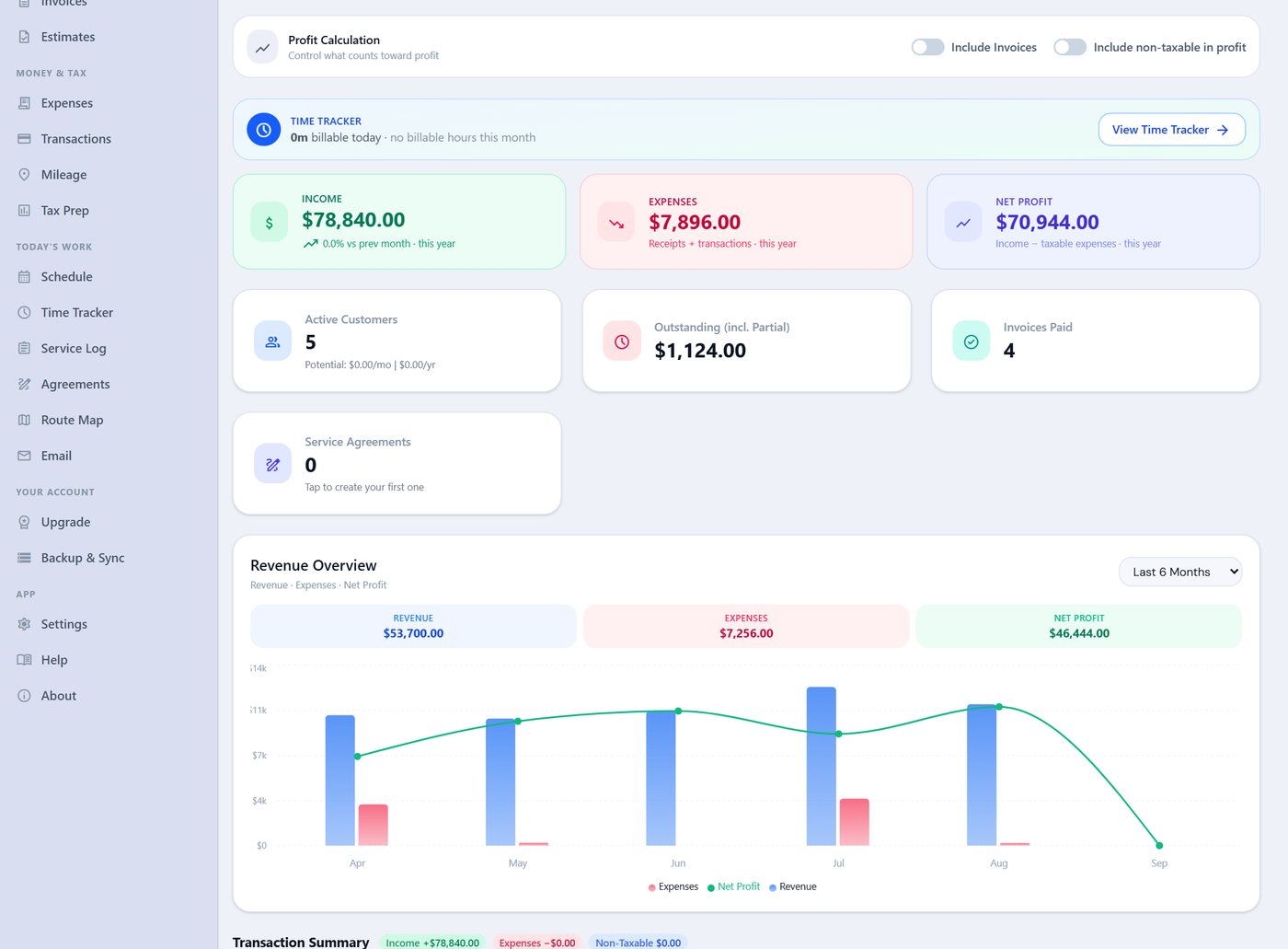
Riverbend spent $3,200 on a jetter hose reel in April. Whether that was a good purchase is answered by the dashboard: income by month, expenses, net profit, and the revenue chart. The bank statement imports monthly (Chase, Huntington, PNC and a dozen other formats plus any OFX file), receipts are photographed at the supply house, and the "Include Invoices" toggle stays off so deposits and invoices are not double counted.
Problem 6: tax time for a van full of fittings
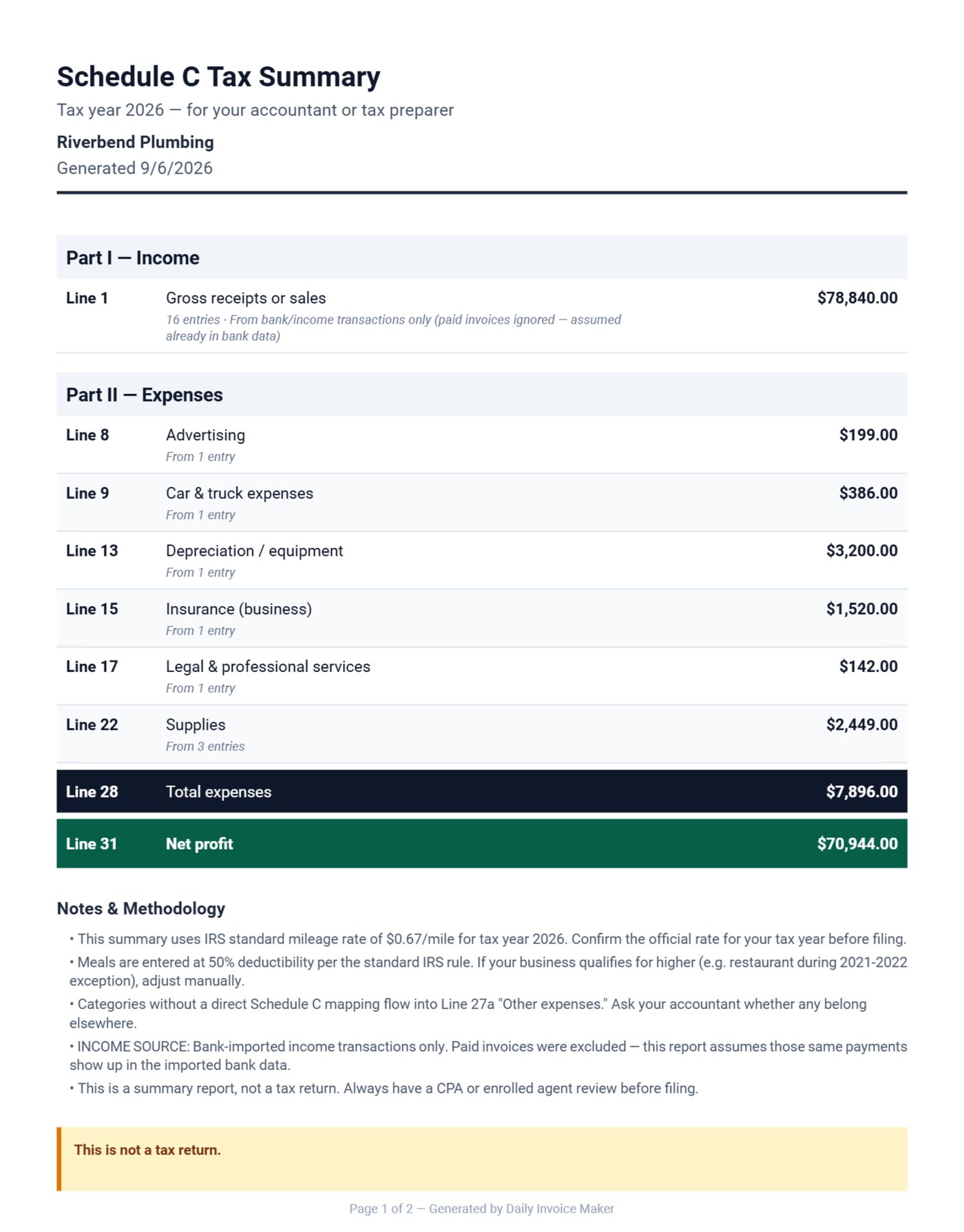
Plumbing expenses split into things you keep (the jetter, the cable machine, the vans) and things you resell or use up (the water heater, fittings, cartridges). Recorded as they happen with the customer name in the item ("RG250T6N + expansion tank + pan (Boateng)"), they land on the right Schedule C lines: equipment to depreciation, resold materials to supplies or cost of goods, permits to legal and professional, the vans to car and truck, liability and commercial auto to insurance.
What a plumbing invoice needs
| Line | Why |
|---|---|
| Service call fee as its own line | It is the trip and the diagnosis; it is not free |
| Labor as hours × rate, with the after-hours rate card in terms | The disputed line, made undisputable |
| Materials with model numbers | Warranty and price checks |
| Permit at cost on its own line | Pass-through, and the customer keeps it for resale disclosure |
| Install date, inspection date, serial in notes | The warranty file |
| Unit and work order numbers for property managers | Paid on day 30 instead of day 60 |
What we changed after watching plumbers use the app
We added invoice terms as a settings field, printed on every document, after a plumber told us the after-hours rate was the only line his customers ever disputed and that they stopped disputing it once it was on paper before they called. We built the estimate validity date for the same trade: tank prices changed monthly and a quote from March was being accepted in May. We noticed permit lines were being buried in materials and made sections the default on the Plumbing template.
Common mistakes on plumbing invoices
- Service call fee not shown. The trip and the diagnosis are work; an invoice that hides them undercharges every short job.
- Permit marked up. Pass it through at cost on its own line; the customer keeps it for the resale disclosure.
- Quotes that never expire. A water heater quote older than two weeks is a loss waiting to be accepted.
- Van as a mileage claim. For a loaded service van, actual costs usually exceed the standard rate; the IRS mileage page explains when each method applies, and the app tracks both.
The bottom line
Rate card in the terms, permits at cost, quotes that expire, and one monthly invoice per property manager by unit. The rest is entering receipts as they happen so February is a download.
FAQ
Can I show a different rate for after-hours?
Yes. Keep both rates in Products & Rates and pick the after-hours one onto the labor line; the rate prints with the hours. The rate card itself goes in the invoice terms in Settings.
How do I handle a permit the customer pays directly?
Leave it off the invoice entirely. If you paid it, it is a line at cost on the invoice and an expense on your side; both must match.
Can the customer approve the estimate from their phone?
Yes. Email the PDF and keep the reply, or have them sign on your phone or tablet; the signature prints on the estimate.
Does it track the van's mileage?
Yes, GPS on Android or manual entry. For a van full of tools, actual costs are usually the better deduction; the app tracks both so your preparer can choose.
Try it on the next service call
Download the free demo for Windows, Mac or Linux, put your rate card in Settings, and write the next service call invoice in it. The licence is $149.95 once, $59.99 a year or $5.95 a month. The plumbing page and the guide cover estimates, sections and the tax export.
Run a service business?
Daily Invoice Maker handles invoices, estimates, expenses, route maps, agreements, and tax reports — offline, on Windows, Mac, Linux + Android. Free demo, lifetime license available.
Download free →