Auto Repair Shop Billing and Invoicing Software: Vehicle, Parts, Labor, Fleet Terms and the Promise to Pay
How a Mesa shop writes repair estimates with the vehicle at the top and parts and labor in separate tables, bills a twelve-van fleet on net 15, and chases a released car.
In this article
- Key takeaways
- Problem 1: the repair order that is not a repair order
- Problem 2: parts and labor on the invoice, without retyping
- Problem 3: the fleet account
- Problem 4: the promise to pay
- Problem 5: shop rent, parts and the tax return
- What a repair invoice needs
- What we changed after a garage asked for it
- Common mistakes on repair invoices
- The bottom line
- FAQ
- Try it on tomorrow's first car
An auto repair shop invoice has to answer four questions before the customer pays: which car, which parts at what price, how many hours at what rate, and did I agree to this. A generic invoice template answers none of them, which is why so many independent shops still run a paper repair order next to whatever software they bought. Fleet accounts add a fifth question: which van, and when is net 15 due.
This guide shows how Quick Fix Auto Repair in Mesa, Arizona runs its paperwork in Daily Invoice Maker, which added a dedicated auto repair estimate in September: the vehicle block, parts and labor in separate tables, fleet terms, a promise-to-pay that went overdue, the shop's profit picture and the Schedule C summary. Every image is the app's real output for this shop. The app runs on Windows, Mac and Linux ($149.95 once, $59.99 a year or $5.95 a month) and works with no internet, which describes most service bays.
Key takeaways
- Use the Auto Repair job type: the vehicle (make, model, year, plate, VIN, odometer) prints at the top of the estimate and the invoice.
- Every line is a part or labor. Parts are quantity × price; labor is hours × your rate, and the PDF prints them as two tables with their own subtotals.
- Save your parts and your labor rates once in Products & Rates (diagnostic, general, fleet) and pick them onto lines.
- Get the estimate authorized before the work, signed on the phone or by email reply; Arizona and most states require it.
- Fleet accounts get their own terms (net 15), their own rate, and the van number on every invoice so the fleet manager can match it.
Problem 1: the repair order that is not a repair order
The estimate below is a fleet van, Ford Transit 250 number 7, with front brakes metal to metal, two hub bearings and a coolant leak. The vehicle card holds the plate, VIN and odometer. Parts and labor are separate: three part lines with prices, three labor lines with hours at the fleet rate of $125. The notes carry the findings and the recommendation (rear pads next visit); the terms carry the fleet account conditions and the warranty. The fleet manager approves it by email and the estimate is marked sent then accepted.
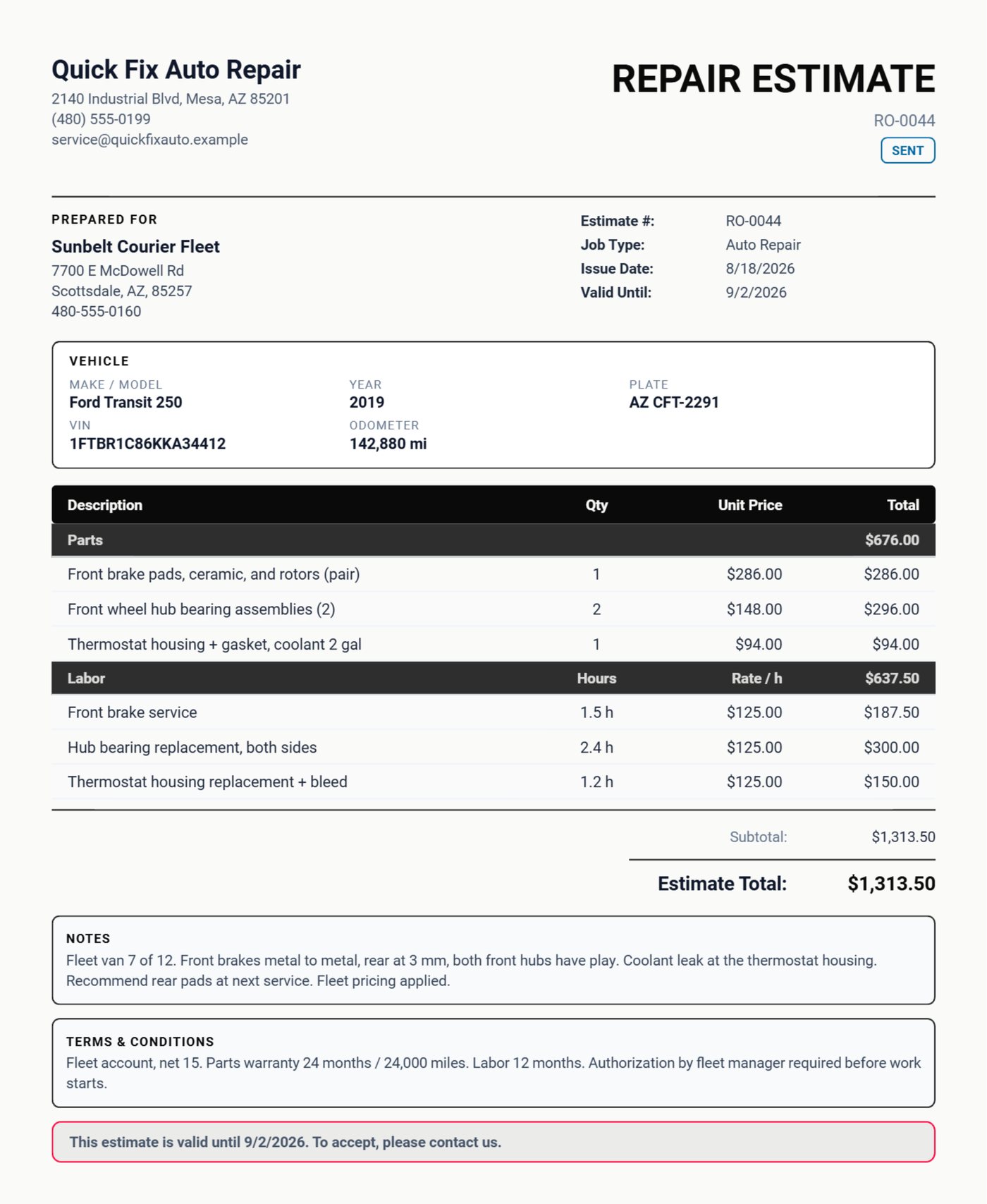
A shop that quotes this way has no "the estimate said $600" argument later, because the estimate said $286 for pads and rotors, 1.5 hours of brake labor at $125, and so on, and the customer said yes to each.
Problem 2: parts and labor on the invoice, without retyping
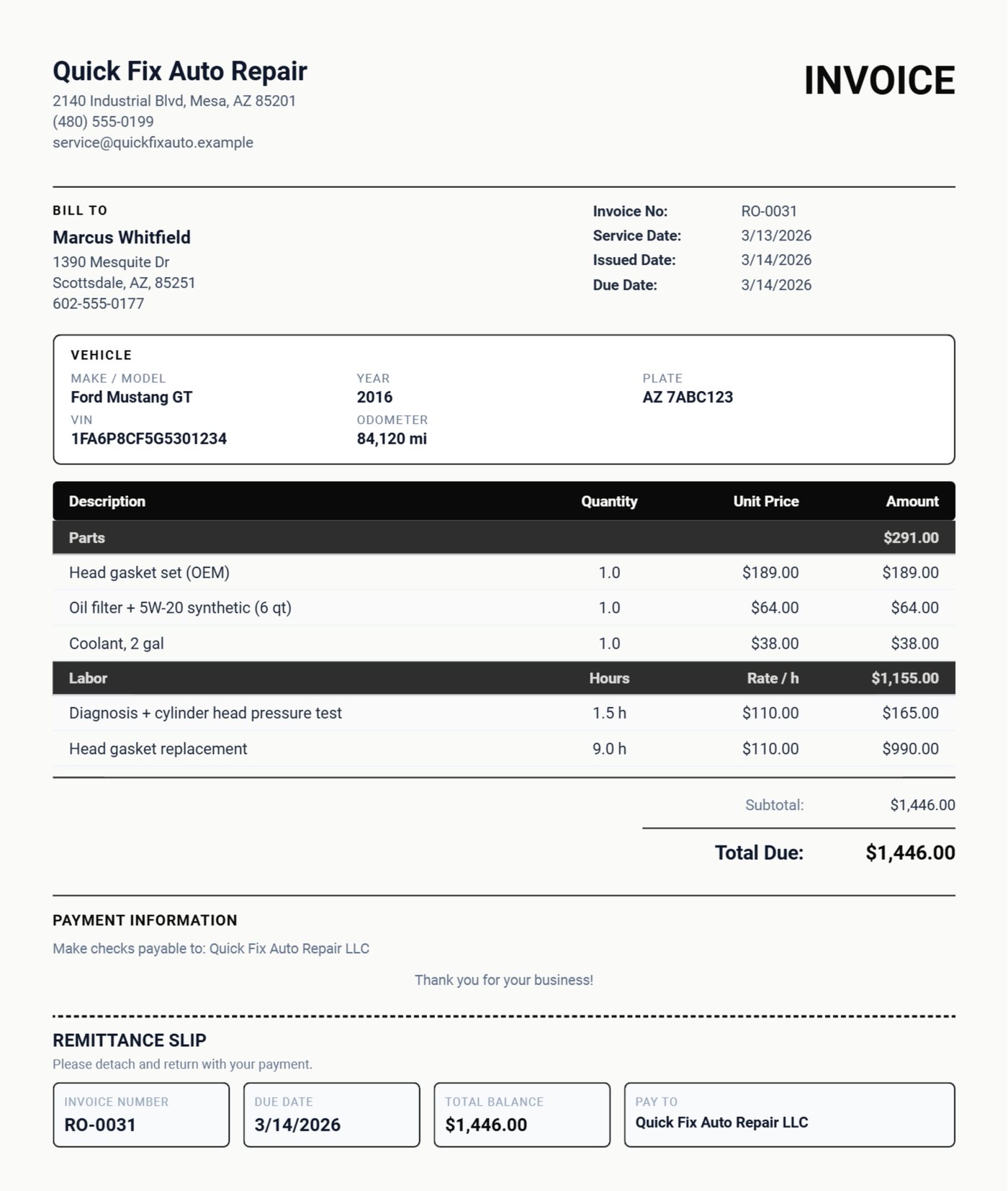
When the van is done, one tap converts the estimate to the invoice. The vehicle block carries over and the parts and labor become Parts and Labor sections with hours and rate printed. The Mustang head gasket invoice below is the retail version: the head gasket set, oil and coolant under Parts; diagnosis and nine hours of replacement under Labor; the diagnosis in the notes. The customer sees exactly what the estimate said, because it is the estimate.
The full walkthrough of the estimate editor covers the part and labor toggles, the Products & Rates list and the Bulgarian PDF option that this feature was built for.
Problem 3: the fleet account
Sunbelt Courier has twelve Transits and wants one thing from its shop: invoices it can match to a van and pay on net 15 without a phone call. Each fleet invoice in the example names the van in the notes ("Fleet van 3 of 12"), carries the plate and VIN in the vehicle block, and uses the fleet labor rate. The customer record holds the account history, so when the fleet manager asks what van 7 has had done this year, it is a filter, not a file search. Fleet work is the steadiest income a small shop has, and it is won on paperwork.
Problem 4: the promise to pay
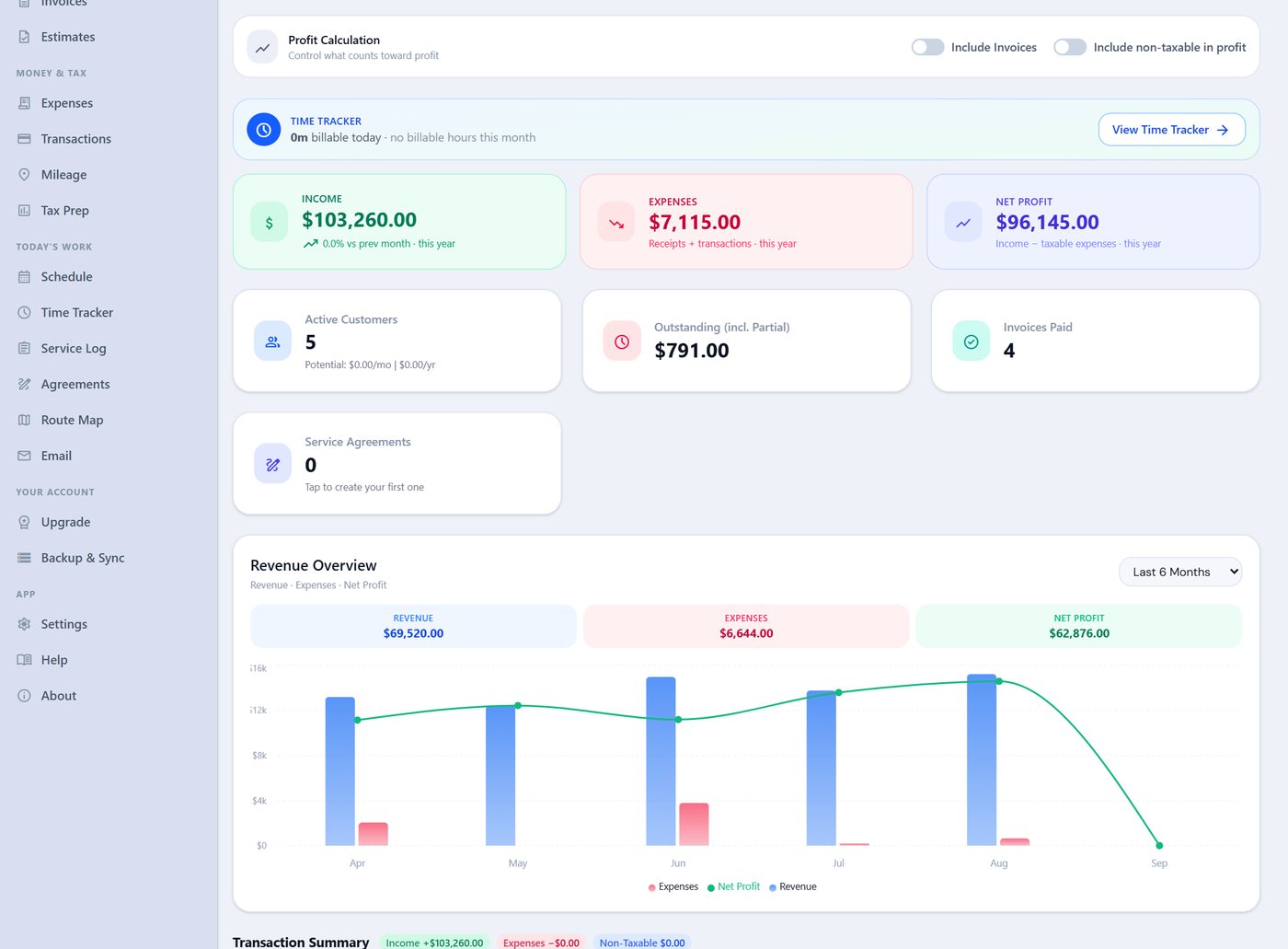
Every shop has released a car on a promise. The Tacoma alternator job in the example was released 7/8 with payment due 7/9; it is the overdue invoice on the dashboard. The Compose Email screen writes the reminder with the invoice attached, in a friendly or firm tone, and the invoice status tracks it. Two reminders are noted on the invoice itself, which is what you want on file if it goes to small claims. The better fix is upstream: the estimate's terms say payment is due at pickup, and the signature at pickup is captured on the same device.
Problem 5: shop rent, parts and the tax return
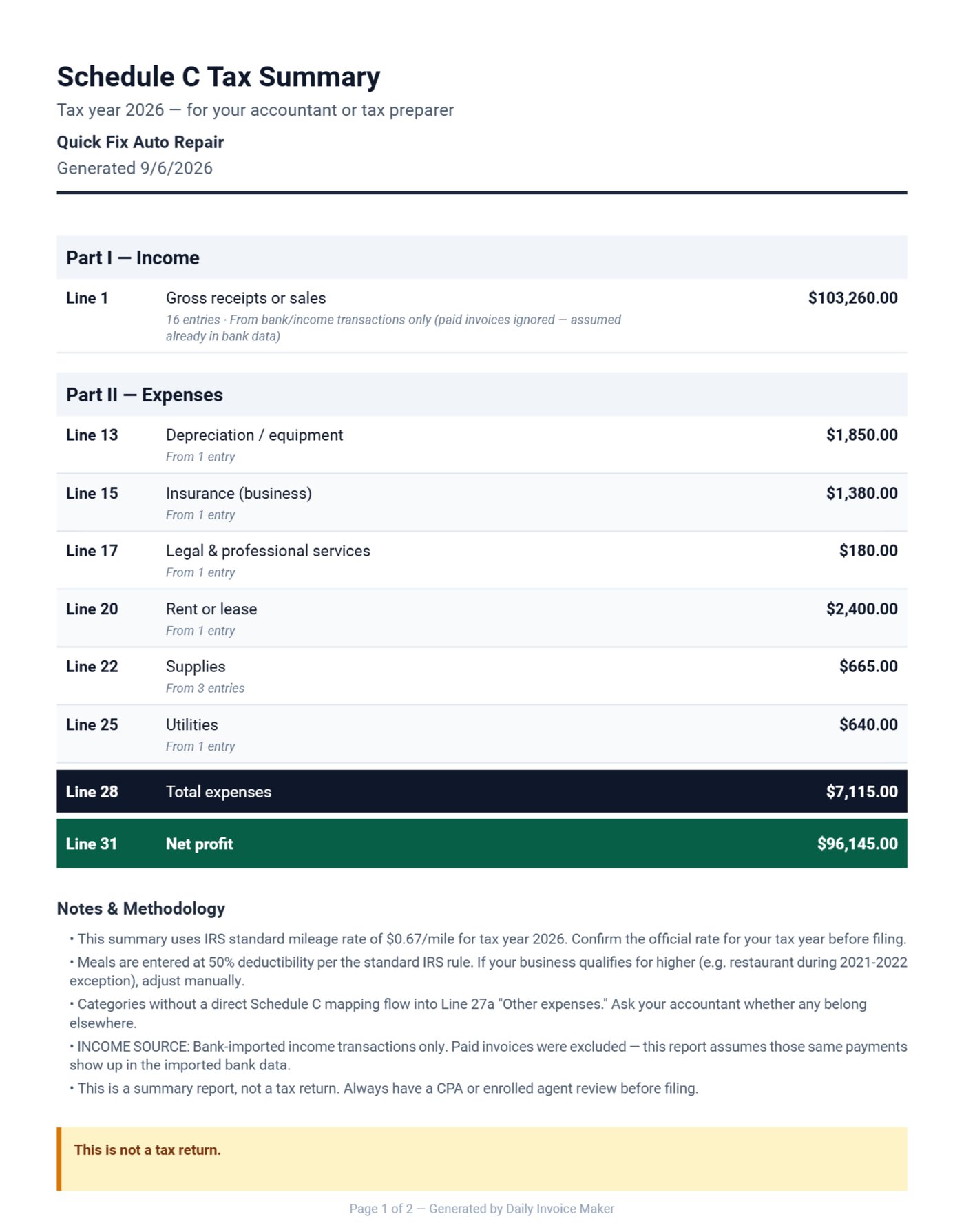
A shop's expenses are bigger and lumpier than most trades: bay rent, garage keepers insurance, a scan tool subscription, the machine shop, and parts bought per job. Entered as they happen with the repair order number in the item ("Head gasket set, filter, coolant (RO-0031)"), they tie each parts purchase to the invoice that resold it, which is what your accountant needs to compute cost of goods. The Schedule C summary maps rent to line 20, insurance to 15, the machine shop to legal and professional, parts to supplies or cost of goods.
What a repair invoice needs
| Element | Why |
|---|---|
| Vehicle block: make, model, year, plate, VIN, odometer | Warranty, fleet matching, and the law in most states |
| Parts table with quantity and unit price | Customers check part prices; show them |
| Labor table with hours and rate | A labor amount with no hours reads as arbitrary |
| Diagnosis in the notes | Explains why the parts are there |
| Authorization before work, signature at pickup | Required by many state repair laws; ends disputes |
| Warranty terms | Parts 24/24, labor 12 months, printed every time |
What we changed after a garage asked for it
We built the Auto Repair job type in September 2026 after a garage in Bulgaria wrote to us with a list: the vehicle at the top, parts and labor in separate tables, hours and rate printed, and the whole PDF in Bulgarian. We added the vehicle block as one card on the estimate rather than six fields on every invoice, and we noticed while testing that a labor line without hours reads as arbitrary even when the price is fair, so the Labor table always prints hours and rate. The fleet examples in this post came from the same conversation: the garage's best account was a courier fleet, and its invoices needed the van number.
Common mistakes on repair invoices
- No VIN or odometer. The warranty claim and the fleet manager both need them, and most state repair laws require the vehicle description on the invoice.
- Labor as one amount. Hours times a printed rate is what customers accept; a lump sum is what they dispute.
- Work without written authorization. The FTC's auto repair guidance tells drivers to insist on a written estimate; a shop that offers one first looks like the honest one.
- Releasing the car on a promise. Payment due at pickup in the terms, and the signature captured at pickup, is cheaper than the reminder emails.
The bottom line
Vehicle block, parts table, labor table with hours and rate, authorization before the work, and the fleet's own numbers on the fleet's invoices. The estimate becomes the invoice with one tap, so what the customer approved is what they pay.
FAQ
Does the invoice show hours and rate for labor?
Yes. On an auto repair estimate a labor line's quantity is hours and the price is the rate; the PDF prints a Labor table headed Hours and Rate, and the invoice keeps it after conversion.
Can I keep different labor rates?
Yes. Products & Rates holds as many labor rates as you use (diagnostic, general, fleet, bodywork) and as many parts as you stock. Pick one onto a line and edit the price for that job if needed.
Can the customer sign the estimate?
Yes, on the screen or phone, and the signature prints on the PDF. For fleet accounts an email approval is kept in the customer record.
Can I print in another language?
Every fixed label on the estimate and invoice can print in Bulgarian today, with more languages on request; Cyrillic, Greek and Turkish text print correctly.
Try it on tomorrow's first car
Download the free demo for Windows, Mac or Linux and write tomorrow's first repair estimate with the Auto Repair job type. The licence is $149.95 once, $59.99 a year or $5.95 a month. The auto repair page shows the PDF in English and Bulgarian, and the guide has a chapter on the vehicle block and the parts and labor tables.
Run a service business?
Daily Invoice Maker handles invoices, estimates, expenses, route maps, agreements, and tax reports — offline, on Windows, Mac, Linux + Android. Free demo, lifetime license available.
Download free →