Auto Repair Shop Invoicing: Parts and Labor, Priced Right, Signed Before the Work
How we quote and bill a real head gasket job in Daily Invoice Maker: a saved parts list with hourly rates, a repair estimate with the car at the top, the customer's signature, and a one-tap invoice.
In this article
- Key takeaways
- Why the split matters more in a shop than anywhere else
- Step 1: Build your price list once (parts and hourly rates)
- Step 2: Write the estimate with the car at the top
- Step 3: The PDF the customer approves
- Step 4: Convert the approved estimate to the invoice
- Step 5: Getting paid and keeping the record straight
- Five mistakes we see on shop invoices
- FAQ
- The bottom line
A repair order is not a generic invoice with car words on it. The customer wants to see which car, which parts at which price, how many hours at what rate, and they want to have said yes to all of it before the head comes off. Most invoicing apps make you fake that in a description column. This guide walks through how we invoice a real repair job in Daily Invoice Maker, from the price list to the signed estimate to the paid invoice, with a screenshot of every step and the numbers left in so you can check the math.
The example job is a 2016 Ford Mustang GT with coolant in the oil: a head gasket, an oil change, coolant, a diagnostic hour and a half, and nine hours of labor. Total quoted: $1,446.00. Everything below was done in the app, not mocked up.
Key takeaways
- Price parts and labor separately. Parts are quantity × unit price; labor is hours × your hourly rate. Customers, warranty claims and your own margin tracking all depend on that split.
- Save your ten most-used parts and your two or three labor rates once in Settings → Products & Rates. After that a line item is a pick, not a typing job.
- Every part gets its own line and its own price, and you can change that price on the one estimate without touching the saved price.
- Get the estimate approved before the work, ideally signed on your phone. Several states require a written estimate and authorization; the FTC recommends one everywhere.
- Convert the approved estimate to the invoice in one tap so the vehicle details and the parts/labor tables carry over exactly.
Why the split matters more in a shop than anywhere else
A landscaper can bill "Spring clean-up, $350" and nobody asks how many rake strokes that was. A shop cannot. The customer is comparing your parts price against the number they saw online, and your labor against the "book time" they heard about. If parts and labor are blended into one line, every question becomes an argument, and you have nothing to point at.
The split also protects you later. When a part fails under warranty you need to know what you charged for the part versus the labor to fit it. When you look at the year, you want to know whether your money came from wrenching or from marking up parts. None of that is possible if the invoice says "Repair, $1,446".
Step 1: Build your price list once (parts and hourly rates)
Open Settings → Products & Rates. It has two kinds of entry. A Product is anything with a per-unit price: a part, a fluid, a fixed-price service. A Labor / hour entry is an hourly rate; the price you type is per hour.
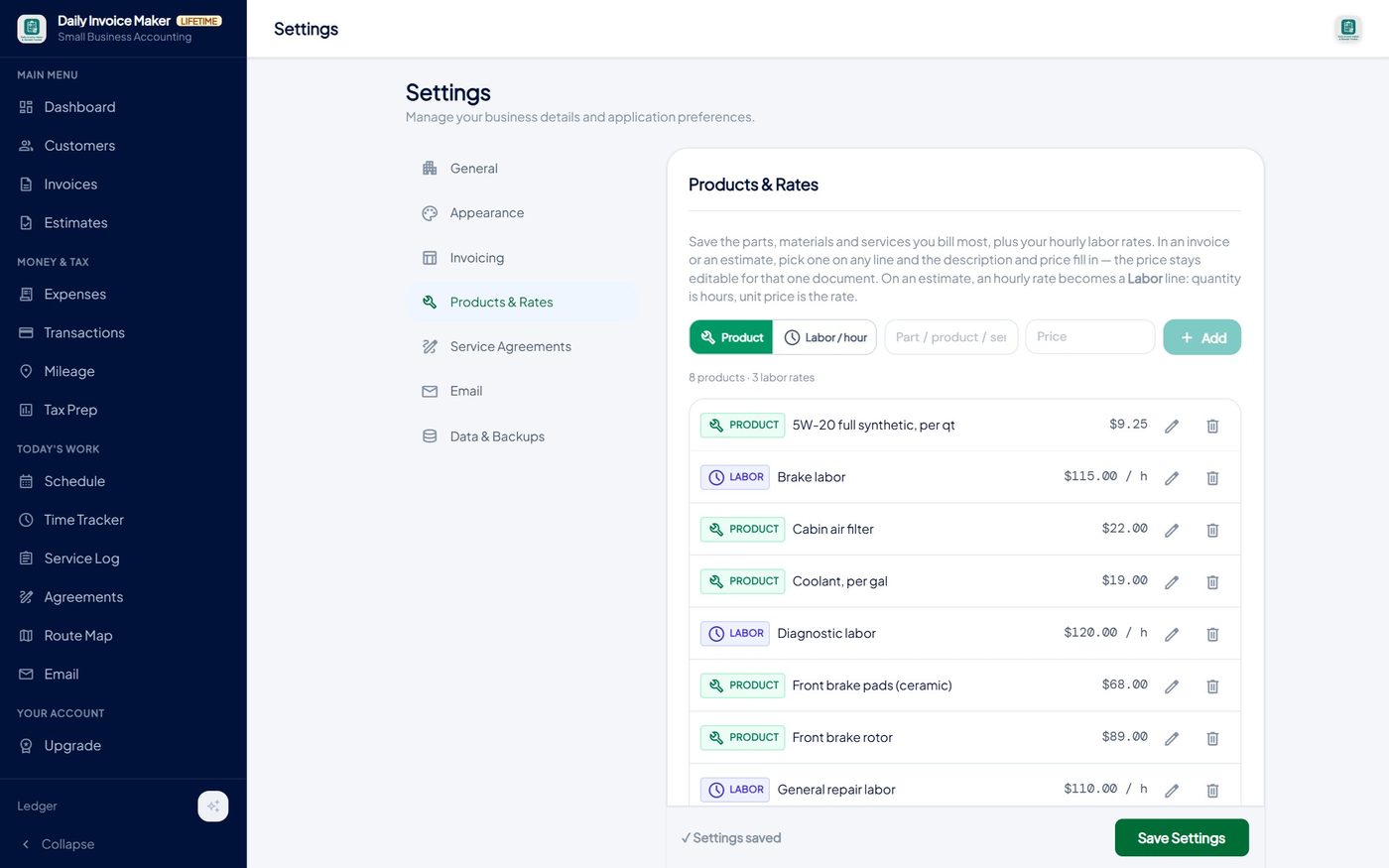
Here is the list we set up for the example shop. It took about four minutes.
| Entry | Type | Price | Why it's on the list |
|---|---|---|---|
| Oil filter (OEM) | Product | $14.50 | On almost every ticket |
| 5W-20 full synthetic, per qt | Product | $9.25 | Priced per quart so the quantity does the math |
| Front brake pads (ceramic) | Product | $68.00 | Most common brake job |
| Front brake rotor | Product | $89.00 | Quantity 2 for a pair |
| Coolant, per gal | Product | $19.00 | Per-gallon unit, like the oil |
| Shop supplies | Product | $12.00 | One flat line instead of arguing over rags |
| Diagnostic labor | Labor / hour | $120.00 / h | Higher rate: it is skilled time with test equipment |
| General repair labor | Labor / hour | $110.00 / h | The default rate |
| Brake labor | Labor / hour | $115.00 / h | Some shops price brake work separately; keep it if you do |
Two habits that pay off: give fluids a per-unit price (per quart, per gallon) so the quantity field does the multiplication for you, and keep more than one labor rate if you actually charge more than one. The app does not force a single shop rate.
Step 2: Write the estimate with the car at the top
On Estimates → New Estimate, tap the Auto Repair job type. A Vehicle card appears with make, model, year, plate, VIN and odometer. Fill in what you have; anything left blank simply does not print.
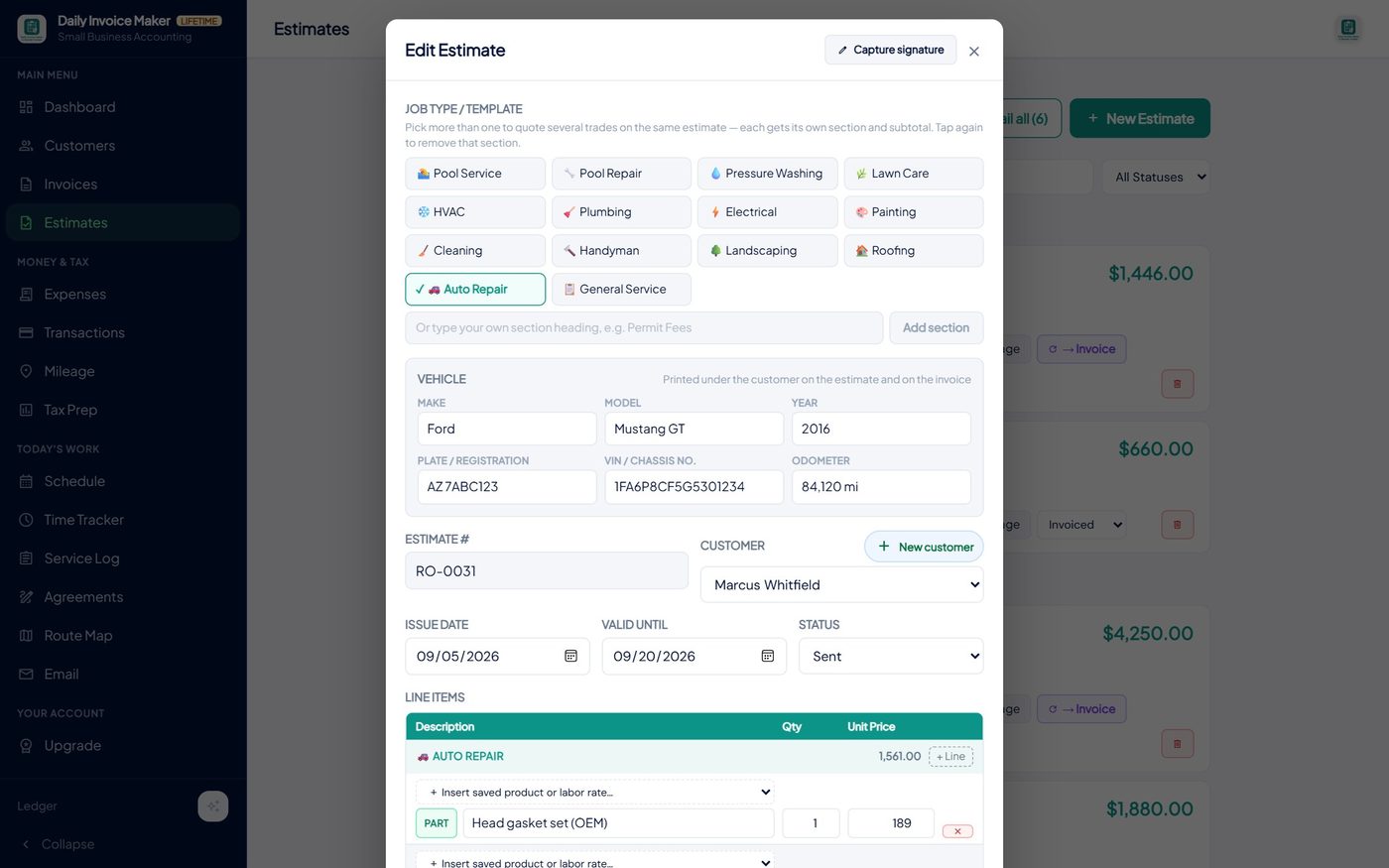
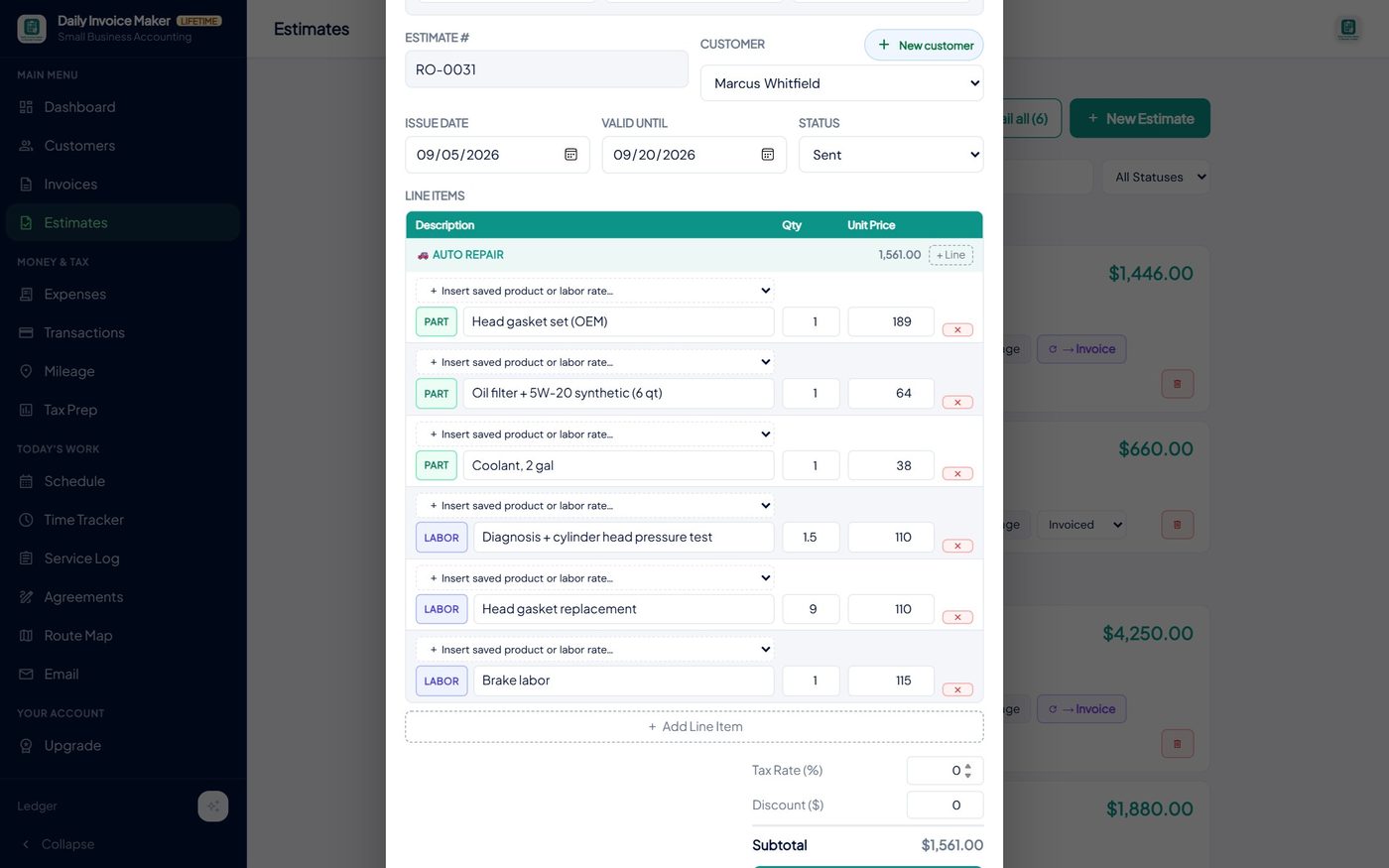
Then the lines. Each one has a PART or LABOR pill at the start, and an Insert saved product or labor rate picker above it. Pick "Front brake pads" and the description and price fill in. Pick "Diagnostic labor" and the line becomes a labor line at $120 an hour: the quantity is now hours.
How to price different parts on the same estimate
This is the question we get asked most, so here is exactly how it works. Every part is its own line with its own price. You have four ways to set that price, and you can mix them on one estimate:
| Situation | What to do | What the customer sees |
|---|---|---|
| A part you stock and sell often | Pick it from the saved list; the saved price fills in | Oil filter (OEM) · 1 · $14.50 |
| This customer negotiated, or the supplier price moved | Pick it, then overtype the price on that line. The saved price is untouched | Front brake rotor · 2 · $82.00 |
| A fluid or consumable | Save it per unit, then set the quantity | 5W-20 synthetic, per qt · 6 · $9.25 |
| A one-off special-order part | Type the description and price straight into the line; do not save it | Head gasket set (OEM) · 1 · $189.00 |
The saved list is a starting point, never a lock. Change a saved price in Settings and only future lines pick it up; estimates and invoices you already sent keep the price they were written at. Your cost for the part does not appear anywhere on the customer's document; the app only prints what you charge.
Labor: hours times rate, and the rate you used last time
A labor line's quantity is hours and its unit price is the hourly rate, so 9 hours at $110 prints as 9 h × $110.00 = $990.00. When you start the next Auto Repair estimate, the labor lines open at the rate you last saved, so the rate only has to be typed once a year, if that.
Step 3: The PDF the customer approves
Preview or send the estimate and you get a document titled Repair Estimate: the vehicle block under the customer, a Parts table, a Labor table with hours and rate, your diagnosis in the notes, the terms, and a valid-until line.
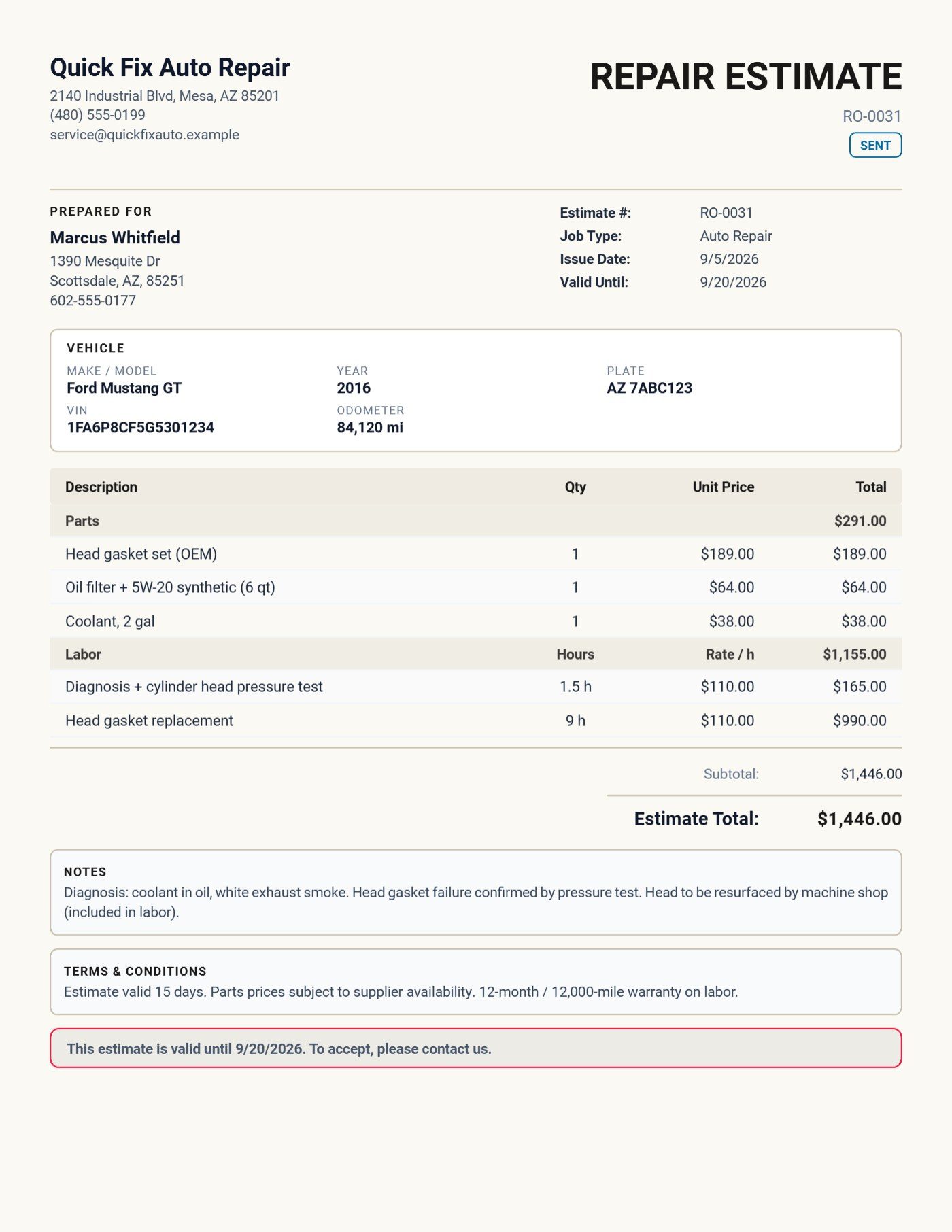
The numbers on that page, so you can check them against the screenshot:
| Line | Qty | Unit | Amount |
|---|---|---|---|
| Head gasket set (OEM) | 1 | $189.00 | $189.00 |
| Oil filter + 5W-20 synthetic (6 qt) | 1 | $64.00 | $64.00 |
| Coolant, 2 gal | 1 | $38.00 | $38.00 |
| Parts | $291.00 | ||
| Diagnosis + cylinder head pressure test | 1.5 h | $110.00 | $165.00 |
| Head gasket replacement | 9 h | $110.00 | $990.00 |
| Labor | $1,155.00 | ||
| Estimate total | $1,446.00 |
Get it approved before the work starts. Tap Capture signature and hand the customer your phone, or send the PDF by email, text or WhatsApp and keep their reply. California's Bureau of Automotive Repair requires a written estimate and the customer's authorization before repairs begin, and the FTC's auto repair guidance tells consumers to insist on one everywhere. A signed estimate is the end of most "I never agreed to that" conversations.
Step 4: Convert the approved estimate to the invoice
When the car is done, open the estimate and tap → Invoice. One tap. The vehicle block, the parts lines and the labor lines, hours included, land on the invoice; nothing is retyped.
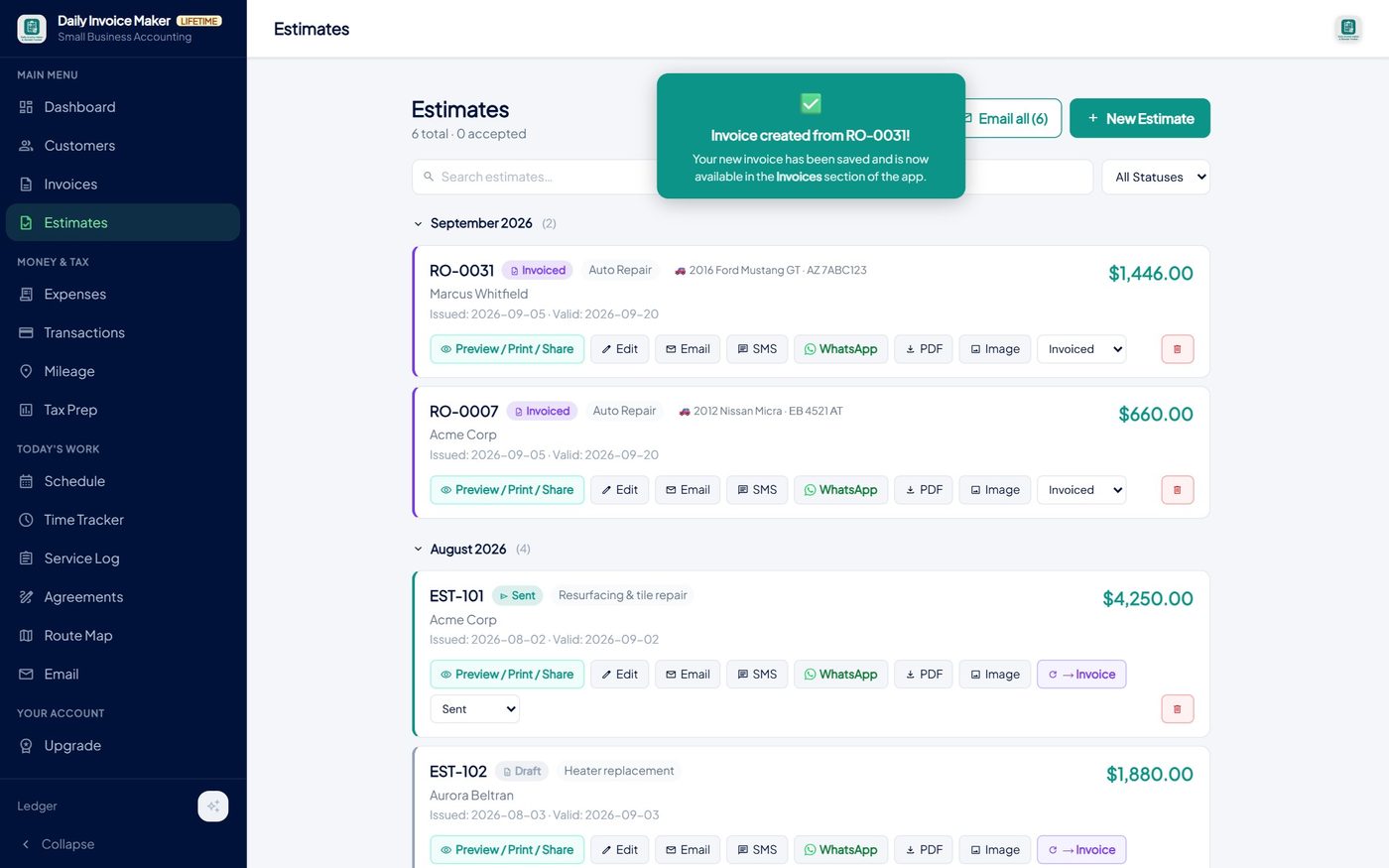
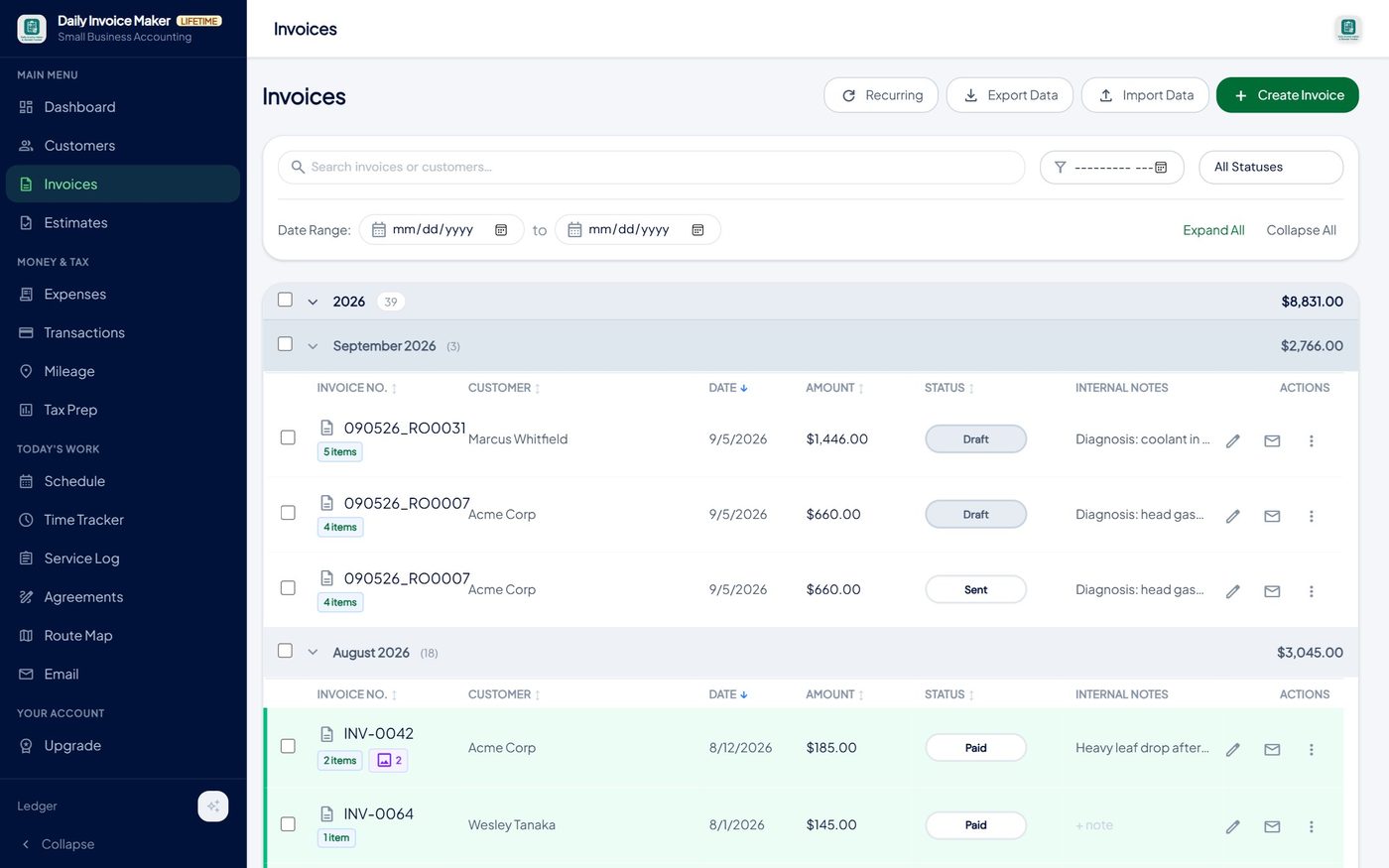
The invoice PDF keeps the same shape as the estimate the customer signed, which is the point: what they approved is what they are billed.
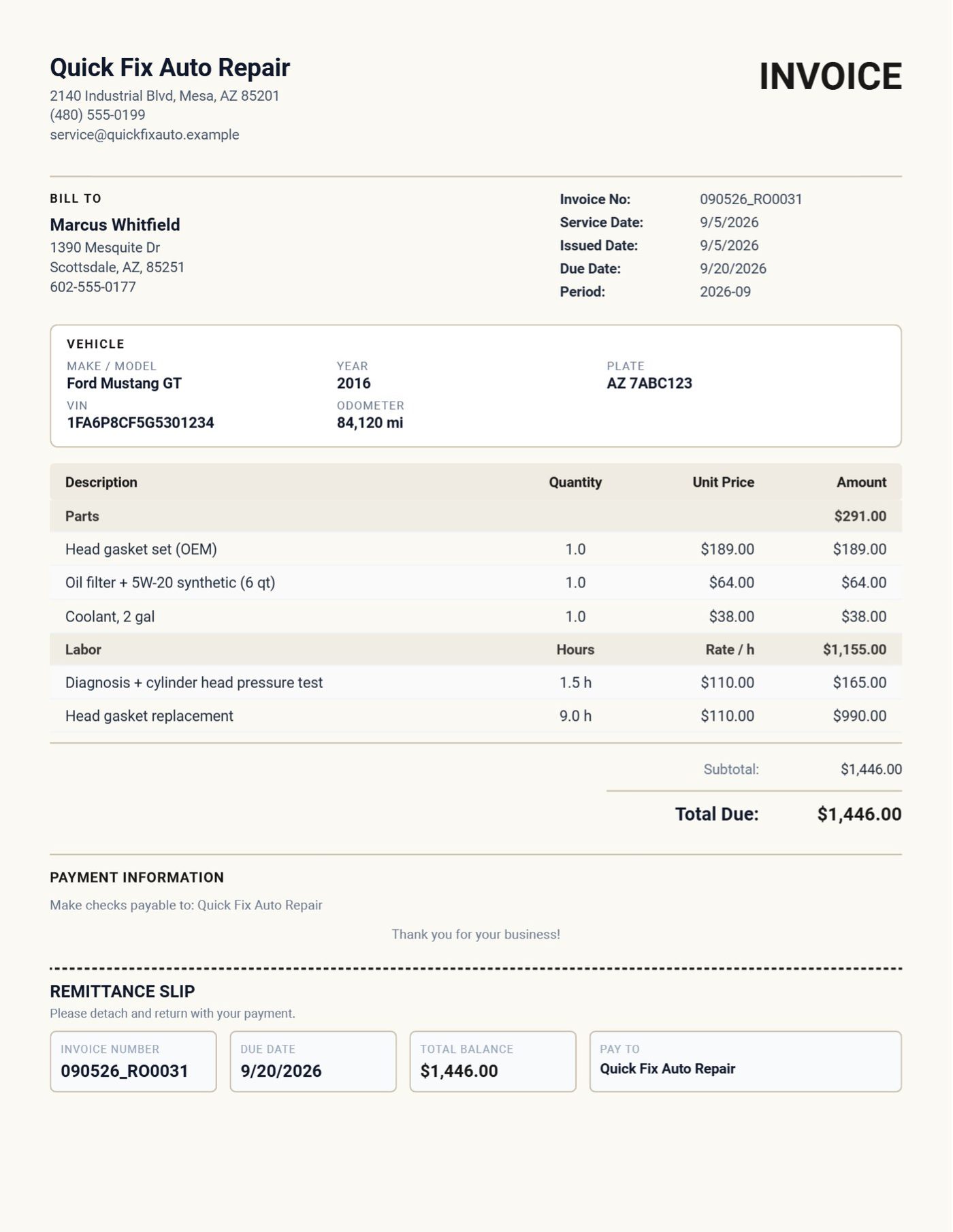
If the final bill differs from the estimate, and it sometimes does when a bolt shears, edit the invoice line and say so in the notes. The estimate is still there, unchanged, as the record of what was agreed.
Step 5: Getting paid and keeping the record straight
Mark the invoice paid when the card goes through, or record a partial payment if they leave a deposit; the balance due updates on the PDF and the remittance slip. If you email the invoice, the app can attach the PDF and write the message for you, including the overdue reminder you will eventually need for somebody.
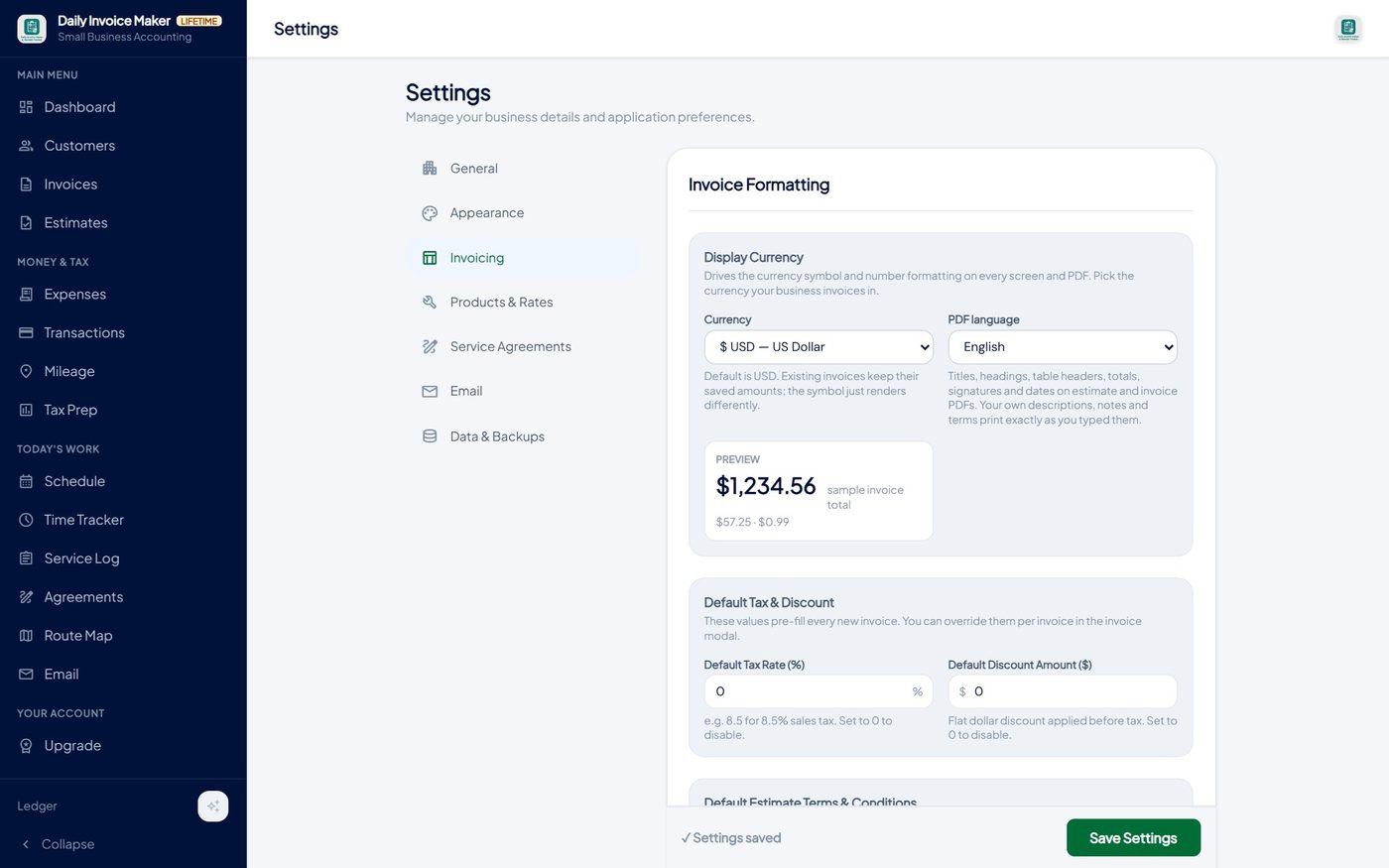
One more setting that matters for a lot of shops: Settings → Invoicing → PDF language. Every fixed label on the estimate and invoice, titles, table headers, totals, signature block, dates, switches language; your own descriptions print as typed. We added Bulgarian first because a garage in Bulgaria asked for it, and their whole repair estimate now prints as Оферта за ремонт with Части and Труд tables.
Five mistakes we see on shop invoices
- One blended line. "Brake job, $480." The customer cannot see the pads from the labor, and neither can you in April.
- Labor without hours. A labor amount with no hours and no rate invites the question "how did you get that number?". Print both.
- No VIN or plate. Two Silverados from the same fleet, one invoice each, and a year later nobody knows which truck got the alternator.
- Starting work on a verbal OK. Get the signature or the written reply. It takes fifteen seconds and it is required in several states.
- Re-typing the estimate into the invoice. That is where the $189 part becomes $198 and the customer notices. Convert, don't copy.
FAQ
Can I add a price for different parts on the same invoice?
Yes. Each part is its own line with its own quantity and unit price. Pick a saved part to fill the price in, or type a price directly. Changing the price on a line changes only that document.
Can I charge different labor rates on one estimate?
Yes. Save as many hourly rates as you use (diagnostic, general, brake, electrical) and pick the right one per line. Each labor line shows its own hours and rate on the PDF.
Does the customer's signature print on the PDF?
Yes. Capture it on the phone or tablet, and it prints in the signature block on the estimate along with the date. The invoice has the same block.
Does the vehicle carry over to the invoice?
Yes. Converting the estimate carries the vehicle block and the Parts and Labor tables, hours included, onto the invoice.
Does it work offline in the shop?
Yes. Everything is stored on your own computer or phone; no account, no cloud, no internet needed. Windows and Mac are $149.95 once; the Android app is a separate purchase on Google Play.
The bottom line
Set up your parts and your hourly rates once, quote with the car at the top and parts and labor in their own tables, get the signature, and convert the estimate into the invoice instead of retyping it. That is the whole system, and it is what made the $1,446 head gasket job above take about six minutes of paperwork. Download the free demo and try it on your next ticket, or read the auto repair page for the short version.
Run a service business?
Daily Invoice Maker handles invoices, estimates, expenses, route maps, agreements, and tax reports — offline, on Windows + Android. Free demo, lifetime license available.
Download free →