Simple, Cheap Small Business Accounting, Billing and Invoice Software: What a Two-Person Shop Actually Needs
A sign and print shop shows the four things a small business needs from software, with a custom-order quote and deposit, sales tax on the invoice, a net-30 account, the profit dashboard and the Schedule C summary.
In this article
- Key takeaways
- Problem 1: the custom order that needs a deposit
- Problem 2: the invoice with sales tax and the deposit already paid
- Problem 3: the account customer and the walk-in
- Problem 4: knowing what the shop made
- Problem 5: February
- Simple and cheap, compared
- Why we built it this way
- Common mistakes in small business books
- The bottom line
- FAQ
- Try it this afternoon
Most small businesses do not need accounting software. They need to send an invoice, know who paid, keep the receipts, and hand the accountant one page in February. The subscription products sell that as a $30-a-month plan with payroll and inventory modules a sign shop or a dog groomer will never open. A one-time-purchase desktop app that does the four things well costs less than five months of that subscription and keeps the data on your own computer.
This guide uses Harbor Sign & Print, a two-person sign and print shop in Portland, Maine, to show what "simple and cheap" looks like in practice with Daily Invoice Maker: a custom-order quote with a deposit, the invoice with sales tax and the deposit recorded, a net-30 account, the profit picture, and the Schedule C summary. Every image is the app's real output. The app is $149.95 once (or $59.99 a year, or $5.95 a month) for Windows, Mac and Linux, no account, and it works offline.
Key takeaways
- Custom orders get a written quote with a deposit, one round of proofs, and a delivery date; the quote converts to the invoice when the job ships.
- Sales tax is set once in Settings and applied per invoice; the sales tax report totals what you collected by state and rate for the return.
- Record deposits as partial payments so the invoice shows the balance and the books show the cash.
- Business accounts get net 30 terms on their customer record; walk-ins get due on receipt; both go out in the same batch.
- Import the bank statement monthly, photograph receipts, and the Schedule C summary at year end is a download.
Problem 1: the custom order that needs a deposit
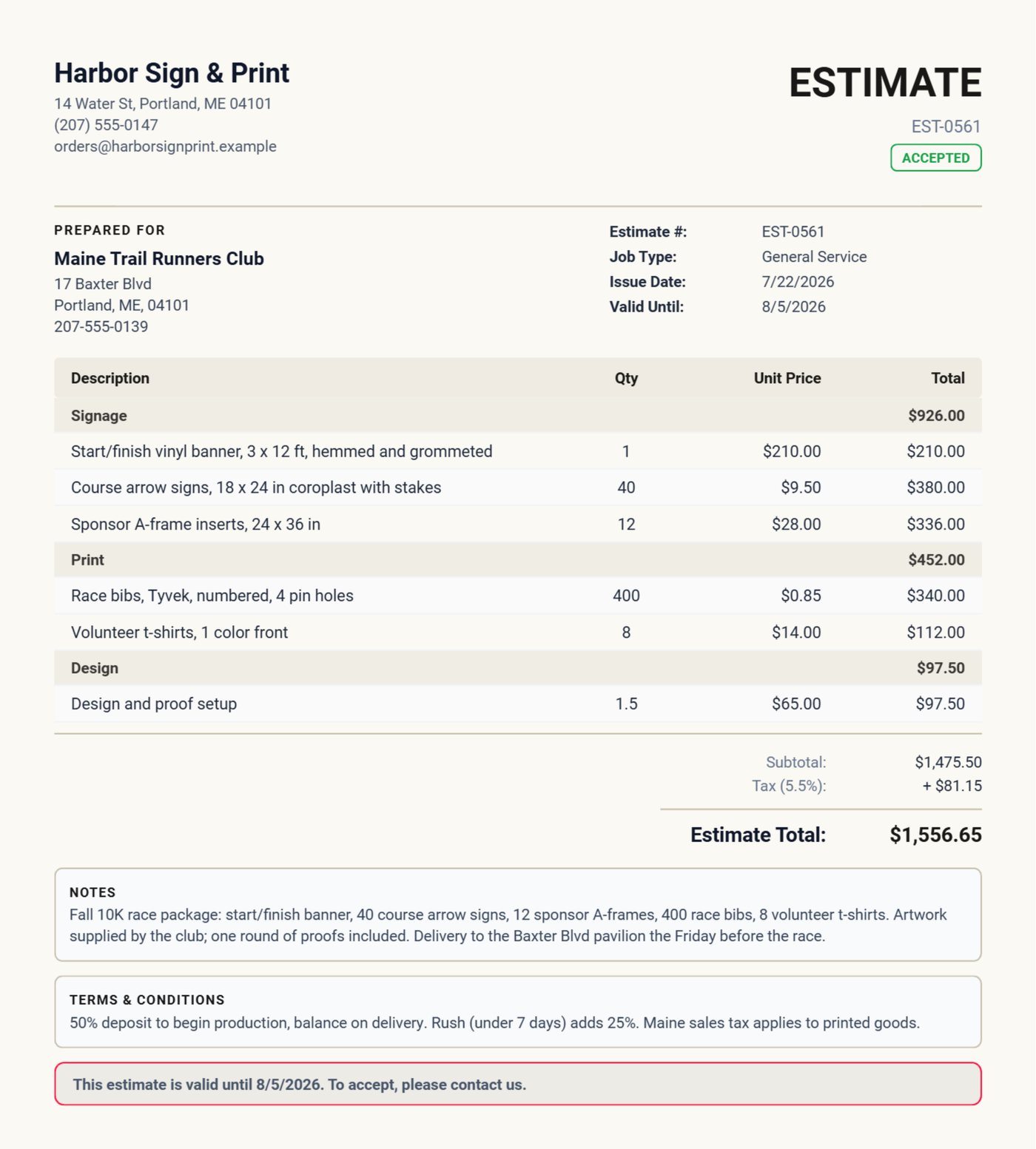
The trail running club wants a race package: a start/finish banner, 40 course arrows, 12 sponsor A-frames, 400 bibs and 8 volunteer shirts, delivered the Friday before the race. Nothing on that list can be sold to anyone else if the club cancels. The estimate prices it in sections (Signage, Print, Design), states 50 percent to begin production, notes that rush adds 25 percent, and that Maine sales tax applies to printed goods. The club treasurer signs on the tablet.
Problem 2: the invoice with sales tax and the deposit already paid
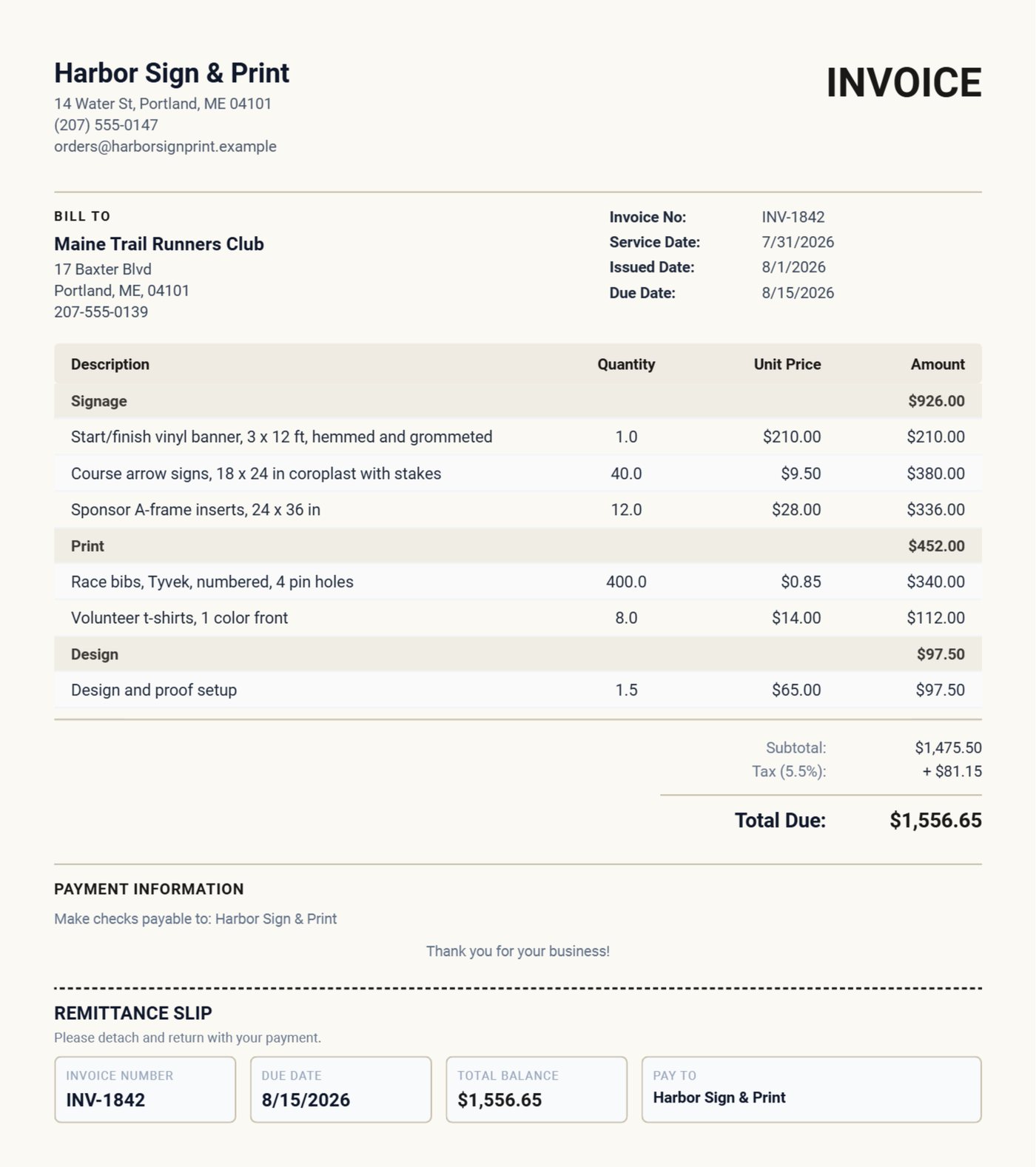
When the package ships, one tap converts the quote to the invoice. Sales tax at the rate set in Settings is applied; the $621.10 deposit is recorded as a partial payment so the invoice shows the balance; the notes carry who signed for the delivery. The customer never sees the full amount as still owed, and your bank reconciliation matches the two payments to one invoice.
Problem 3: the account customer and the walk-in
Casco Bay Realty orders yard signs every month and pays net 30 from an accounts-payable department. The oyster bar orders menu boards twice a year and pays on pickup. Terms live on the customer record, so the realty invoice is due in 30 days and the restaurant's on receipt, and both are created in the same run. The dashboard's Outstanding figure shows what is owed across both kinds, and the Compose Email screen writes the reminder for the youth soccer league's overdue banners with the invoice attached.
Problem 4: knowing what the shop made
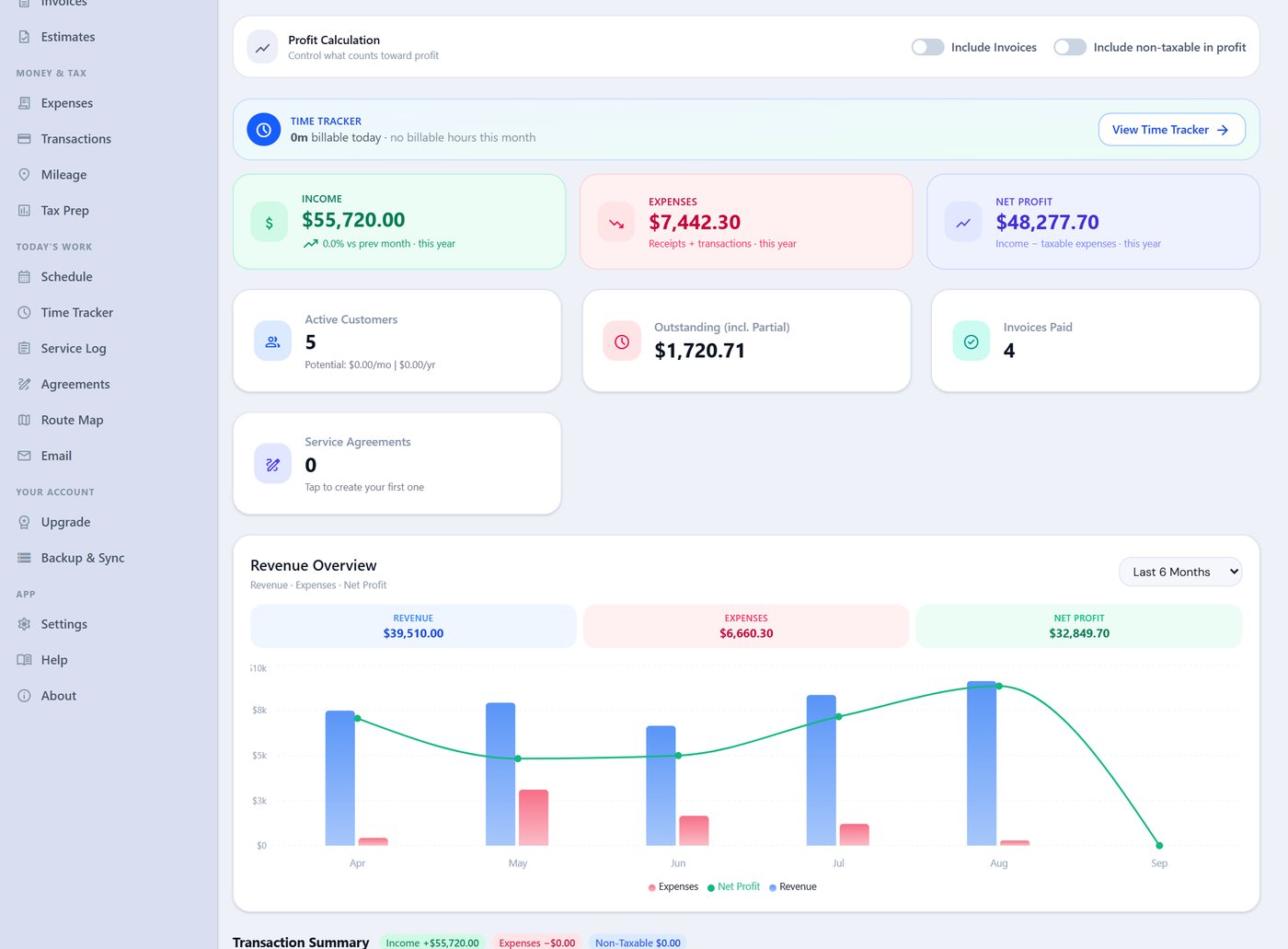
The dashboard shows the year's income, expenses and net profit, and the revenue chart by month. Income comes from the bank statement import (Bangor Savings, Chase, PayPal, Square, Stripe and a dozen other formats); expenses come from photographed receipts and the same import. Leave "Include Invoices" off if you import the bank, so a paid invoice and its deposit are not counted twice. For a sign shop, the printer service bill in May is the expense that makes the month look bad and the year look normal, and the chart shows exactly that.
Problem 5: February
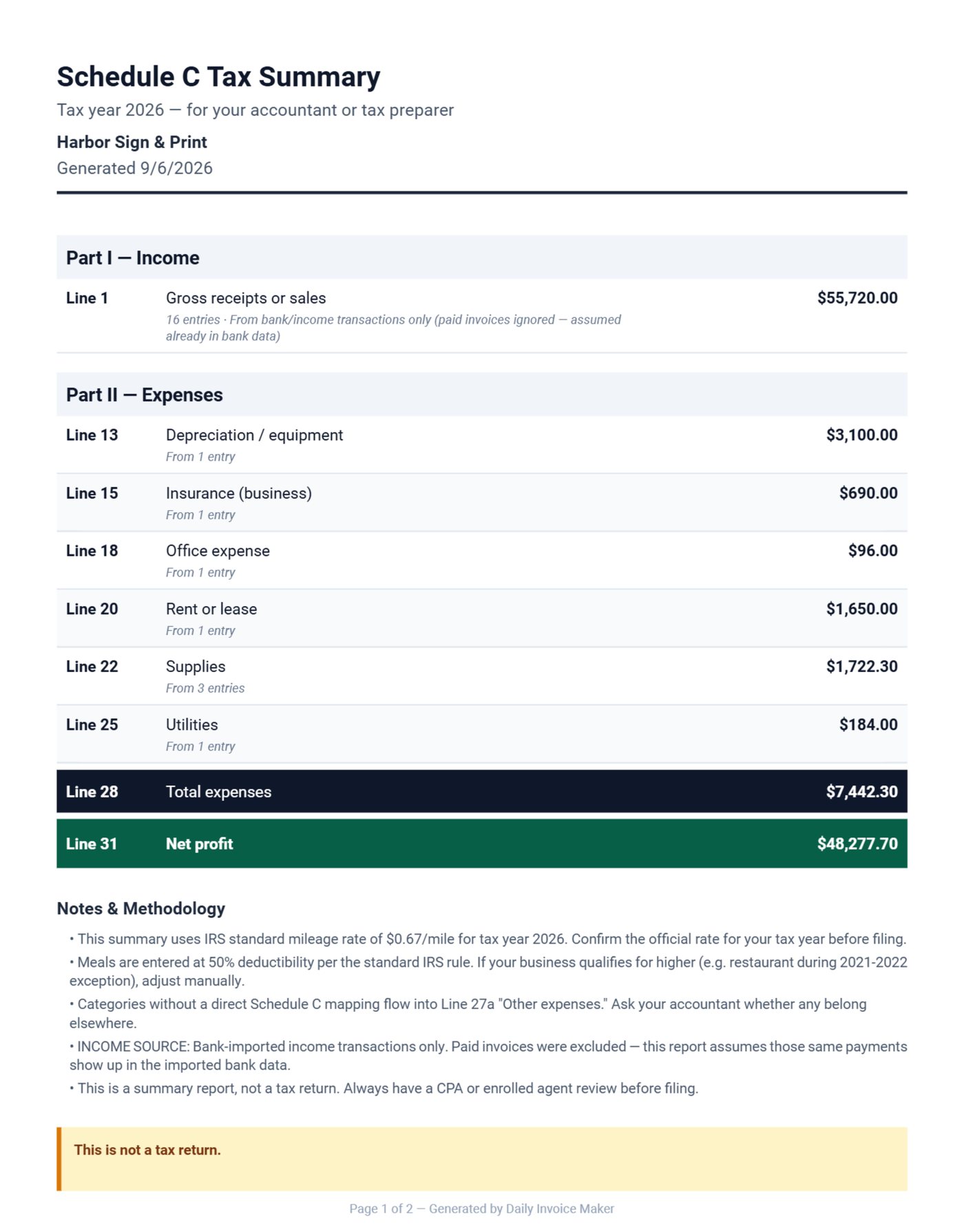
The Schedule C summary maps the year's expense categories to IRS lines: shop rent to line 20, the printer repair to repairs, vinyl and coroplast to supplies, Adobe to software, liability to insurance, electric to utilities. It arrives as one PDF for the accountant, or as a TurboTax file if you file yourself, and the sales tax report sits beside it for the state return. The guide to Venmo and Cash App income covers the payment apps most small shops get paid through.
Simple and cheap, compared
| Daily Invoice Maker | Typical subscription accounting | |
|---|---|---|
| Price | $149.95 once | $30 to $90 a month, forever |
| Account and login | None; data is a file on your computer | Required; data on their servers |
| Works offline | Yes | No |
| Invoices, estimates, deposits, sales tax | Included | Included |
| Bank import | Statement files, 16 formats | Live feed |
| Tax export | Schedule C PDF, TurboTax, QuickBooks, Xero | Reports; accountant access is a higher tier |
| Payroll, inventory | Not included, by design | Add-on modules |
If you have employees on payroll or a stockroom to count, the subscription products earn their money. If you are one or two people who sell work and want to know where they stand, they are paying for modules they never open.
Why we built it this way
We built Daily Invoice Maker with a pay-once option because the subscription products we tried charged a service business for payroll and inventory it never used, and stored the books on a server it could not reach on a job site. We chose statement-file import over a live bank feed so there is no bank login stored anywhere, and we noticed that owners who photograph receipts on the day keep books that reconcile, while owners who "do it at the weekend" do not, which is why the receipt scanner is on the phone app.
Common mistakes in small business books
- Sales tax counted as income. It is the state's money; keep it separate and remit it. The SBA's guide to business taxes is the plain-language starting point.
- Custom work without a deposit. Four hundred numbered race bibs cannot be sold to anyone else.
- Invoicing a week after delivery. Every day between shipping and invoicing is a day added to net 30.
- Paying for modules you never open. A two-person shop needs to invoice, track payment, keep receipts and export for tax. Pay for those.
The bottom line
Quote custom work with a deposit, apply sales tax on the invoice and keep it out of income, give business accounts their terms, import the bank monthly, and hand the accountant the Schedule C summary. That is the whole job, and it should not cost $90 a month.
FAQ
Does it handle sales tax?
Yes. Set the default rate in Settings, override per invoice, and the sales tax report in Tax Prep totals collected tax by state and rate on a cash or accrual basis for the return.
Can I accept card payments?
Put your PayPal, Venmo, Zelle or Stripe payment link in Settings and it prints on every invoice. Payments arrive in your account and are matched when the statement is imported.
What about my accountant?
Send the Schedule C summary PDF, or the QuickBooks IIF or Xero CSV export if that is what they use. Everything they need is in one file.
Is there a catch on the one-time price?
The licence covers two computers, Windows or Mac, with every desktop update. The Android app is a separate Google Play purchase. There is no subscription and no account.
Try it this afternoon
Download the free demo, put your logo and tax rate in Settings and send one real invoice from it. Every feature is open in the demo; the licence is $149.95 once, $59.99 a year or $5.95 a month. The guide walks through the first hour.
Run a service business?
Daily Invoice Maker handles invoices, estimates, expenses, route maps, agreements, and tax reports — offline, on Windows, Mac, Linux + Android. Free demo, lifetime license available.
Download free →