Lawn Care Billing and Invoicing Software: Route Billing, Rain Credits and the Spring Cleanup Deposit
How a two-crew lawn company bills forty properties in one batch, credits a rained-out visit on the invoice, quotes cleanups with a deposit and hands the accountant a Schedule C summary.
In this article
- Key takeaways
- Problem 1: forty properties, one billing day
- Problem 2: it rained on Thursday
- Problem 3: the spring cleanup that needs a deposit
- Problem 4: knowing where the season stands
- Problem 5: the shoebox in February
- What goes on a lawn care invoice
- What we changed after watching lawn companies use the app
- Common mistakes on lawn care invoices
- The bottom line
- FAQ
- Try it on your own route
Lawn care billing has a rhythm no generic invoicing app understands. Twenty or forty properties get cut on the same days every week, half of them are on a flat monthly price and the other half are per visit, it rains on a Thursday and four of them do not get cut, the HOA pays net 30 while Mrs. Pettigrew pays the day the invoice lands, and in March there is a spring cleanup with 22 yards of mulch that needs a deposit before you order it. The paperwork for all of that is not hard, but it is repetitive, and repetitive paperwork is what does not get done at 7 pm after a full route.
This post walks through how Daily Invoice Maker handles a real season for a two-crew lawn company, Greenline Lawn & Landscape in Raleigh. Every screenshot below is the app's own output for that business, not a mockup: the spring cleanup estimate, an August invoice with a rain-skip credit, the profit and loss for the year, and the Schedule C summary that goes to the accountant. The app runs on Windows, Mac and Linux ($149.95 once, $59.99 a year or $5.95 a month) and works without an internet connection, which matters when you are invoicing from the truck at the end of a route.
Key takeaways
- Put every property on a customer record with a monthly rate, then bill the whole route in one batch at month end instead of typing forty invoices.
- Handle rain skips and weather credits as a negative line on the same invoice, so the customer sees the credit and your income stays honest.
- Quote one-off work (cleanups, mulch, plantings) on an estimate with sections and a deposit term, then convert it to the invoice when the job is done.
- Keep fuel, mower repairs and mulch receipts as expenses as you go; the Schedule C summary at year end is then a download, not a weekend.
- The dashboard shows who is overdue in September, which is when a lawn business needs to collect before income drops off for winter.
Problem 1: forty properties, one billing day
Most residential lawn customers are on a flat monthly rate for weekly service. The mistake is treating each month as forty separate invoices to write. In Daily Invoice Maker the monthly rate lives on the customer, so month-end billing is one action: pick the customers, set the service period and the due date, and the app creates every invoice with the right amount, then emails them in a batch. Greenline runs 5 customers in this example, but the same screen creates 20 or 60 invoices at once. The monthly billing walkthrough shows that screen step by step.
Commercial accounts work differently and the app lets them: Brightwater HOA is invoiced at $1,450 a month on net-30 terms, Piedmont Dental at $320 with irrigation repairs added as extra lines. Terms are per customer, so the HOA's 30 days and Mrs. Pettigrew's 14 days coexist on the same billing run.
Problem 2: it rained on Thursday
Weather is the argument every lawn company has with customers. If you cut four times instead of five and bill the flat rate, someone calls. If you quietly under-bill, you lose money and nobody thanks you. The clean answer is to show it. The August invoice below bills five visits at $40 and then credits one visit as a named line: "Rain skip credit, 8/14 (no service)". The customer reads exactly what happened, the total is right, and the credit is in your books as a reduction of income rather than a mystery.
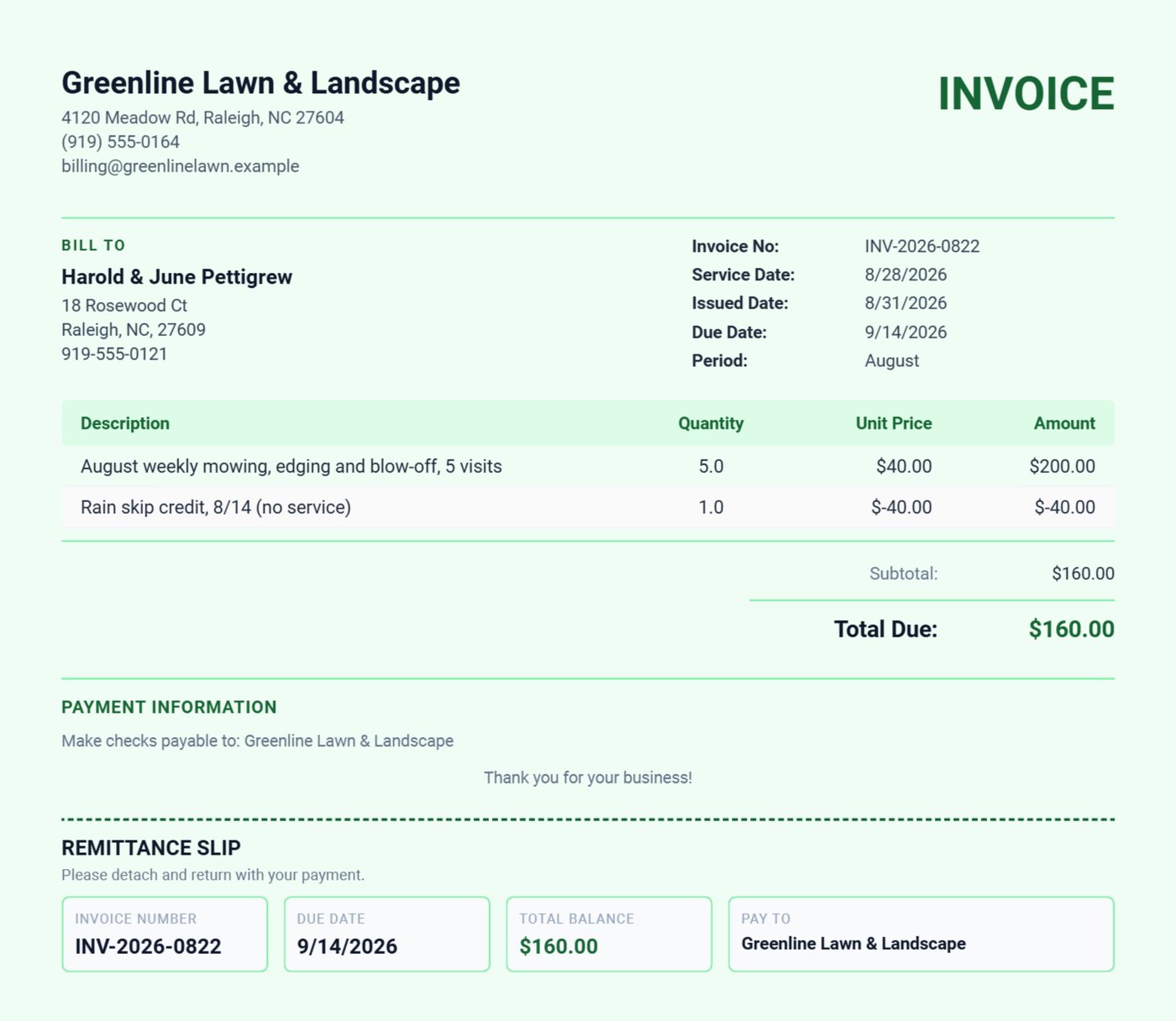
Negative lines are allowed on any invoice, which also covers the other lawn-care specials: a referral credit, a prepay discount, or the half-visit when the mower broke and you only finished the front.
Problem 3: the spring cleanup that needs a deposit
One-off work is where lawn companies get burned. Mulch is ordered and paid for before the job, plants come from the nursery on your card, and a crew of three spends a day on site. If the customer has only a verbal quote, you are financing the job. The fix is a written estimate with the cost broken into sections and a deposit term, sent before anything is ordered.
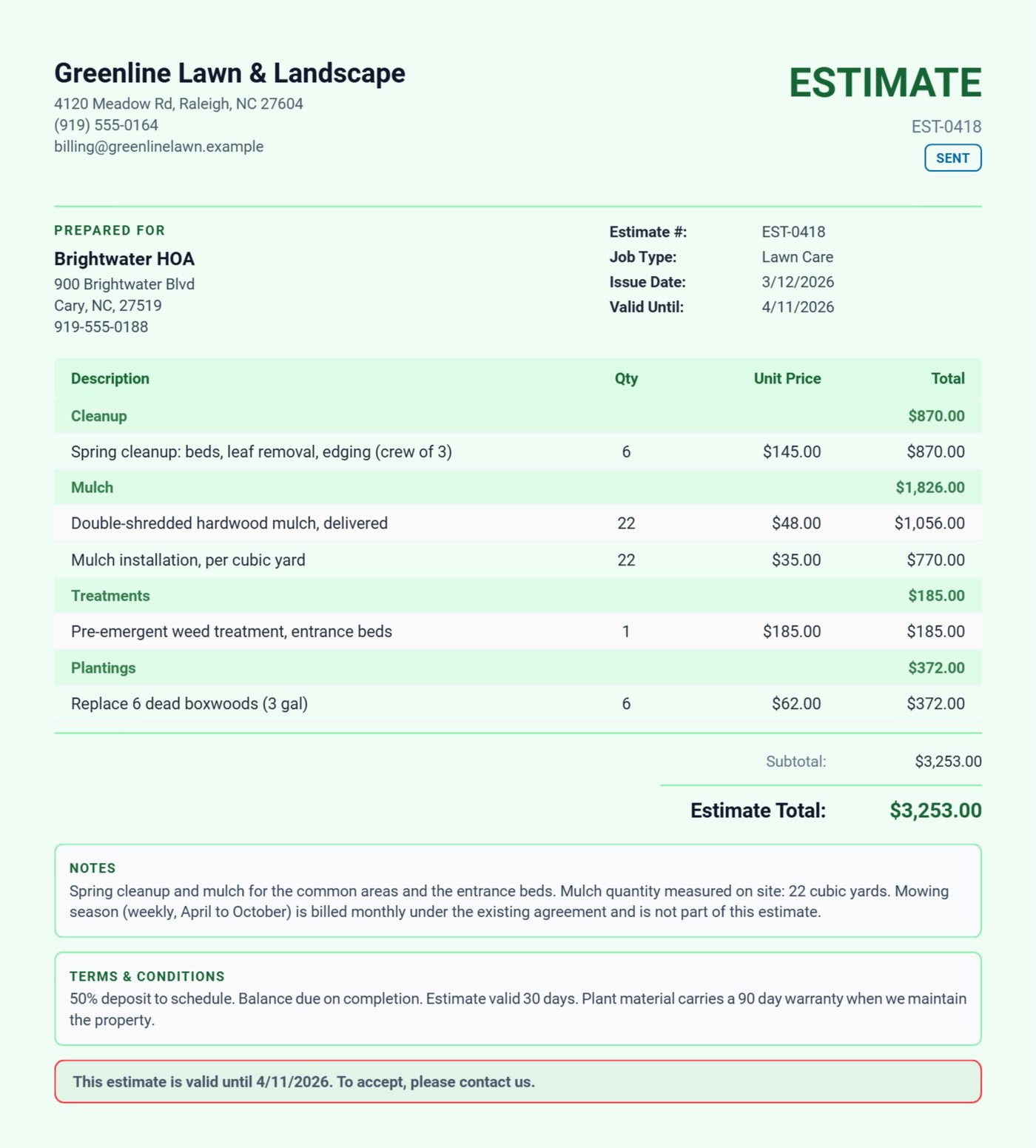
The Brightwater estimate groups the work into Cleanup, Mulch, Treatments and Plantings, each with its own subtotal, because the HOA board approves line by line and will ask what the mulch alone costs. The terms say 50 percent to schedule, balance on completion, 90-day plant warranty only while you maintain the property. The board signs on the tablet or replies to the email; when the job is done, one tap converts the estimate to the invoice with every line carried over. The lawn care page shows the job templates the app starts you with.
Problem 4: knowing where the season stands
Lawn income is not flat. Greenline bills about $2,000 a month in January and February and over $8,000 from May through August. The dashboard puts the year's income, expenses and net profit at the top, then the six-month revenue chart underneath, so the seasonal shape is visible instead of guessed. Two toggles matter for a lawn business: leave "Include Invoices" off if you import bank statements (otherwise a paid invoice and its deposit count twice), and use the date filters to compare this July with last July.
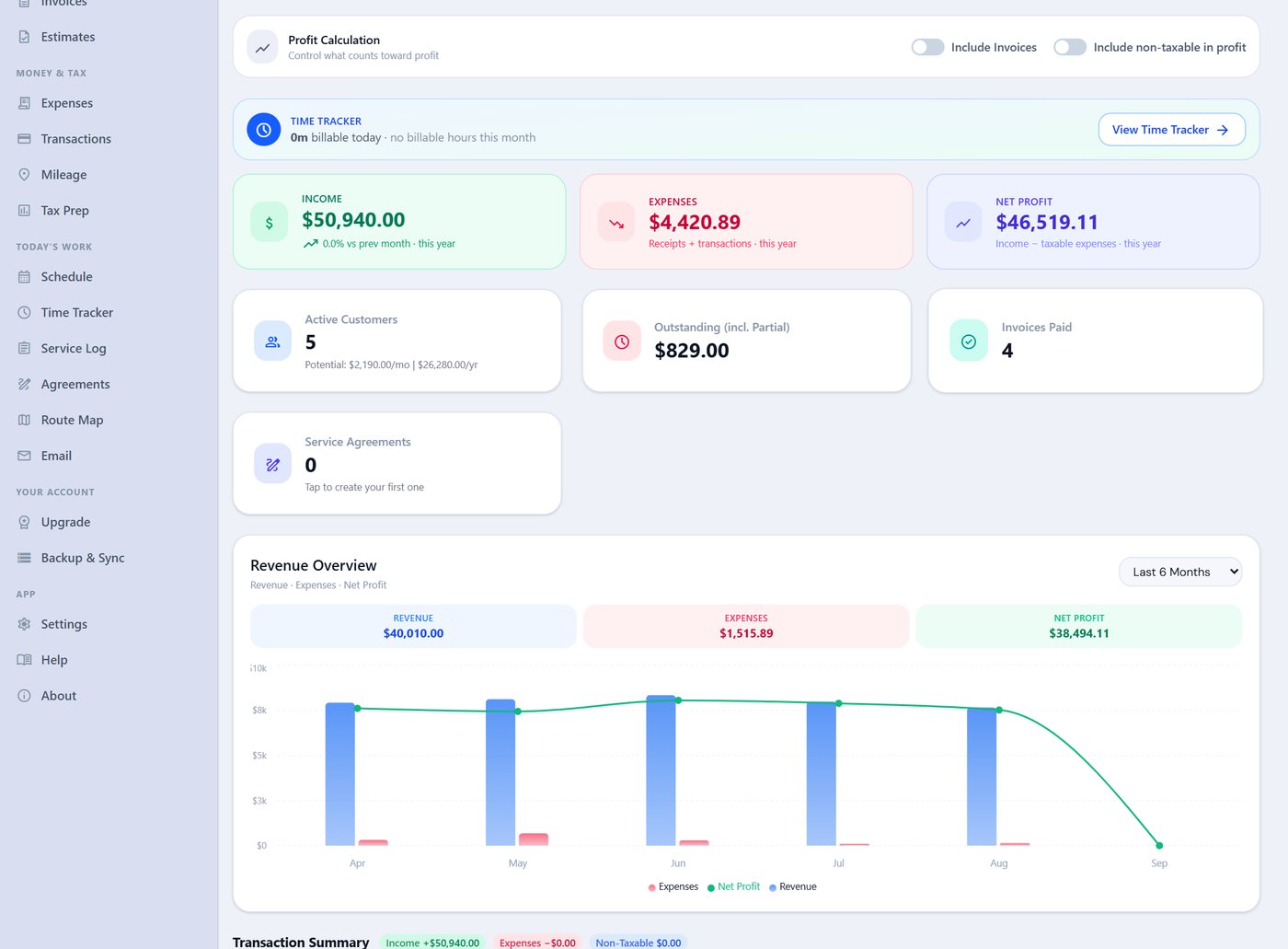
The Outstanding card is the one to check in September. Everything owed at the end of the season has to be collected before the phone goes quiet; the invoice list filters to overdue, and the Compose Email screen writes the reminder with the invoice attached.
Problem 5: the shoebox in February
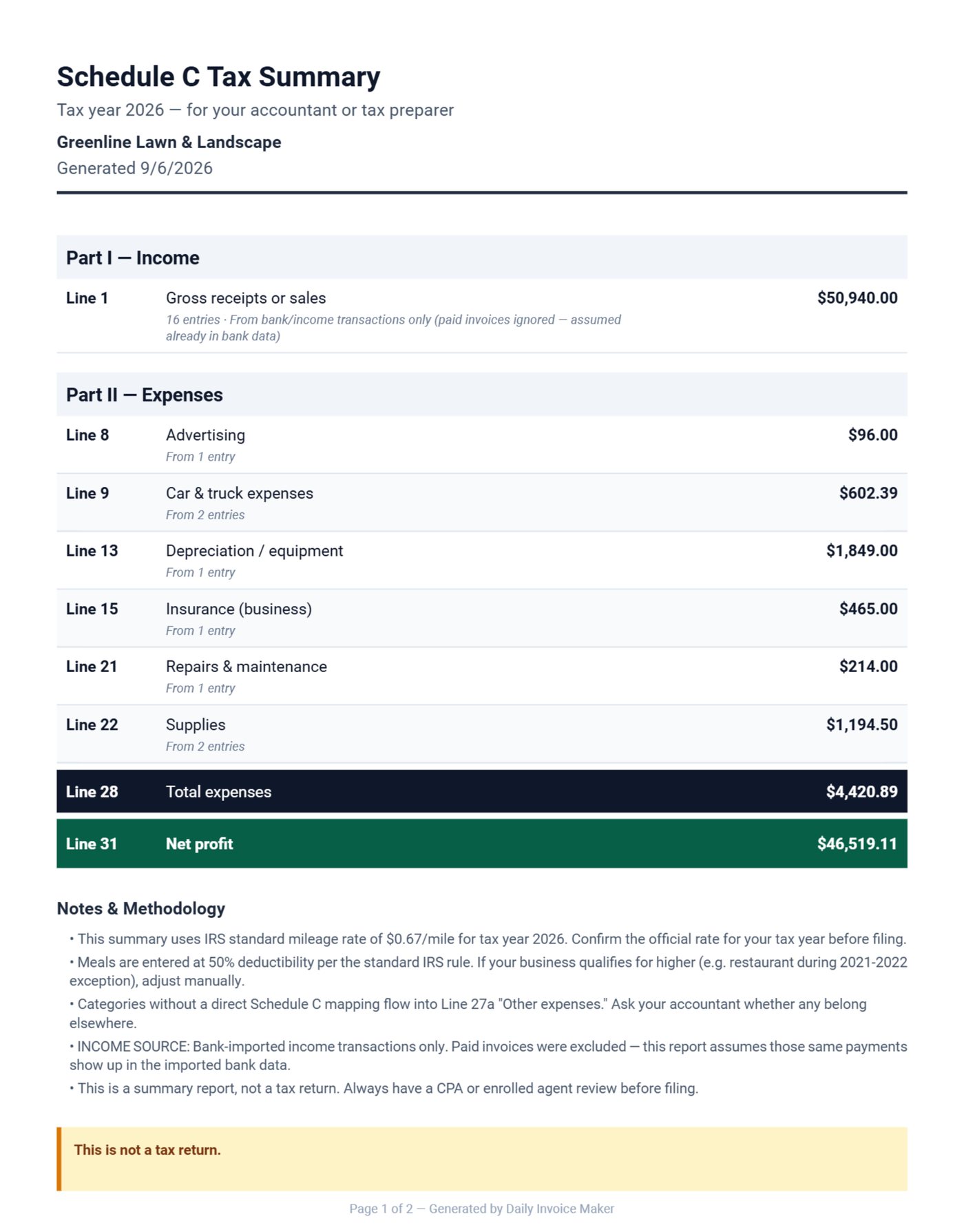
A lawn company's expenses are a few big categories: fuel, equipment, repairs, mulch and plant material, insurance, a little advertising. Entered as they happen (photograph the receipt from the fuel pump and the app reads the amount), they roll up to a Schedule C summary that maps each category to the IRS line. Equipment lands on the depreciation line, fuel on car and truck expenses, mulch on supplies. Your accountant gets one PDF, or a TurboTax file if you file yourself.
What goes on a lawn care invoice
| Line | Why it matters |
|---|---|
| Service period (e.g. "August") and visit count | Ends the "you only came three times" call; the count is on the paper |
| Per-visit price for residential, flat monthly for contracts | Matches how each customer thinks about the price |
| Weather credits as a named negative line | The customer sees honesty; your books see a credit, not lost income |
| Extras as separate lines (bed weeding, irrigation heads) | Stops extras from being absorbed into the flat rate for free |
| Due date matched to the customer's terms | Net 30 for HOAs and commercial, 14 days for residential |
| Remittance slip | Older customers still mail checks; the slip tells them what to write |
What we changed after watching lawn companies use the app
We built the month-end batch after a pool and lawn route owner told us he typed the same forty invoices every month and skipped the ones he was tired of. We added negative line items when a landscaper asked how to show a rain credit without editing the price of a visit, and we noticed that customers who see the credit line stop calling about it. The Lawn Care job template ships with mowing, weed control and cleanup lines because those are the three services on almost every estimate we were sent.
Common mistakes on lawn care invoices
- No visit count. "August service, $160" invites the "you only came three times" call. Put the number of visits and the dates on the line.
- Extras absorbed into the flat rate. Bed weeding and irrigation heads done "while I was there" and never billed add up to a month of lost income by October.
- Cleanups without a deposit. The mulch is paid for before the job; a verbal quote means you are lending the money.
- Fuel receipts instead of mileage. For a route business the IRS standard mileage rate is usually the larger deduction; the IRS publishes the rate each year and the app applies it.
The bottom line
Bill the route in one batch, show weather credits as lines, quote one-off work with a deposit, and log the miles. The season's paperwork then takes an evening a month, and the Schedule C summary in February is a download.
FAQ
Can I bill some customers per cut and others monthly?
Yes. The monthly rate on the customer record is the default; any invoice can be edited to visits × price instead, and both kinds go out in the same batch.
How do I handle prepaid seasons?
Invoice the season up front and mark it paid. Each month's service invoice can then be created at $0 with the visits listed, or you can skip monthly invoices and keep the visits in the Service Log. Prepaid income counts in the month it was received for a cash-basis business.
Do I need internet on the route?
No. The app stores everything on your computer or Android phone and works offline. Emailing invoices needs a connection, but writing and printing them does not.
Does it track mileage between properties?
Yes, with GPS on the phone app or manual entry, at the IRS rate for the year. For a route business the mileage deduction is usually larger than the fuel receipts, so log it.
Try it on your own route
Download the free demo for Windows, Mac or Linux, add five of your properties and run one month-end batch. Every feature is open in the demo; the paid licence is $149.95 once, $59.99 a year or $5.95 a month. The product guide covers recurring invoices, weather credits and the Schedule C export in more detail.
Run a service business?
Daily Invoice Maker handles invoices, estimates, expenses, route maps, agreements, and tax reports — offline, on Windows, Mac, Linux + Android. Free demo, lifetime license available.
Download free →