Cleaning Billing and Invoicing Software: Recurring Clients, Cancellation Fees and Move-Out Cleans with Photos
How a two-person cleaning company bills weekly clients in one batch, charges late cancellations without a fight, quotes move-outs with optional lines and attaches before-and-after photos to the invoice.
In this article
- Key takeaways
- Problem 1: recurring clients and the visit-count argument
- Problem 2: the late cancellation
- Problem 3: the move-out clean
- Problem 4: is the business actually making money?
- Problem 5: tax time
- What belongs on a cleaning invoice
- What we changed after watching cleaning companies use the app
- Common mistakes on cleaning invoices
- The bottom line
- FAQ
- Try it with your own clients
A cleaning business bills three different ways in the same week, and most invoicing software only understands one of them. There is the weekly or biweekly home client on a fixed price, the office on a monthly contract with consumables added, and the one-off move-out clean for a property manager who wants before-and-after photos and pays on the day. Add a late cancellation that needs to be charged without a fight, a part-time cleaner to pay, and supplies bought on a personal card, and the paperwork side of a two-person cleaning company is a real job.
This guide shows how Bright & Tidy Home Cleaning in Dallas runs all of it in Daily Invoice Maker. The estimate, invoice, profit summary and tax export below are the app's actual output for that business, captured on Windows. The app costs $149.95 once, $59.99 a year or $5.95 a month, runs on Windows, Mac and Linux (Android is separate), and does not need an internet connection, which is useful when you invoice from the car between houses.
Key takeaways
- Set each recurring client's price on their customer record and bill everyone in one month-end batch; the invoice lists the visit dates so nobody disputes the count.
- Charge late cancellations as a named line on the next invoice, with the policy printed in the terms, instead of a separate awkward bill.
- Quote move-outs on an estimate with optional lines (carpet shampoo, inside cabinets) so the property manager picks and signs before you arrive.
- Attach before-and-after photos to the move-out invoice; it is your proof for the deposit dispute that comes two weeks later.
- Track supplies, the vacuum, insurance and helper pay as expenses as they happen; year end is a one-page Schedule C summary.
Problem 1: recurring clients and the visit-count argument
Lena is biweekly at $170, the Okonkwos are weekly at $130, the pediatric office is three times a week at $90 a visit. Each of those is a customer record with a rate, and at month end the app creates the whole month's invoices in one go. The trick that prevents disputes is in the description: "Biweekly clean, 2 visits (3/14, 3/28)". Dates on the invoice, every time. When a client asks why July was five visits instead of four, the dates answer it.
For the office contract, consumables are a second line: "Consumables: paper, liners, soap, $64.20". Keeping it separate from the service line means the contract price stays clean and the office manager can see what the supplies cost when the lease renews.
Problem 2: the late cancellation
Every cleaner has a policy about cancellations inside 24 hours and almost none of them charge it, because sending a separate $65 invoice for nothing feels petty. The way around that is to charge it where it belongs: as a line on the next regular invoice, worded plainly. The Trans' June invoice reads "Late cancellation 6/13 (inside 24 h), 50%", $65, under the two regular visits. The policy is printed in the invoice terms so it is not a surprise. Clients who see the charge once rarely cancel late twice.
Problem 3: the move-out clean
Move-outs are the best-paying and most disputed work in cleaning. The property manager wants a price before the tenant leaves, wants inside the oven and fridge, may or may not want the carpet done, and wants proof the place was left spotless. The estimate handles all of that: base clean at hours × rate, add-ons as lines, and the carpet shampoo as an optional line in its own section so it can be accepted or declined.
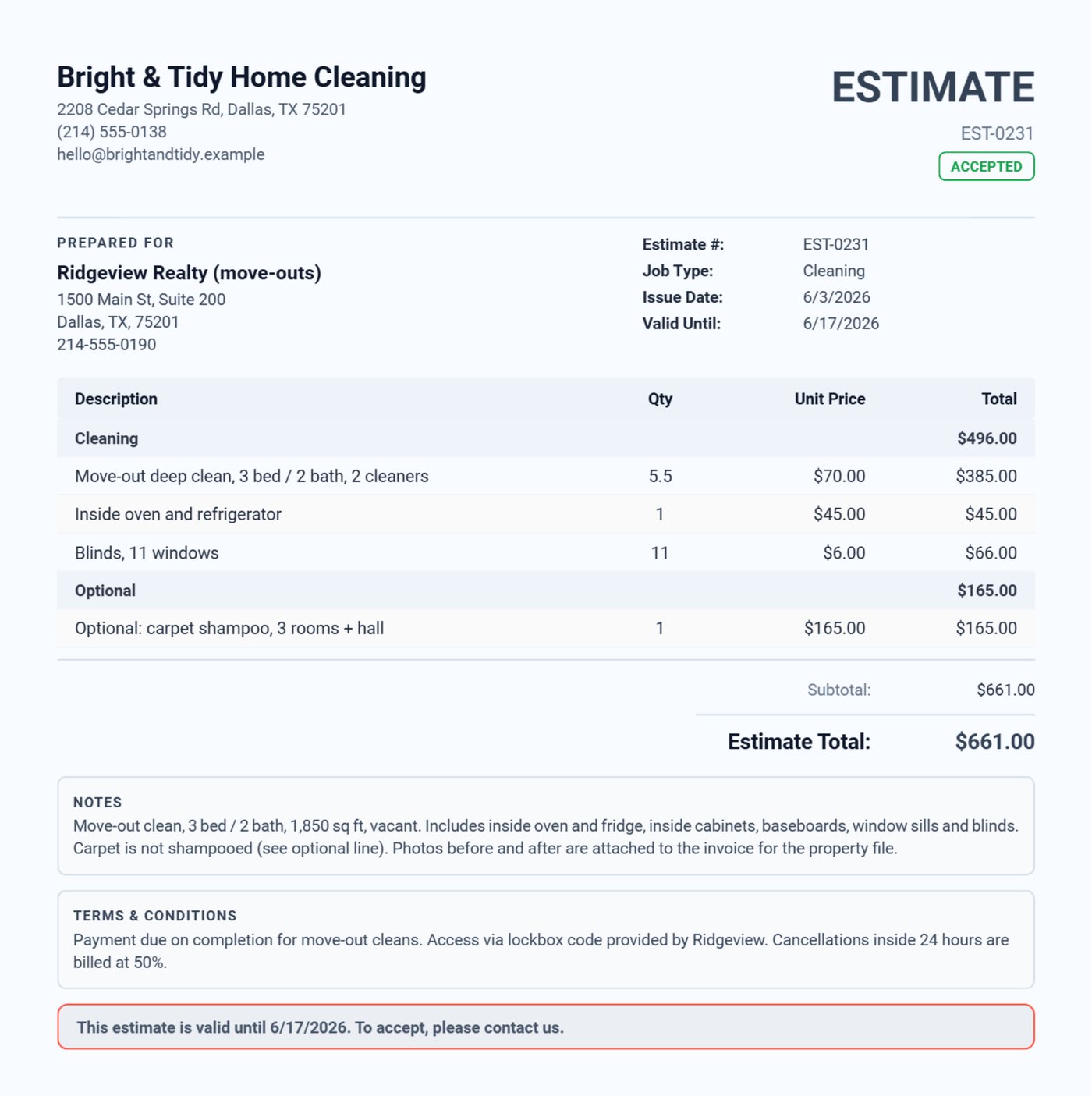
When the job is done, the estimate converts to the invoice with one tap and the photos go on it. The invoice below is the one Ridgeview Realty received: the same lines as the estimate, a note that says which property and that the lockbox was re-secured, before-and-after photos attached, paid on the day.
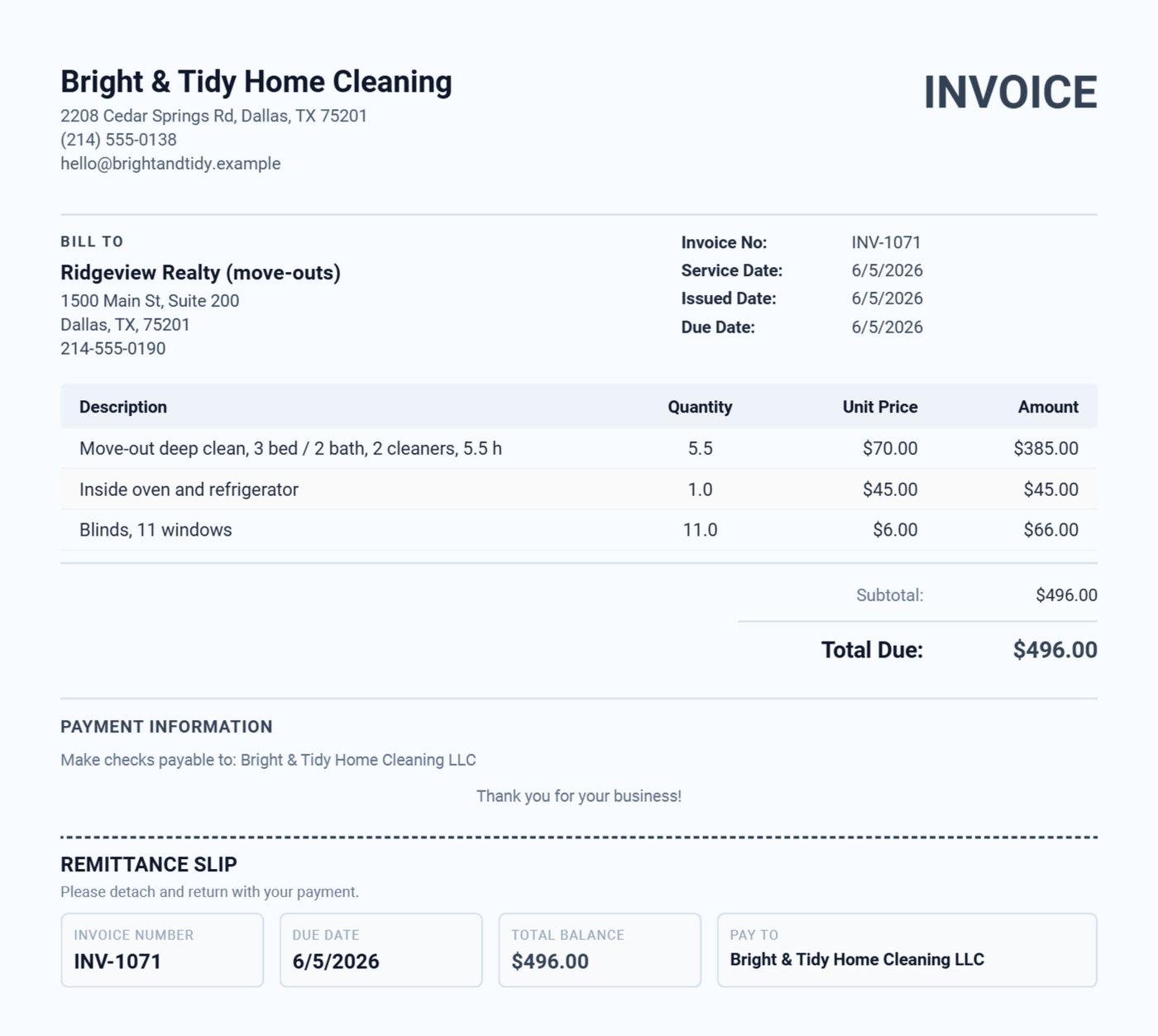
Two months later, when the former tenant disputes the cleaning charge on their deposit, the manager has your invoice with dated photos. That is the reason the cleaning page leads with photo attachments: they are not decoration, they are evidence.
Problem 4: is the business actually making money?
Cleaning has thin margins that hide easily. Supplies go on a personal card, a helper gets paid in cash, and the bank balance looks fine until the quarterly tax bill. The dashboard shows income, expenses and net profit for the year with the revenue chart by month, once you import the bank statement (Chase, Bank of America, Wells Fargo, Venmo, Cash App and a dozen more formats) and photograph the receipts.
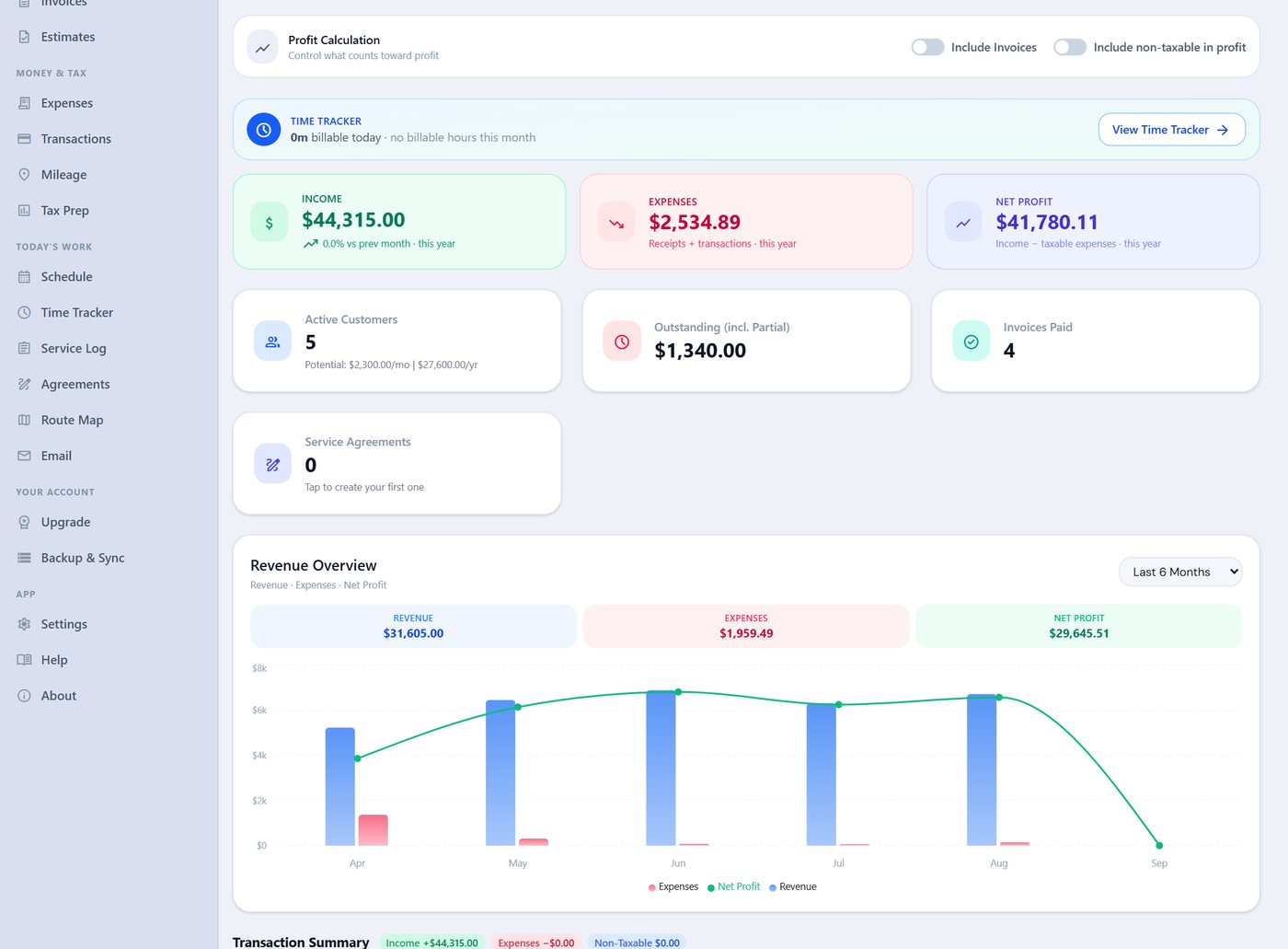
Bright & Tidy's biggest expense is not supplies, it is the part-time cleaner. That belongs on the books as labor, not as a cash withdrawal, because it is deductible and because the day you need to prove you had help, you will want the record.
Problem 5: tax time
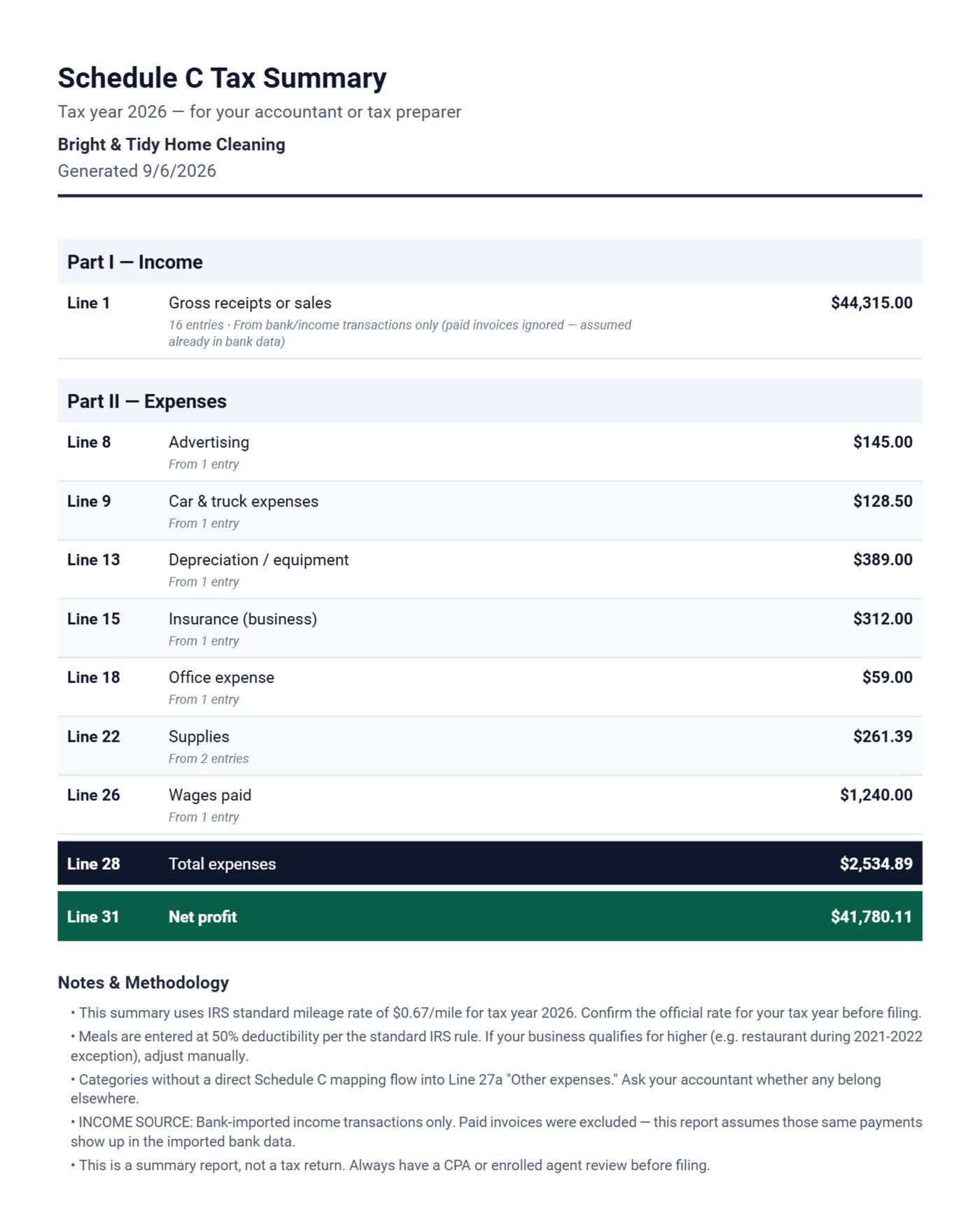
The Schedule C summary maps each expense category to the IRS line: supplies to line 22, the commercial vacuum to depreciation, bonding and liability insurance to line 15, the part-time cleaner to wages, door hangers to advertising. The income line comes from either your paid invoices or your bank deposits, whichever you tell it, so the same payment is never counted twice.
What belongs on a cleaning invoice
| Line | Why |
|---|---|
| Visit dates in the description | Ends the visit-count dispute |
| Add-ons as separate lines (fridge, oven, windows) | Extras stop being free |
| Consumables separate from service for offices | Contract price stays comparable at renewal |
| Cancellation fee as a named line, policy in terms | Charged without a separate bill |
| Property address and access note on move-outs | The manager files it against the unit |
| Before-and-after photos | Proof for deposit disputes |
What we changed after watching cleaning companies use the app
We added visit dates to the recurring invoice description after a cleaner showed us a text thread arguing about whether June was four visits or five. We built photo attachments for pool work first, and noticed move-out cleaners were the ones using them most, so the invoice now holds as many photos as the property manager wants. The cancellation-fee line came from a customer who had a policy on her website and had never once charged it.
Common mistakes on cleaning invoices
- Helper paid in cash and never recorded. The largest expense in a two-person cleaning company is the second person; unrecorded, it is a deduction lost and a margin misread.
- Consumables folded into the office contract price. When the lease renews, nobody can tell what the cleaning actually cost.
- Move-outs without a written scope. "3 bed / 2 bath, vacant" in the estimate notes is what stops a garage full of boxes becoming your problem.
- No quarterly tax set aside. The IRS estimated tax rules apply from the first profitable quarter; the dashboard's net profit figure is the base.
The bottom line
Dates on every recurring invoice, the cancellation fee as a line, move-outs quoted with photos, and the helper on the books. That is the whole system, and the demo does all of it.
FAQ
Can I send all my monthly invoices at once?
Yes. Month-end billing creates the invoices for every customer with a rate and emails them in a batch. Each one can be edited first if a month had an extra visit or an add-on.
How do I bill a client who pays by Venmo or Zelle?
Put your Venmo or Zelle details in Settings and they print in the payment section of every invoice. When the bank statement is imported, the deposit is matched and the invoice marked paid.
Do I have to give the property manager a written quote?
Not legally in most states, but managers who use you repeatedly will expect one, and a signed estimate is what protects you when the scope grows on site.
Does it work on my phone?
The desktop licence (Windows, Mac and Linux) covers this app; the Android app is a separate Google Play purchase, and the two sync over Google Drive so you can invoice from the car and reconcile at home.
Try it with your own clients
Download the free demo, add three recurring clients and one move-out, and run a month end. Everything in this post is in the demo; the licence is $149.95 once, $59.99 a year or $5.95 a month. The guide has a chapter on recurring invoices and one on attaching photos.
Run a service business?
Daily Invoice Maker handles invoices, estimates, expenses, route maps, agreements, and tax reports — offline, on Windows, Mac, Linux + Android. Free demo, lifetime license available.
Download free →