We Asked Google's AI to Compare Invoicing Apps. Its First Answer Was an Ad.
A Gemini comparison opened with a vendor's marketing paragraph and tier-stale prices, then re-evaluated on tax-form alignment, local sales-tax rates and data ownership once it saw real screens. What changed, what didn't, and how to run the test on any app.
In this article
We asked Google's Gemini to compare our own app with Wave, FreshBooks and QuickBooks. Its first verdict on FreshBooks was, word for word, a paragraph of FreshBooks marketing. Its prices for two of the four products were a full tier out of date. And its comparison table did not contain a single feature that decides what happens on your tax return. Then we showed it five screenshots, and it changed its mind — not because we argued, but because the screens contained facts the roundups it had read did not.
This is that transcript, what it got wrong, what changed its answer, and the five questions that actually separate invoicing apps from each other. We sell one of the apps in this comparison, so the disclosure box below is not decoration; read it first.
Disclosure. Daily Invoice Maker is our product. We built it, we sell it, and this site exists to sell it. Everything Gemini said about it is quoted as the AI said it, including the parts where it says another tool is the better choice — because for several kinds of business that is true, and the section headed "Where Gemini was right the first time" says so plainly.
Key takeaways
- Most software comparisons — human and AI — are assembled from other comparisons. The "winner" paragraph in the first answer was traceable to a vendor's own landing page.
- The features that decide your tax return are rarely in the table. Which IRS schedule each dollar lands on, how local sales-tax rates are split, and whether your data lives on your machine were absent from the first pass entirely.
- Screenshots beat adjectives. The re-evaluation happened the moment the AI could see a real Schedule C / Schedule E split and a real sales-tax table instead of reading that a product was "intuitive".
- Prices in roundups go stale a tier at a time. Gemini quoted FreshBooks at "~$19" and QuickBooks at "$30–40". Read off the vendors' own pricing pages this month: $23 and $38.
- The right tool is still not always ours. Payroll, inventory, live bank feeds and a CPA who insists on QuickBooks are four real reasons to pay a subscription.

The first answer, and where it came from
The prompt was ordinary: compare Daily Invoice Maker against its competitors in a table, then say which is best on price, ease of use and accessibility. The table came back with six rows — pricing, invoice limits, "AI/automation", offline access, client portal, "accountant ready" — and a verdict per category. The verdict for ease of use read:
"FreshBooks wins easily if your goal is an intuitive, stress-free interface. It is intentionally designed so you don't feel like you're doing hard corporate accounting. It tracks your billable hours, sends beautifully polished proposals, and alerts you the second a client opens an invoice."
Nothing in that paragraph is a finding. It is a feature list in the vendor's own register — "beautifully polished", "the second a client opens" — and the sources cited beside it were two YouTube videos and a comparison blog. When we said so, Gemini agreed without hedging: "That previous summary parroted generic marketing copy rather than looking at how the tools actually operate under the hood."
The pricing had the same problem in a quieter form. The first table listed FreshBooks from "~$19/mo" and QuickBooks from "$30–40+". We keep a note of every vendor's list price read off its own pricing page, because third-party roundups are routinely a tier behind, and this month those pages say $23 for FreshBooks Lite and $38 for QuickBooks Simple Start. A comparison that is $4 and $8 a month wrong on two of four rows is not a small error over the three-year life of a subscription; it is $430.
What changed its mind: five screens
We did not argue. We sent five screenshots from the app, running against a demo file, and asked it to reassess "based on actual usability and features that help the business owner manage business and expenses". The second answer opened with a different table, and every row in it was a thing you can point at on a screen. Here it is, with the AI's wording tightened but its judgements unchanged, and our own corrections marked where we disagree with it in our favour.
| What decides your year | Daily Invoice Maker | Wave | FreshBooks | QuickBooks Online |
|---|---|---|---|---|
| Which IRS schedule each dollar lands on | Each business is set up as Schedule C, Schedule E or W-2 and reported separately | One general ledger; you map lines to schedules yourself | Generic categories and a generic tax summary | Full mapping, but a second business means a higher tier |
| Local sales-tax rates | Grouped by state, then by rate, with a total per return | State-level; layered local districts are manual | One flat rate per invoice | Automated by address — robust, and paid for |
| How bank data gets in | You download the statement, the app parses it on your machine. No bank login shared | Live feed through an aggregator; connections drop | Live feed, built for matching billable expenses | Live feed; the strongest auto-categorisation of the four |
| Service agreements | Drafted in the app, signed on the customer's record | Invoicing only | "Proposals", your own text | Estimates only |
| Where your data lives | On your computer. Works with no internet | Cloud only | Cloud only | Cloud only |
| List price, Sept 2026 | $149.95 once, or $5.95/mo | Free; $19/mo Pro | $23/mo, 5 clients | $38/mo |
The difference between the two tables is not that the second one favours us. It is that the second one can be checked. "Intuitive" cannot be verified from a screenshot; "groups sales tax by state, then by rate" can. Here are the two screens that did the most work.
1. Three businesses, three schedules, one file

This was the screen Gemini singled out as "a huge structural advantage if you run multiple operations". The reasoning is worth repeating because it is the thing most roundups miss: cloud accounting assumes you are one entity with one pool of money. A pool route that also owns a rental is two entities on two IRS schedules — Schedule C for the trade, Schedule E for the rental — and self-employment tax applies to one and not the other. Software that adds them into one net-profit figure is not simplifying; it is producing a number that maps to no form. We built the Businesses card because our own file had exactly this shape, and the year-end report was wrong until it did.
2. Four rates, one return

A field business crosses municipal lines all week, and the sales-tax rate changes by fractions of a percent as it does. The demo file above billed the same service in four Arizona districts — 8.6%, 8.1%, 7.8% and 8.3% — and the panel keeps each rate on its own row, because a return asks for them that way; an averaged rate matches no line on any form. The header line matters as much as the table: not income, excluded from your Schedule C/E gross receipts. In practice that is the bug we found in our own app before this feature existed: tax collected on behalf of the state was being reported as revenue, and on a $100,000 business at 8.5% that is roughly $7,800 of income you never earned.
3. Bank statements without a bank login
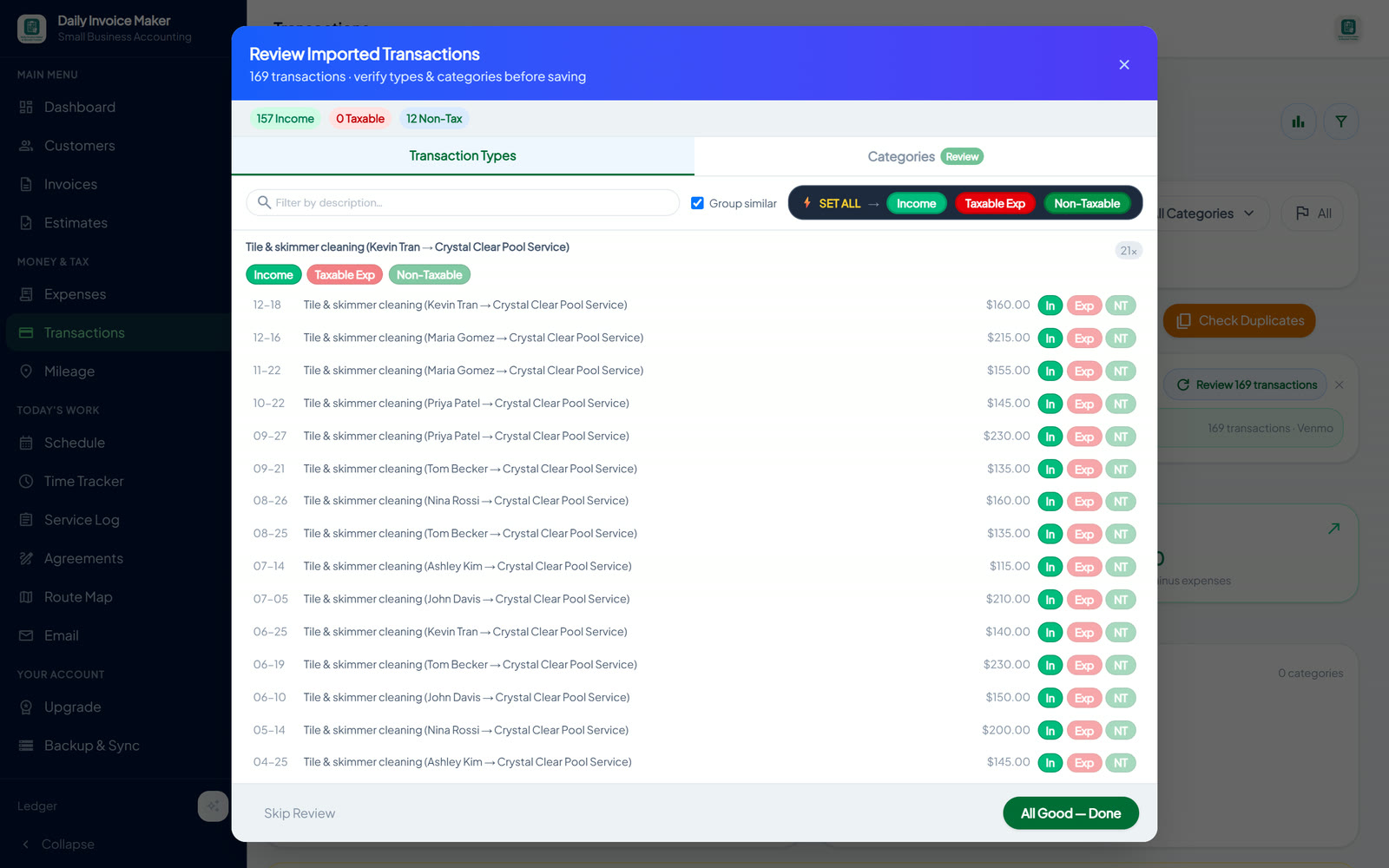
Gemini's second answer framed this as a privacy trade-off, which is fair: live bank feeds are convenient when they work, and every cloud tool in the table has one. What it added, unprompted, is that feeds "frequently break" and that many owners "dislike giving cloud apps constant, live access to their banking credentials". The alternative is dull and works: download the statement, drop the file, let the parser run on your own machine. The catch is that it is not automatic — you have to do it monthly. We think that is the right trade for a one-person business, and we say so knowing it is the row where QuickBooks genuinely beats us.
4. The contract lives with the customer

An estimate in FreshBooks or QuickBooks is a priced list of parts and labor. If you want the customer to sign something that governs recurring visits, liability or what happens when they cancel, you leave the app, write it in Word, and pay a third party to collect the signature. The AI called the native agreement "a major differentiator for service-based businesses". It is, and the reason it is not in most comparisons is that most comparisons are written for bookkeepers, not for people who show up at houses. Our agreements guide covers what to put in one.
Where Gemini was right the first time
The re-evaluation did not flip every verdict, and it should not have. Three of its original recommendations survived, and we agree with all three.
- Wave, if you have no budget. Its invoicing and income tracking are free, and free is a real feature. You will map your own tax lines in April. If that is a fair trade for $0, take it.
- QuickBooks Online, if you are going to grow past yourself. Employees, inventory, multi-state payroll, or an accountant who will not accept anything else: pay the $38 and stop thinking about it. Daily Invoice Maker has no payroll, no inventory, no accounts payable, no double-entry balance sheet, and it is single-user. Those are not gaps we are closing next quarter; they are the shape of the product.
- FreshBooks, if your billing is hours and your clients open a portal. The marketing paragraph was still marketing, but the client-collaboration space is real and we have nothing like it.
Run the test yourself
The useful part of this exercise was not the answer; it was watching an answer change when it met evidence. You can do the same with any app you are considering, in about twenty minutes, with any of the AI assistants.
- Ask for the comparison table it would give anyone. Save it.
- Take five screenshots of the screens that matter for your year: the tax summary, the sales-tax panel if you collect it, the bank-import review, whatever you sign with customers, and the settings that say where your data is stored.
- Ask it to re-evaluate "on usability and on the features that affect my tax return, without vendor marketing". Compare the two tables.
- Check every price on the vendor's own pricing page. Not the roundup's, not the AI's.
The bottom line is that the rows that appear only in the second table are the ones worth paying for. If a comparison cannot tell you which IRS schedule a dollar lands on, it is not comparing accounting software; it is comparing adjectives.
FAQ
Did you edit what the AI said?
Quotations are verbatim. The second table is its rows in its order with wording tightened for width; where our own reading differs from the AI's, the text says "we" and says so. The full transcript is the source for this post and nothing in it was cut to favour us.
Isn't a comparison on the seller's own site inherently biased?
Yes, which is why it is labelled at the top, why the table carries the list prices of the competitors rather than promo rates, and why the section on where the other tools win is not a footnote. Judge it by whether you could verify each row from the screens, not by who published it.
Which of these handles sales tax across several states?
QuickBooks automates rates by address and is the strongest here if you ship or work across state lines. Daily Invoice Maker reports what you charged, grouped by state and rate, from the rate on each invoice; it does not determine nexus or look up rates for you. Wave and FreshBooks assign a rate per invoice with little grouping behind it.
What does "offline" actually buy me?
Your file is on your computer. No internet means you can still invoice, log a visit and print a report; the vendor closing down or changing terms cannot lock you out of your own history. Multi-device sync through your own Google Drive is the one part that needs a connection, and it is optional.
Where does this leave the "which is best" question?
Where the AI left it on the second pass: Daily Invoice Maker if your friction is paperwork and your year ends on Schedule C or E; Wave if the budget is zero; FreshBooks if you bill hours to clients who use a portal; QuickBooks if you are building a company rather than running a trade. The invoicing roundup and the two-account setup are the two posts that follow on from this one.
Run a service business?
Daily Invoice Maker handles invoices, estimates, expenses, route maps, agreements, and tax reports — offline, on Windows, Mac, Linux + Android. Free demo, lifetime license available.
Download free →