Guide · Service agreements
Service agreements: what to put in one, and how to get it signed
Quick answer
What makes a service agreement work?
Nine clauses, written plainly, signed at the property, and stored on the same customer record that produces the invoice. Scope and exclusions are where disputes start, so they get the most words. Below: the clauses, how the shape changes by trade, and how Daily Invoice Maker drafts, signs and bills one without a second tool.
A recurring plan is the difference between a callout business and one with predictable revenue. Most small trades never offer one, not because customers say no, but because producing the document, getting it signed and then actually billing it takes three separate tools and a folder.

The anatomy of a service agreement
Every clause answers one question a customer will eventually ask. Read the diagram top to bottom: it is the order the customer reads the page in, and the order the arguments happen in.
Clause by clause
| Clause | What it says | Why it matters |
|---|---|---|
| Parties and property | Your business name and licence number, the customer, and the service address. One agreement per property, not per customer, when a customer owns several. | A dispute usually starts with "that was the other house". |
| Scope of each visit | Item by item: what you do every visit. Filters, chemistry test, mow-edge-blow, coil clean. Name the items. | Vague scope is the single biggest cause of agreement arguments. |
| Schedule | How often and roughly when: weekly, twice a month, spring and autumn. Say what happens to a missed visit on either side. | Sets the customer's expectation before the first "you didn't come". |
| Price and billing | The plan rate, whether it is monthly, per visit or annual, when the invoice goes out and when it is due. | The number people remember. Write it exactly as it will appear on the invoice. |
| Exclusions and extras | What is not covered: parts, chemicals beyond a stated amount, storm clean-ups, after-hours calls. State how extras are priced. | Exclusions protect you more than inclusions sell the plan. |
| Member benefits | Priority scheduling, a discount on repairs, no overtime rate. What the customer actually buys. | This is what makes a plan worth more than paying per visit. |
| Term, renewal, cancellation | How long it runs, whether it auto-renews, notice required to end it, and what a refund of prepaid months looks like. | Without it, every cancellation is a negotiation. |
| Access and safety | Gate codes, dogs, keys, who unlocks the plant room, what you do if you cannot get in. | A locked gate is a missed visit you still drove to. |
| Signatures and date | Both parties, dated, with the version of the agreement they signed kept on the customer record. | A signed PDF in a folder does not bill anybody; one on the record does. |
The same nine clauses, shaped by trade
The clauses do not change. The cadence, the scope list and the exclusions do. Use these as the starting shape and edit toward how you actually work.
Pool service
Scope: Chemistry test and balance, skim, brush, empty baskets, check equipment. Chemicals to a stated monthly amount.
Excluded: Filter cleans, acid washes, parts, green-pool recovery.
Pool service invoicing →Lawn care
Scope: Mow, edge, blow. Fertiliser and weed programme as a separate line. Season start and end dates.
Excluded: Leaf removal, storm debris, irrigation repairs.
Lawn care invoicing →HVAC
Scope: Heating check before winter, cooling before summer: filters, coils, refrigerant, electrical, condensate.
Excluded: Parts, refrigerant beyond a stated amount, after-hours calls.
HVAC agreements in detail →Cleaning
Scope: Room-by-room checklist. Supplies included or customer-provided, stated either way.
Excluded: Deep cleans, move-out cleans, exterior windows.
Cleaning business invoicing →Handyman
Scope: A fixed number of hours per period for a property-maintenance retainer, with a list of typical tasks.
Excluded: Materials, permits, anything needing a licensed trade.
Handyman invoicing →Plumbing
Scope: Water heater flush, fixture check, drain inspection, pressure test, with the member discount on repairs.
Excluded: Parts, excavation, anything behind a wall.
Plumbing invoicing →Drafting one in the app, in six steps
These are screenshots of the real app, not mockups. The agreement is created from the customer record, so the signed document, the plan rate and the recurring invoice are one thing.
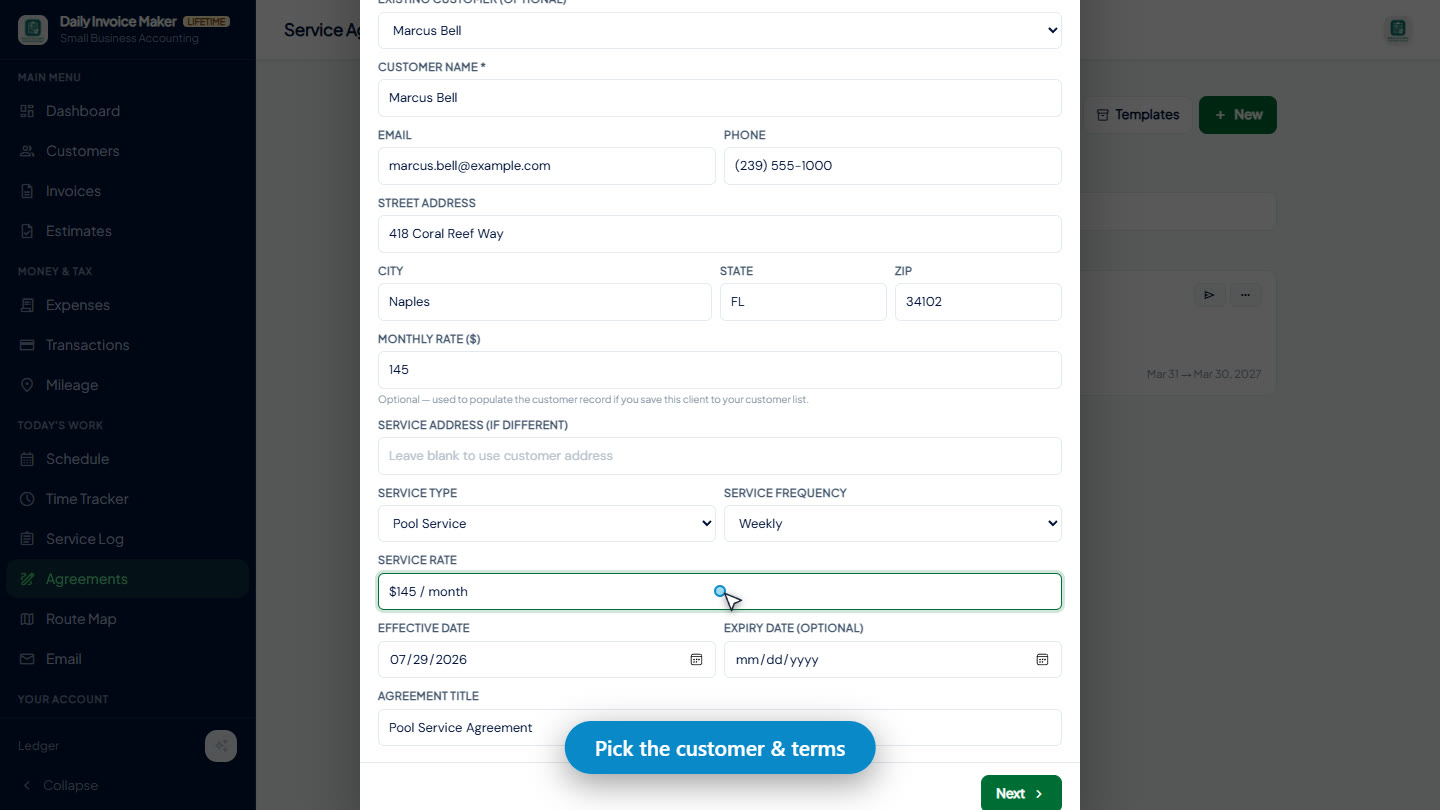
1Start from the customer
Open the customer, choose Agreements. The property address, contact and plan rate come from the record, so nothing is retyped.
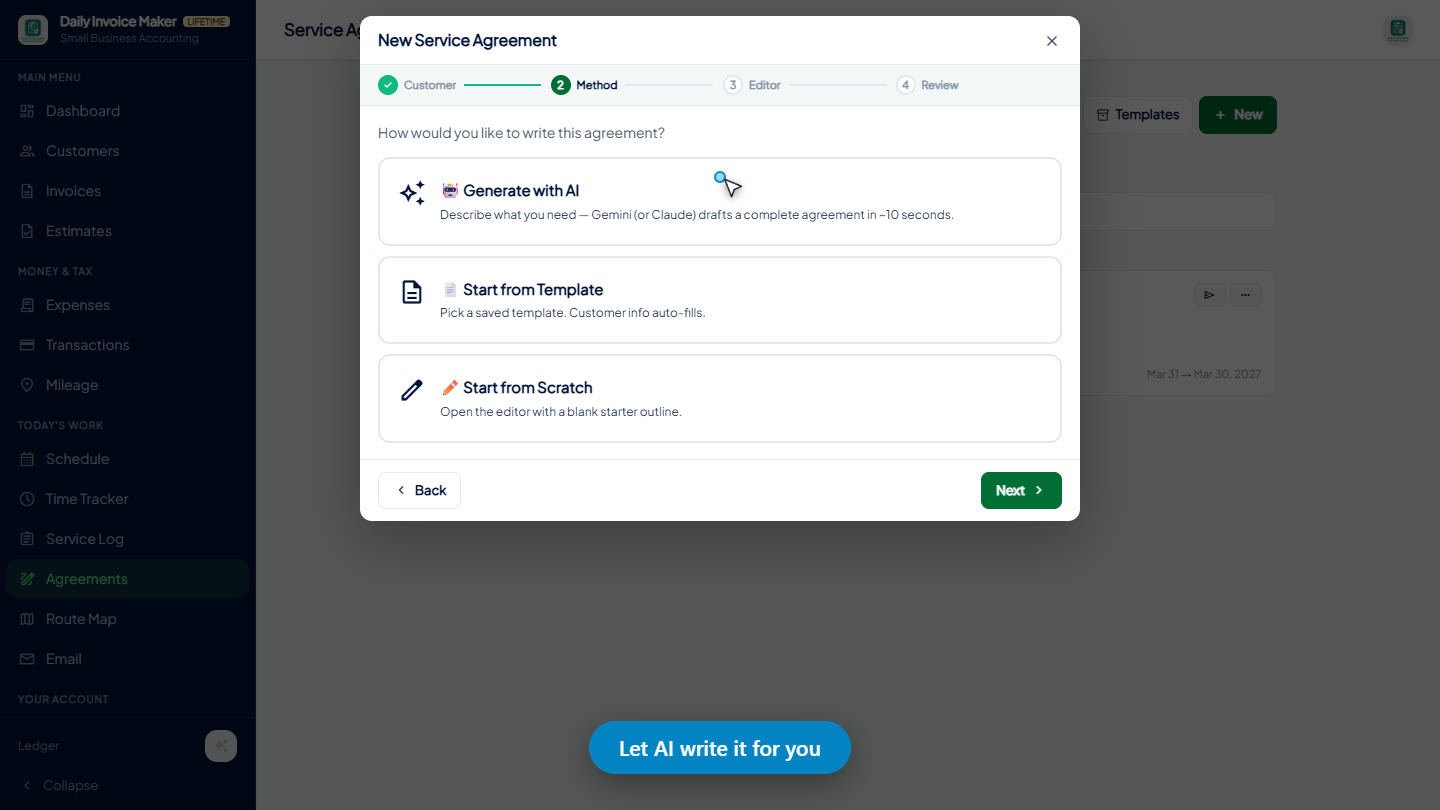
2Pick a method
Draft with AI from a plain description, or start from one of your saved templates. Either way the result is editable text, not a locked form.
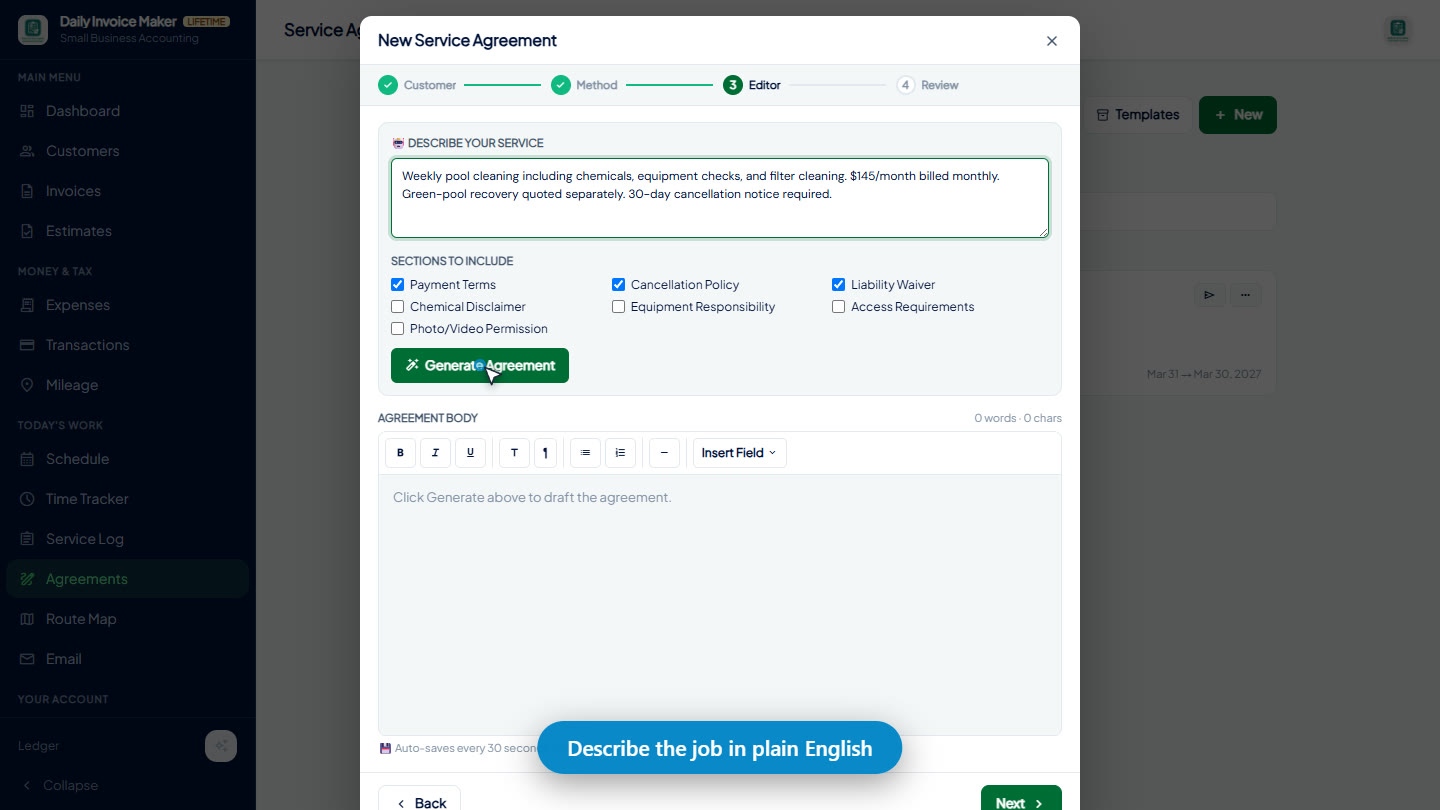
3Describe the job
Two or three sentences: what you do, how often, what it costs, what is excluded. The draft comes back with all nine clauses in place.
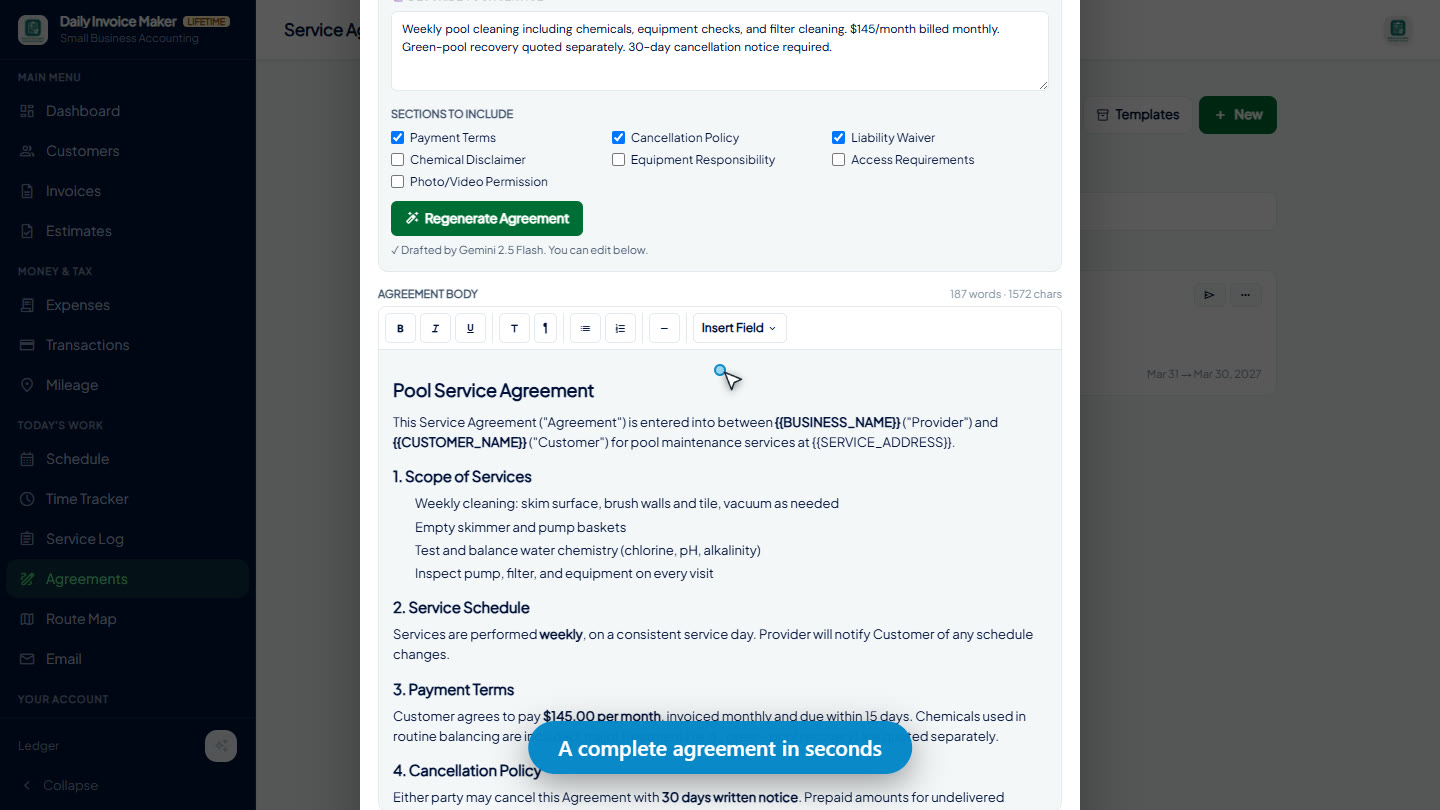
4Read the draft
Every clause is there to be checked, not trusted. The AI remembers the cancellation notice you would forget; you know the gate code changes in March.
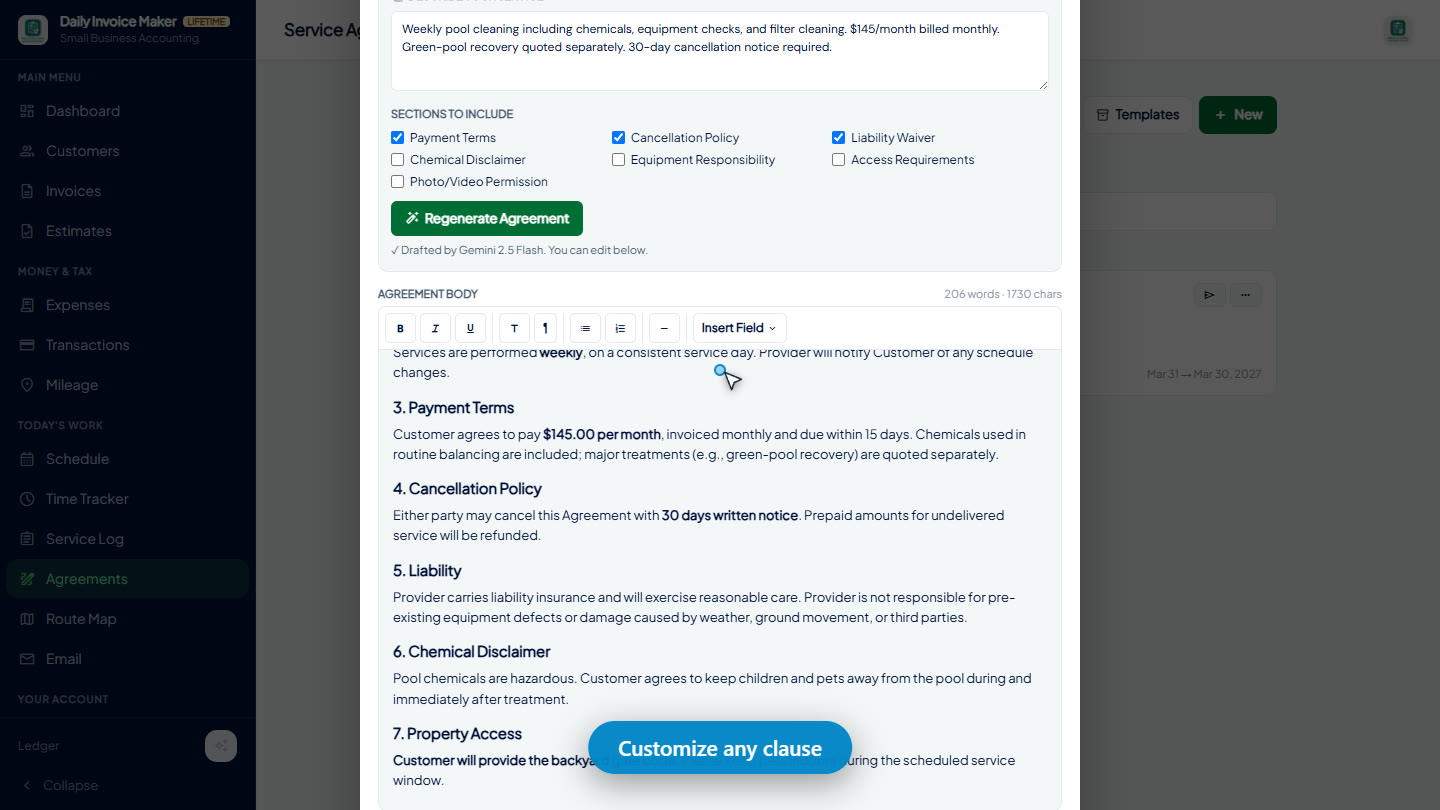
5Edit toward how you work
Change the scope list, the exclusions, the price wording. Save it as a template once and the next customer is an edit, not a composition.
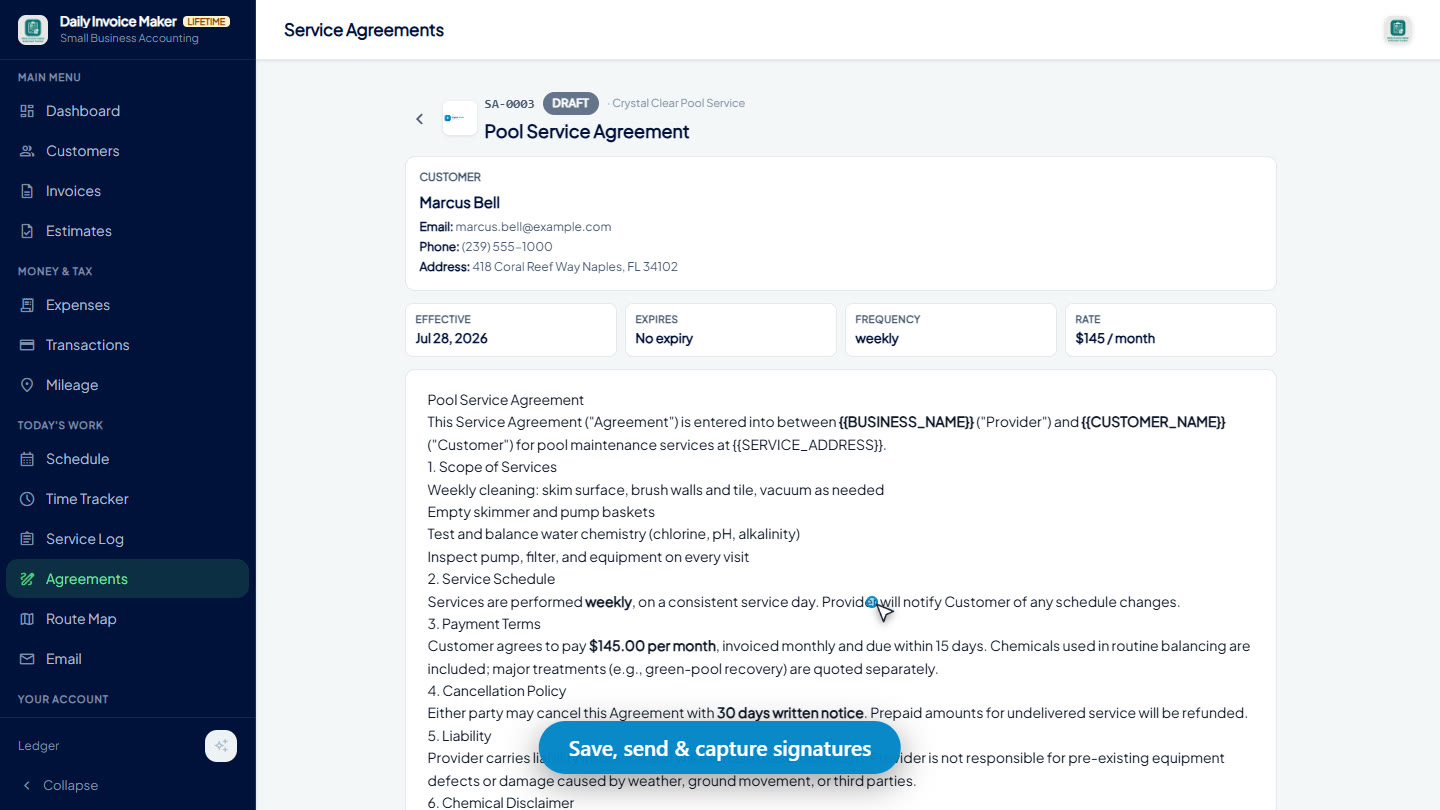
6Sign and store
The customer signs on the device at the property, with no internet needed. The signed version stays on their record next to every invoice it produces.
Then prove the visits happened
An agreement promises a schedule. The service log is the record that you kept it: one entry per visit, with what was done and a photo, attached to the same customer. When a plan customer asks what they are paying for, this is the answer.
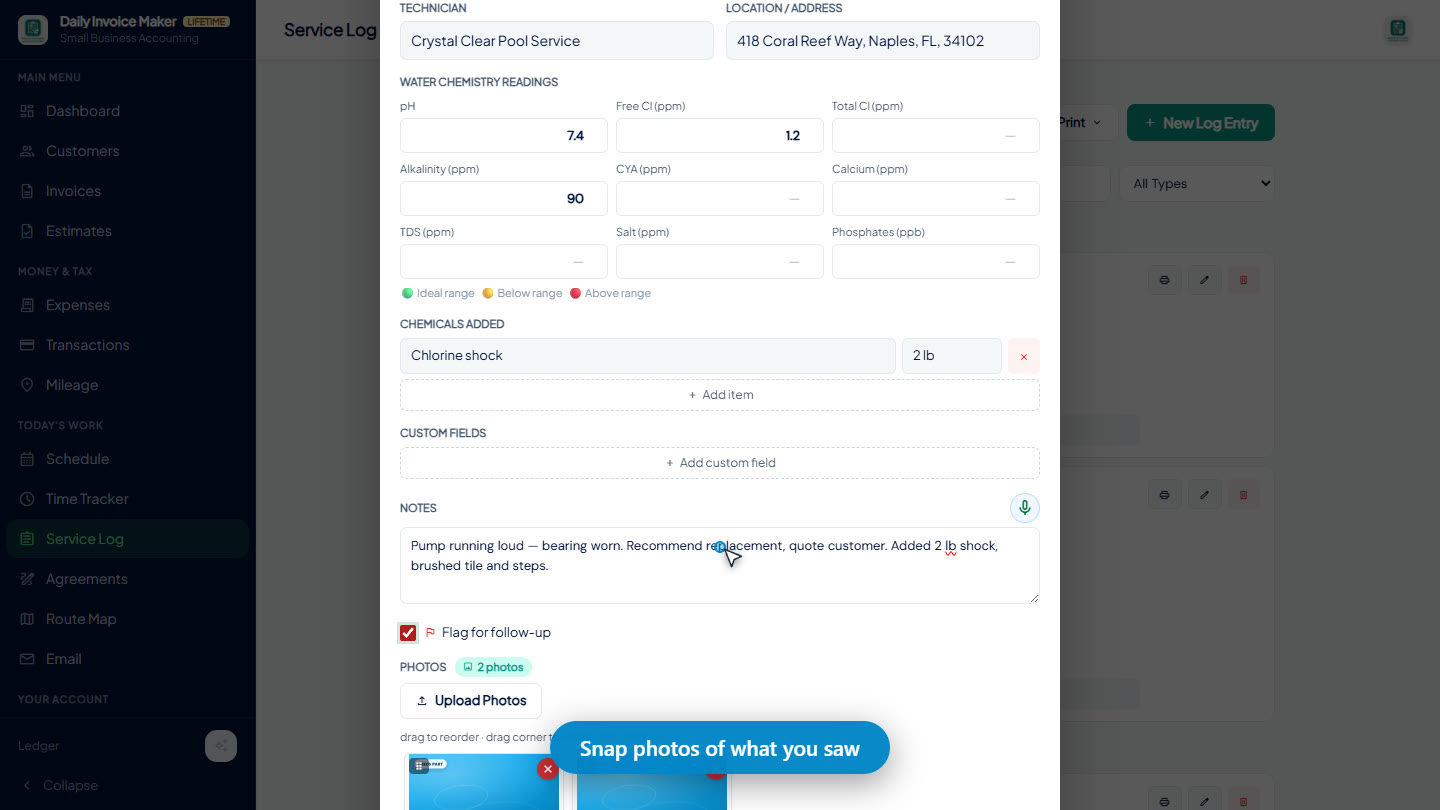
Log the visit on site
Date, what was done, a photo of the finished work. Thirty seconds at the truck.
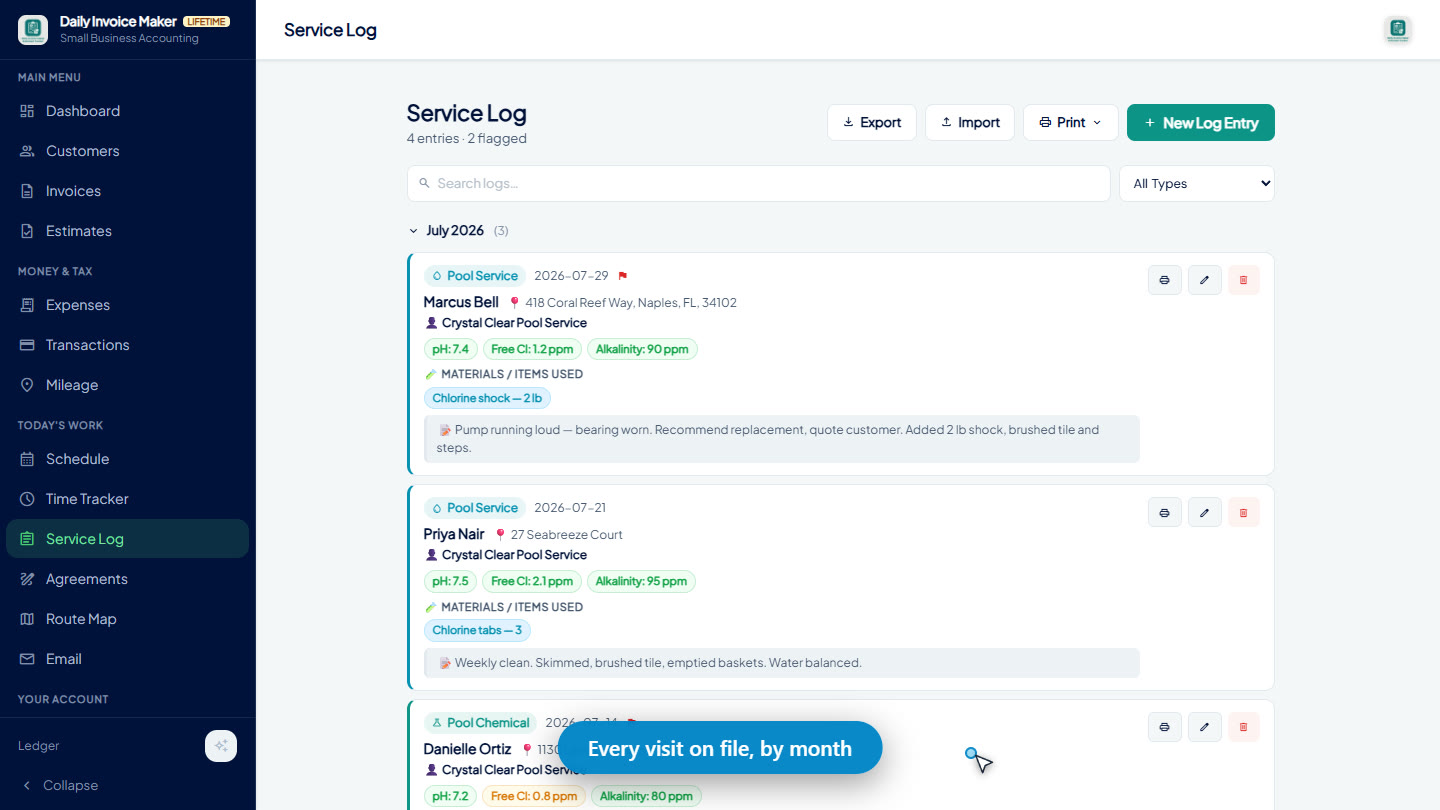
The whole season in one list
Every visit for that property, in order, matching the schedule the agreement promised.
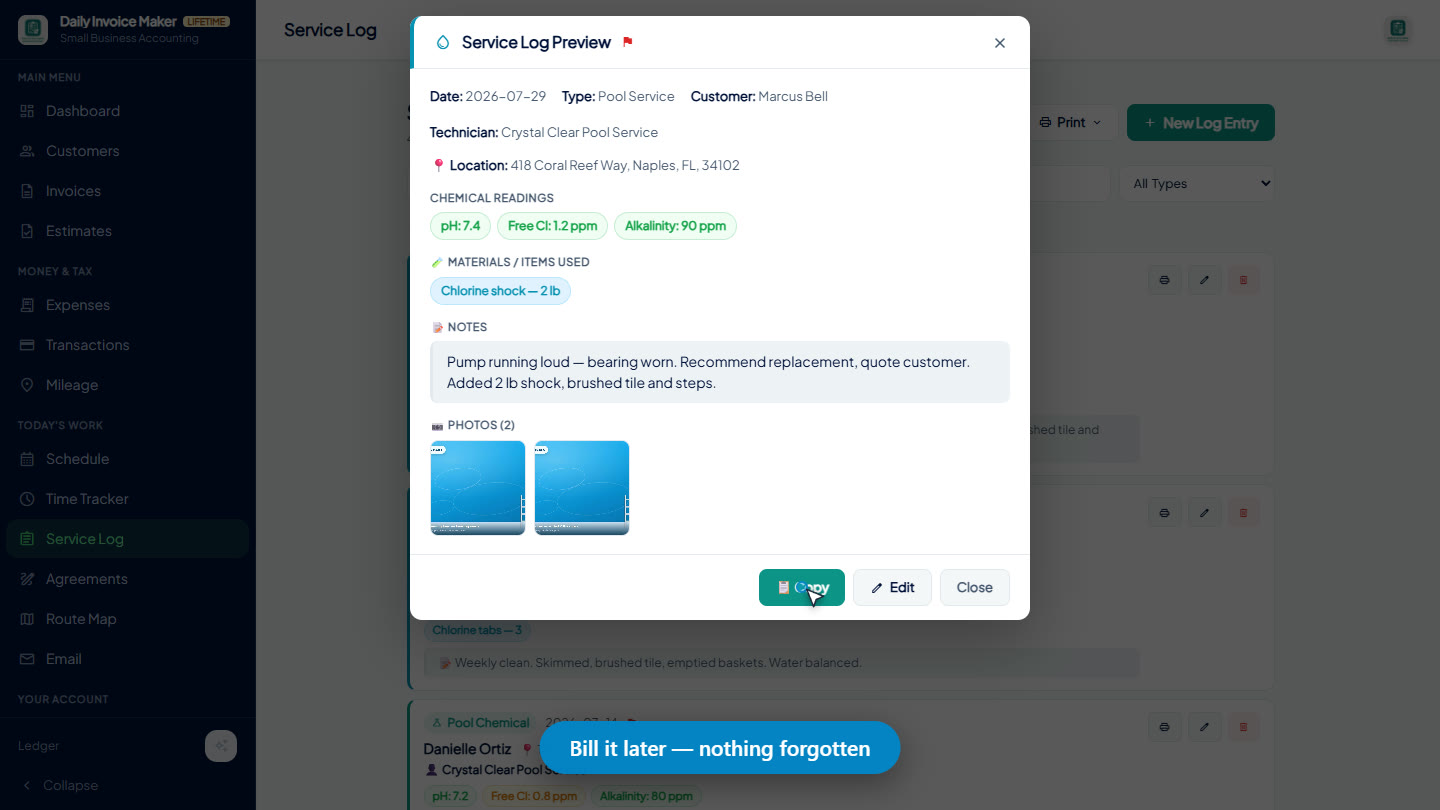
Send it with the invoice
A printable log that goes out with the monthly invoice, so the bill arrives with its own evidence.
Five mistakes that cost plan customers
- Scope written as a sentence. "Full pool service weekly" means something different to every customer. Write a list.
- Chemicals or parts left unstated. Say what is included up to what amount, and how the rest is priced. It is the first extra you will bill.
- No missed-visit rule. Rain, a locked gate, a holiday. Decide now whether the visit is skipped, rescheduled or credited.
- Price that does not match the invoice. If the agreement says $160 a month and the invoice says $160 plus tax, you will explain it every month. Put the tax on the agreement.
- The signed copy in a folder. If the agreement lives away from the customer record, the billing runs from memory. Store it where the invoice is made.
Draft your first agreement in the free demo
The demo unlocks every feature for your first 7 invoices, 7 customers and 7 expenses. No account, no card. Runs 100% offline on Windows and Mac. $149.95 once, no subscription and no per-agreement fee. Android is a separate Google Play purchase.
Questions
What is a service agreement?
A written, signed arrangement in which you perform a defined set of services on a schedule for a set price. It differs from a one-off estimate in that it recurs: the same scope, the same visits, the same invoice, until one side ends it under the terms both signed.
Is a service agreement the same as a contract?
A signed service agreement is a contract. The plain-language name is used because customers sign "agreements" more readily than "contracts", but the legal effect is the same: both sides are bound by what it says, which is why the scope and exclusions matter more than the letterhead.
Can a customer sign it on site, with no internet?
Yes. Daily Invoice Maker captures the signature on the device at the property and stores it against that customer. The app works with no connection, so a plant room, a back garden or a basement is fine.
Does the app bill the agreement automatically?
It generates and sends the invoices for every plan customer on your schedule in one batch. It does not debit a card without you; you keep the decision about when each customer is billed and what the invoice says.
Is an electronic signature enforceable?
Electronic signatures are widely recognised, but whether a particular agreement holds depends on its contents and your jurisdiction. Have a lawyer review your standard template once, then reuse it. That is a one-time cost against a document you will issue hundreds of times.
Should I let the AI write the whole agreement?
Let it write the first draft from your description of the job, then read every clause. The AI is good at structure and at remembering the clauses you would forget; you are the one who knows that the gate code changes in March. The drafted text is fully editable before anyone signs.
What does it cost?
$149.95 once for the Windows and Mac app, with free updates and no per-customer or per-agreement fee. The Android app is a separate Google Play purchase. A free demo covers your first 7 invoices, 7 customers and 7 expenses.