For electrical contractors
From the dead outlet to the 200 A upgrade, quoted, recorded and billed in one app.
Bill the troubleshooting call on site, record voltages, torque and test results under the customer, and quote the panel and EV circuit with the permit and utility fees broken out. 100% offline. $149.95 once.
Quick answer
What is the best invoicing app for electricians?
An electrician needs three things from billing software: service calls invoiced on the spot; a dated record of readings, tests and inspections for each job; and quotes for upgrades that keep materials, labor, permit and utility fees apart, with deposits and change orders on the final invoice. Daily Invoice Maker does all three on your own computer, with or without a signal. $149.95 once on Windows, Mac and Linux; the Android app is sold separately on Google Play.
30-day money-back guarantee
Watch it work
Quote it on site, bill it the same day.
Built for the van, not the office
Your work is up to code. Your paperwork should be too.
Troubleshooting calls, panel swaps with permits and utility coordination, EV charger circuits, and a dated record of what you measured.
The old way
Clean install. Messy records.
- Readings and test results on the back of a permit card
- Panel upgrade quotes totaled by hand: gear, wire, hours, permit
- Change orders agreed on site and forgotten at billing
- Deposits tracked in your head until the final invoice
With Daily Invoice Maker
Calls, readings, quotes and change orders in one place.
- Voltages, torque, AFCI/GFCI tests and permit numbers saved per job
- Materials, labor, permit and utility sections with their own subtotals
- Add the change order as its own section before you convert to the invoice
- Record the deposit; the invoice shows what was paid and the balance due
A day in the van
Four electrical jobs, one app.
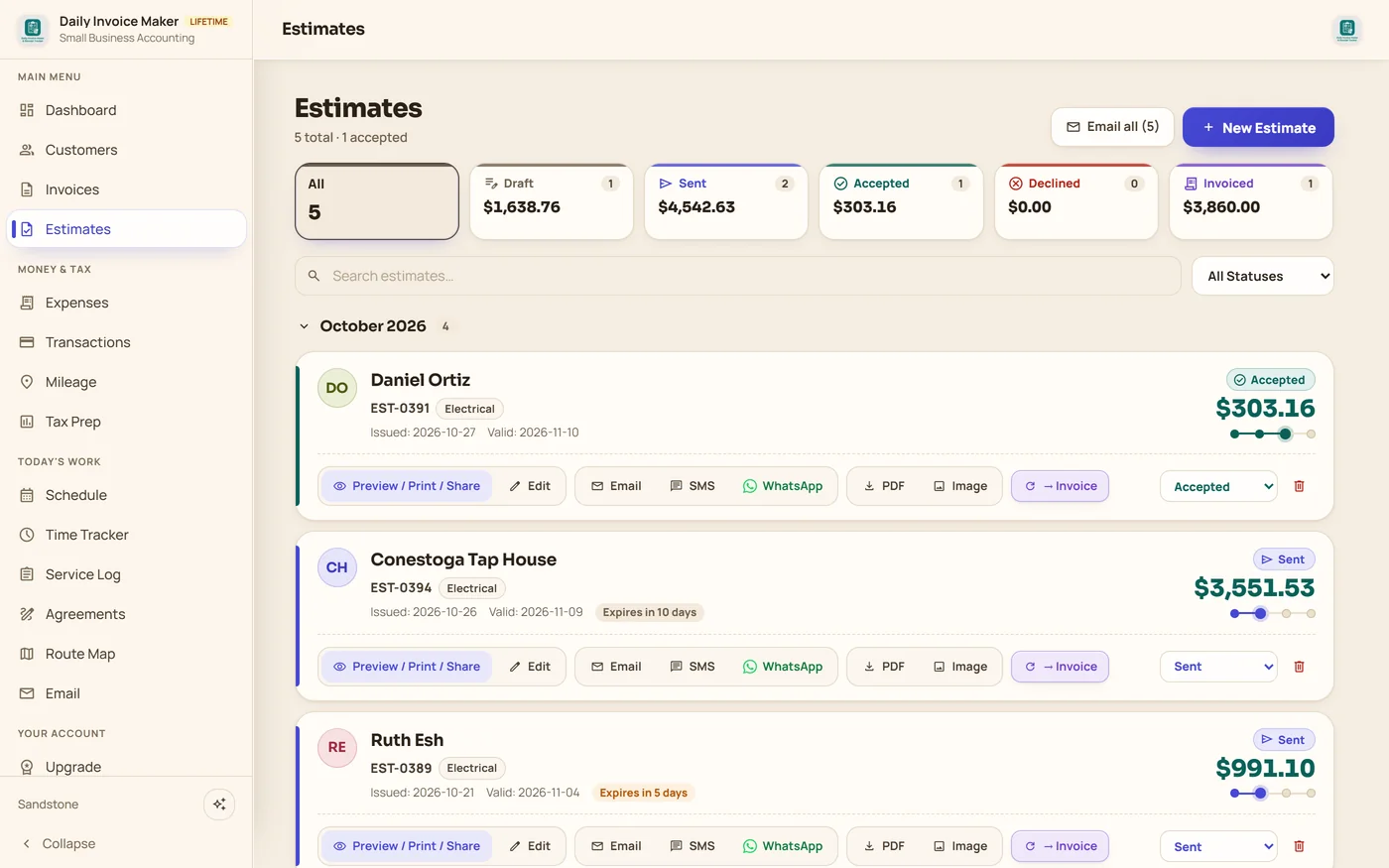
Every screen below is the real app, filled with an example company, Keystone Electric Co. in Lancaster, PA.
8:00 am · Dead kitchen outlets
Find it, fix it, bill it on the first visit
Two counter circuits dead: a burnt backstabbed receptacle upstream and no GFCI on the second circuit. The service call, two tamper-resistant GFCIs and the labor go on one estimate, the homeowner approves it, and it becomes the invoice, paid before you leave.
11:00 am · Annual panel inspection
Readings and tests on file, dated
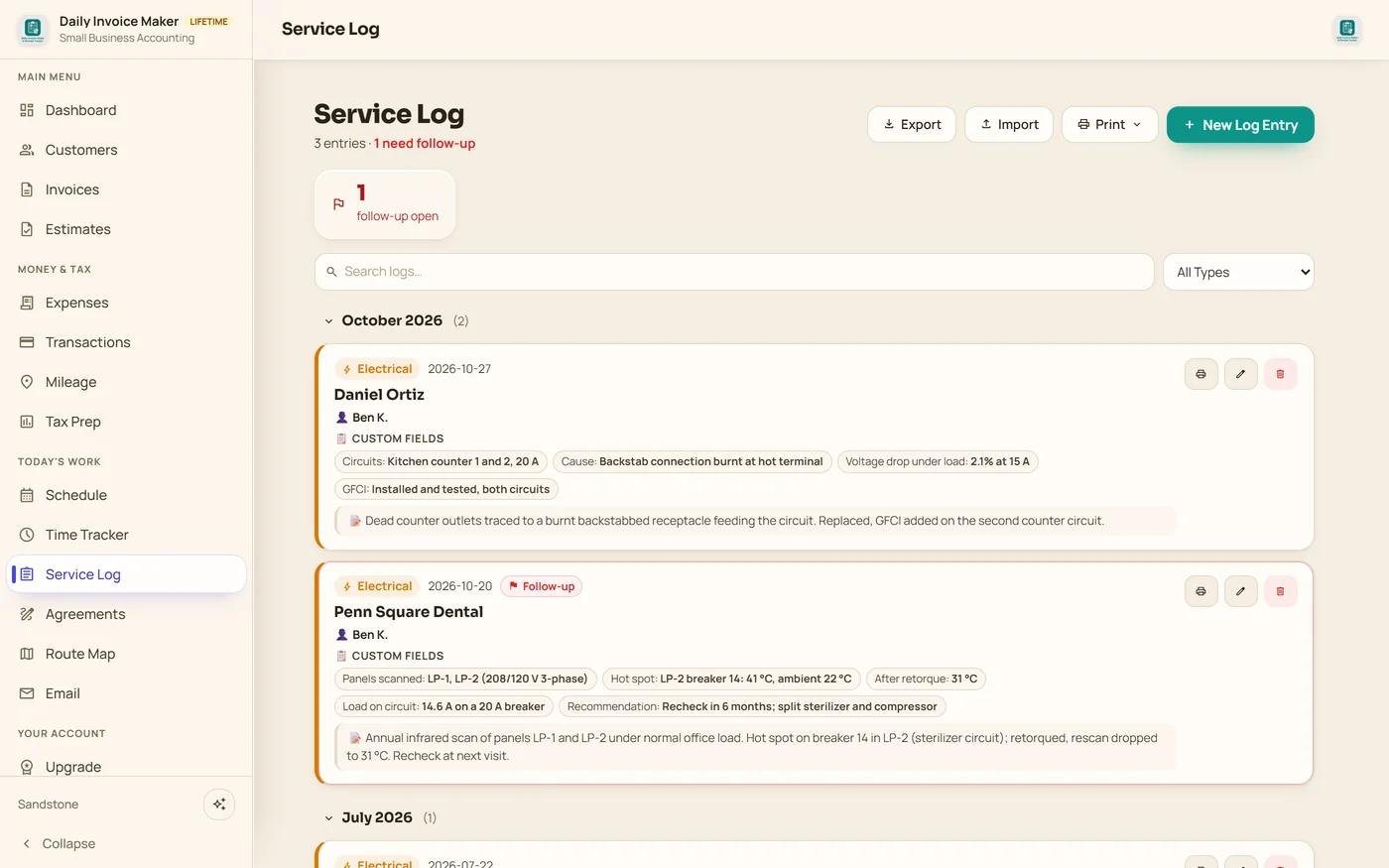
Log what you scanned and measured: the hot spot on breaker 14, the temperature after retorque, the load on the circuit and your recommendation. Flag it for the six-month recheck. Service upgrades get voltages, grounding, lug torque and the permit number.
2:00 pm · Panel upgrade + EV charger
Gear, wire, labor, permit and utility on one quote
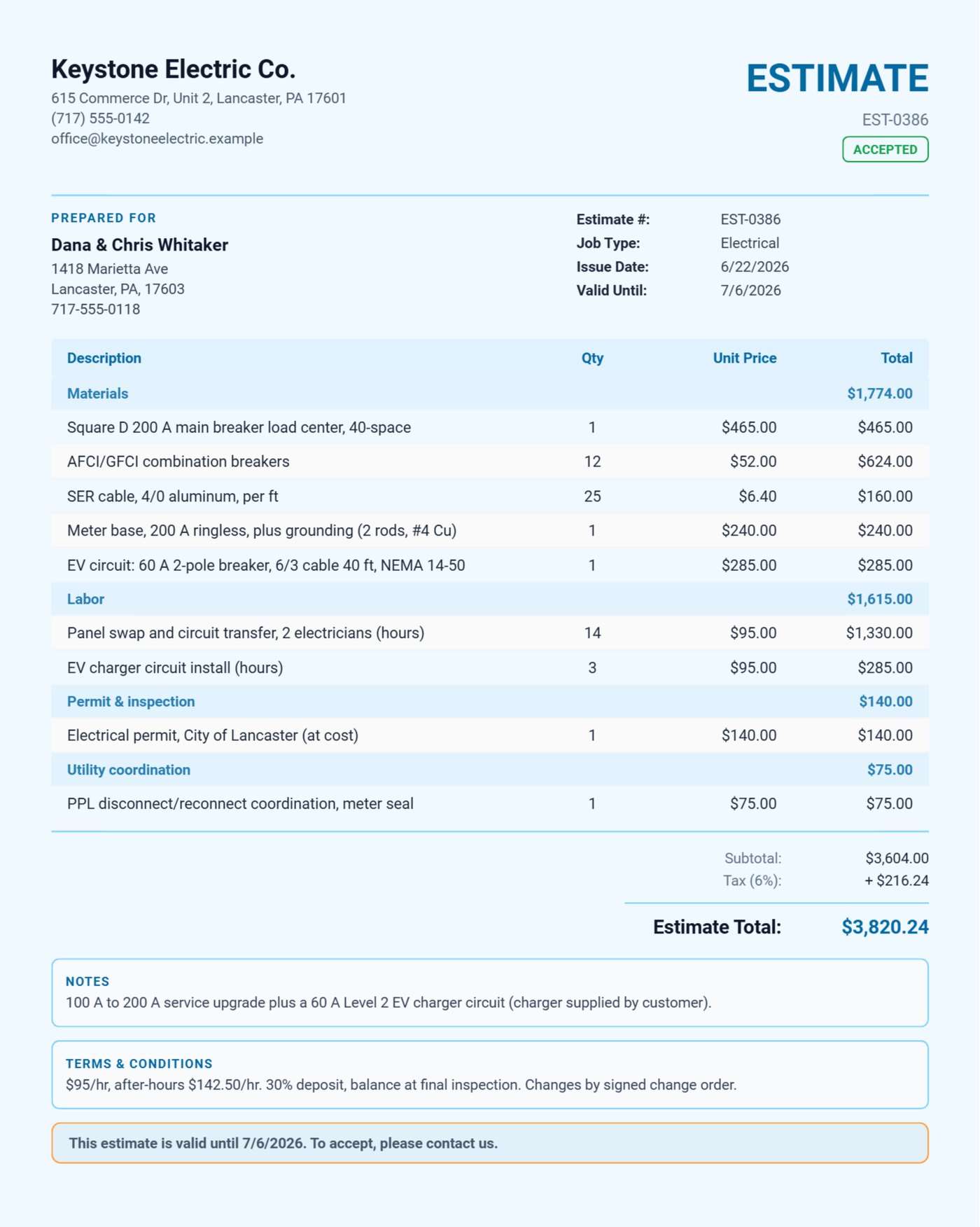
List the 200 A load center, AFCI/GFCI breakers, SER cable, meter base and the 60 A EV circuit, then the hours, the city permit and the utility disconnect, each in its own section. Your deposit and change-order terms print at the bottom.
5:00 pm · Final inspection passed
Change order and deposit on the final invoice
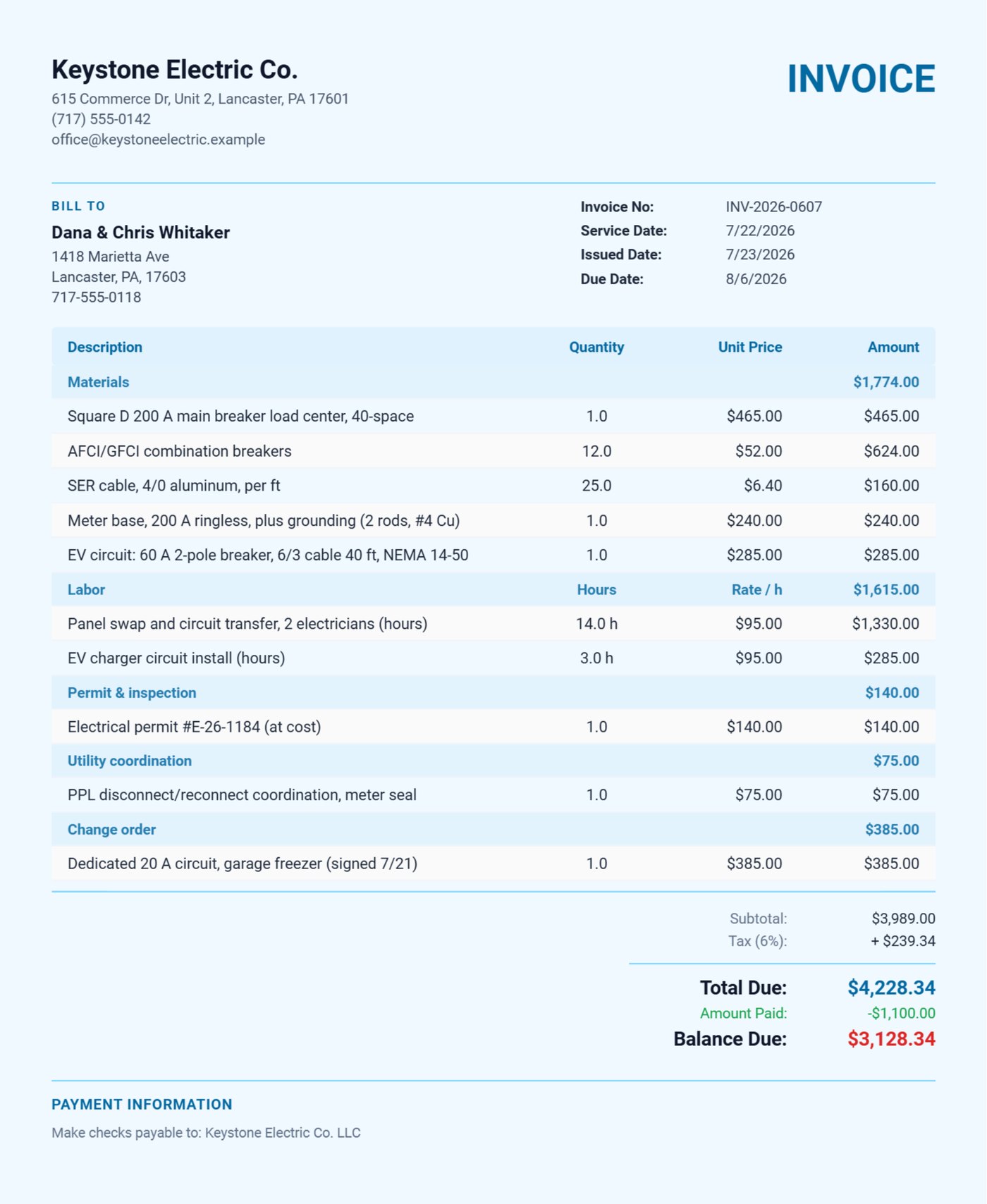
The customer added a garage freezer circuit mid-job, so it goes on as a Change order section. Record the 30% deposit they paid up front and the invoice shows the total, the amount paid and the balance due.
Build your price list once (breakers, receptacles, wire by the foot, hourly and after-hours rates) and every estimate after that is a few taps.
Already use Daily Invoice Maker?
Tell electrical pros what it is really like. Every review we show comes from a real customer.
Write a reviewWhat your customer actually gets
Real documents exported from the app for the Keystone Electric example: a 200 A service upgrade estimate with an EV charger circuit, and the final invoice with a change order, the deposit paid and the balance due, in the blue Ocean design. Pick any design in Settings; it applies to every estimate, invoice and agreement you send.
Pay once. Own it forever.
One panel upgrade pays for it. Every job after is yours.
$149.95 once, about one service call, or $5.95/mo. Free demo first: every feature, your first 7 invoices.
30-day money-back guarantee Windows, Mac & Linux · Android on Google Play 100% offline
Questions
Electrician questions, answered.
What is the best invoicing app for electricians?
Daily Invoice Maker handles the service call, the upgrade quote and the record of what you measured. Estimates and invoices split materials, labor, permit and utility fees into sections with their own subtotals, an approved estimate becomes the invoice in one tap, and a service log keeps readings and test results under each customer. It runs 100% offline: $149.95 once for the Windows, Mac and Linux app, with a separate Android app on Google Play, and no monthly subscription either way.
Can I record voltages, torque values and test results for each job?
Yes. A Service Log entry of type Electrical takes your own fields, for example service size, voltage L1-N, L2-N and L1-L2, grounding, lug torque, AFCI/GFCI test results, infrared readings and the permit number. Entries are dated, saved under the customer, searchable and printable, and a follow-up flag keeps a recheck in front of you.
How do I handle deposits and change orders?
Put your deposit terms in the estimate. When the deposit is paid, record it on the invoice and it shows the amount paid and the balance due. Work added on site goes in its own Change order section, so the customer sees exactly what changed and what it cost.
Can I attach panel and job photos to the invoice?
Yes. Attach before and after photos to an invoice or estimate and they print inside the PDF, which gives the customer a dated record of the work.
Does it need an internet connection?
No. Everything lives on your own computer or phone, so estimates, invoices and logs work in a basement or a new build with no signal. Google Drive sync between your devices is optional and catches up when you are back online.
Worked example
See a whole electrical season billed in the app.
Other trades