Guides · Money and records
Simple bookkeeping ledger: a digital cash book for a small business
Before software, a small business kept a cash book: a ruled ledger with money in on one side, money out on the other, a column for what each entry was, and a running balance. It was simple because the business was simple, and it worked because it was kept every day.
A digital ledger should keep that simplicity and remove the arithmetic. This guide covers what a small business ledger has to record, why a cash book is the right shape for a sole proprietor, the reconciliation that keeps it true, and how Daily Invoice Maker serves as one.

What a small business ledger records
Strip away the accounting vocabulary and a ledger is a list of every time money moved, with five facts about each move:
| Column | What it holds | Why |
|---|---|---|
| Date | When the money moved | Puts the entry in the right month and tax year |
| Description | Who paid you, or who you paid, and for what | The entry has to be explainable a year later |
| Money in | Income received | Totals to gross receipts |
| Money out | Expenses paid | Totals, by category, to the expense lines |
| Category | Which kind of income or expense it is | The tax form asks for expenses by kind, not a lump sum |
Two more columns earn their place in a digital ledger. A type that distinguishes income, taxable expense and non-taxable movements (transfers between your own accounts, loan principal, personal spending on the business card), because those are neither income nor expense and a ledger that forces them into one column lies. And a source, the statement or receipt the entry came from, so it can be traced.
Cash book or double entry?
Double-entry bookkeeping records every transaction twice, as a debit and a credit, so the books balance by construction. It is the right system for a company with assets, liabilities, inventory and investors, and the wrong system for a sole proprietor who needs to know income, expenses and net profit. The tax form for a sole proprietor, Schedule C, is a cash book: money in at the top, money out by category below, net at the bottom.
A single-entry cash book has one weakness: nothing forces it to balance, so errors do not announce themselves. The fix is not double entry; it is reconciliation. Once a month, the ledger's entries are checked against the bank statement, and the two must agree. That check does for a cash book what the second entry does for double entry, at a fraction of the effort.
If a bookkeeping app makes you post journal entries to a chart of accounts to record a $40 fuel purchase, it was built for a different business. A ledger for a sole proprietor should take the date, the amount, the description and a category, and nothing else.
Cash basis: record money when it moves
A cash book is by nature cash-basis: income is recorded when it arrives, expenses when they are paid. Most sole proprietors file on the cash basis, and it is the right choice because it matches what the bank statement shows. An invoice sent in December and paid in January is January income. A bill received in December and paid in January is a January expense.
The one place the ledger and the invoice book diverge is receivables. The invoice book knows what you are owed; the ledger only knows what arrived. Keep both: the invoice book for chasing money, the ledger for counting it.
Keeping the ledger: two feeds and a review
Entries reach a modern ledger two ways, and both should be reviewed rather than trusted:
- Receipts and invoices you record as they happen: the receipt photographed at the counter, the invoice marked paid when the customer pays. These carry the evidence and the purpose.
- Bank and card statements you import monthly, which catch everything the first feed missed: subscriptions, fees, the licence renewal paid by card, the deposit you forgot to invoice.
The review is where the ledger earns its keep. Every imported line gets its type and category; personal lines are marked non-taxable; and any entry that already exists as a receipt is recognised so it is not recorded twice. A ledger that imports without review is a bank statement with extra steps.
The monthly reconciliation
Reconciling means proving the ledger against the outside record. With the month's statement imported:
- Every deposit on the statement matches a paid invoice, or is marked as a transfer.
- Every receipt recorded during the month has been matched to its statement line, and the duplicate dropped.
- The ledger's income and expense totals for the month agree with what you would get by adding up the statement, after the non-taxable lines are set aside.
The first time you reconcile a ledger that has never been reconciled, expect to find a deposit you never invoiced, an expense recorded twice, and a personal purchase on the business card. That is the point; those are the errors that reach the tax return when nobody looks.
What the ledger should be able to tell you
A ledger that only lists is a diary. It should also answer: income versus expenses by month, to see the shape of the year; expenses by category with percentages, to see where the money goes; and net profit year to date, per business if you have more than one, which is what quarterly estimated tax is set aside against. At year end the same categories are the expense lines on the tax form, so the ledger's totals, with sales tax kept out of income, are the return.
Step by step
How Daily Invoice Maker handles it
Daily Invoice Maker's Transactions screen is a digital cash book of exactly this shape: every entry has a date, description, amount, type, category and business, with the source it came from. Entries arrive from invoices you mark paid, receipts you scan and statements you import, and the review step is built in. Here it is with a fictional pool-service business.
-
The ledger: every movement of money with its type and category
Transactions is the cash book. Each entry has a date, description, amount, type (income, taxable expense, non-taxable), category and business, and the file it came from. The tiles total income, expenses and non-taxable movements and show the net; the chart shows income against expenses by month.
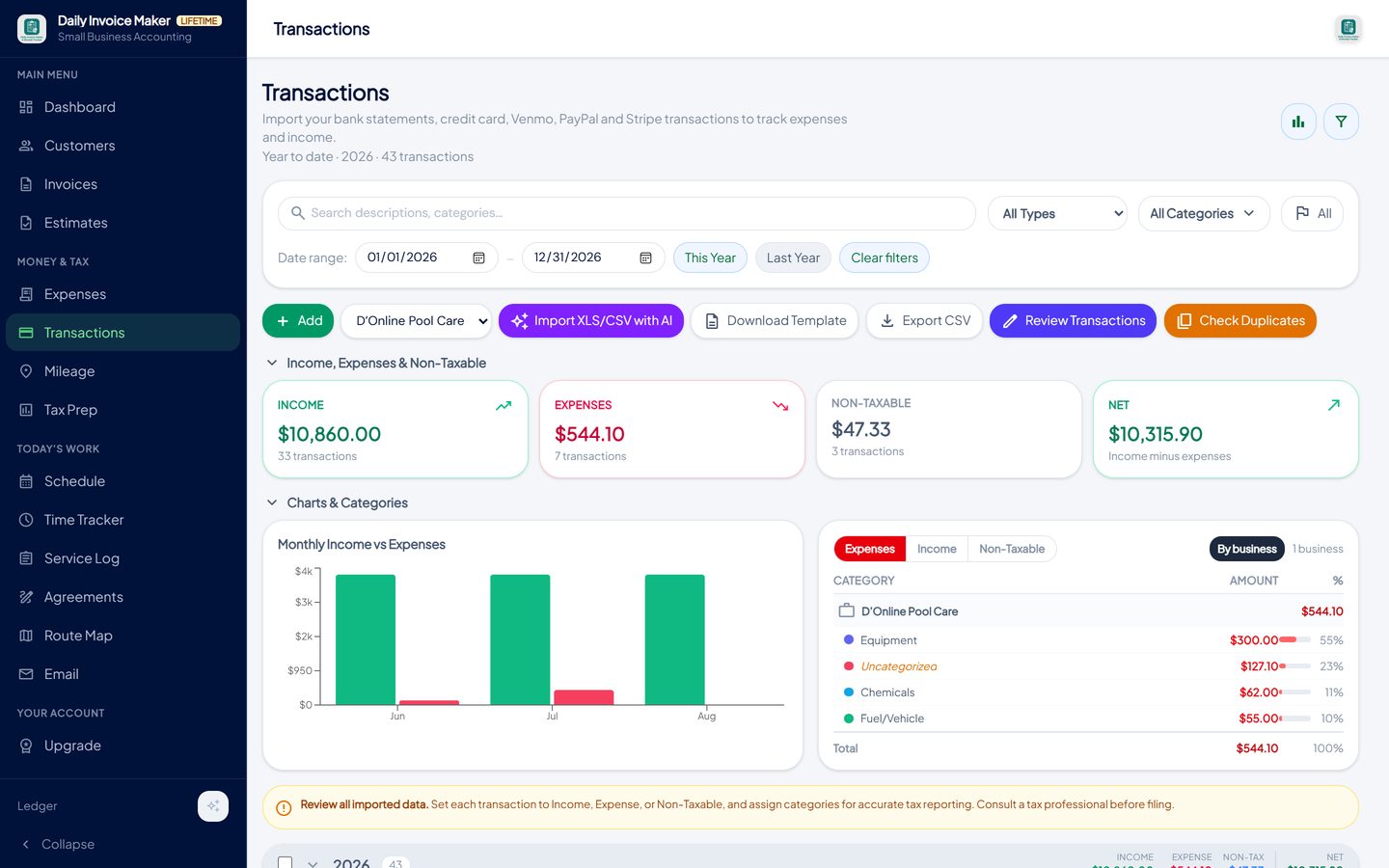
Income, expenses and non-taxable totals with the net; a monthly chart; and categories by business with percentages. -
Add entries by hand, from receipts, or by importing a statement
Type an entry, scan a receipt, or import a downloaded statement from the bank, card or payment app. Imported lines are reviewed before they enter the ledger: similar lines are grouped, the ones that need a decision come first, and each gets a type, category and business. Transfers are marked non-taxable so they never inflate income or expenses.
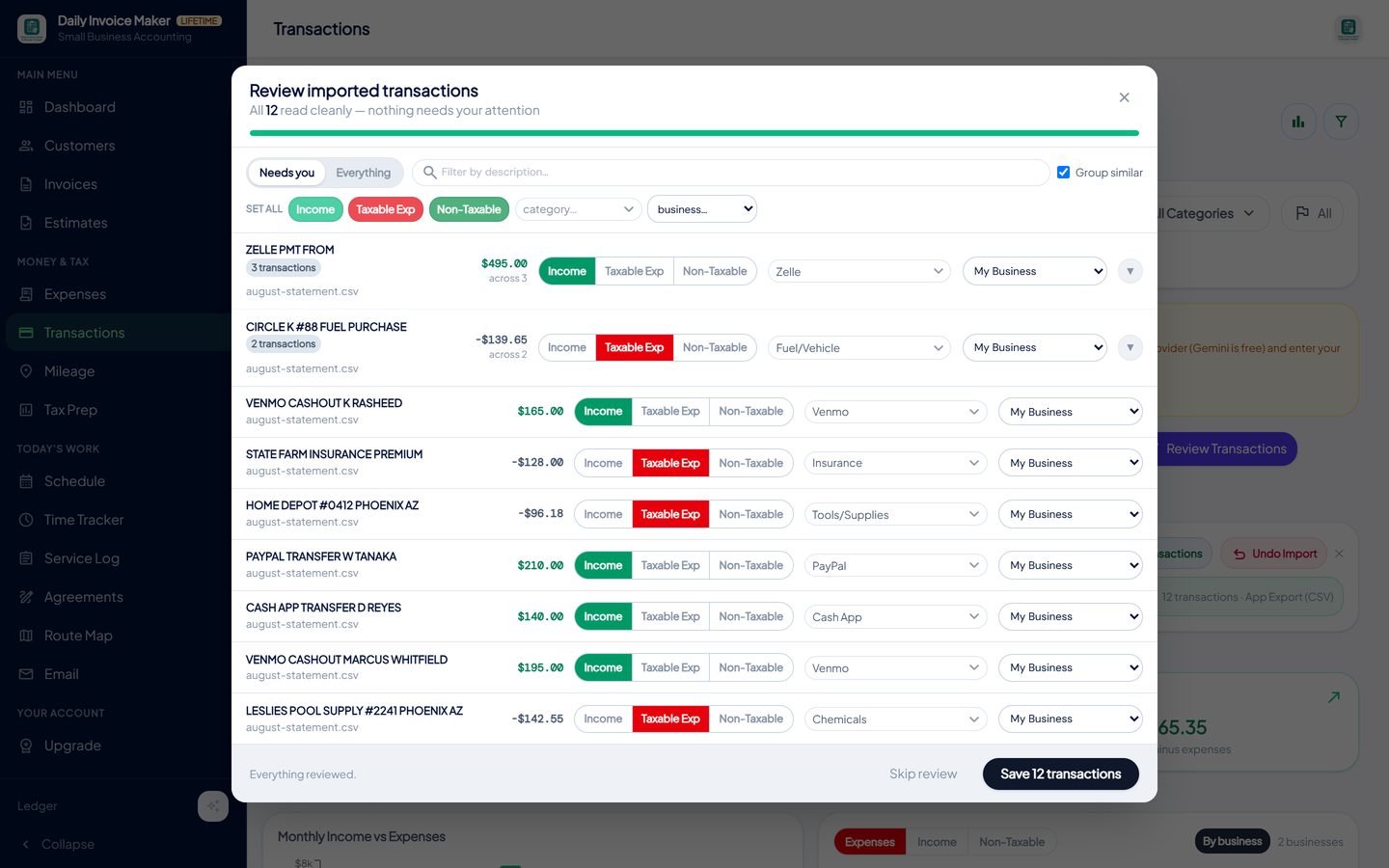
An imported statement becomes ledger entries after a review: type, category and business on every line, grouped where similar. -
Trace any entry back to its source
Each entry shows the statement file it came from, and a details view shows the original line as the bank wrote it, the import run and the parser used. A whole import can be undone in one click, and a statement imported twice is caught by the duplicate check.
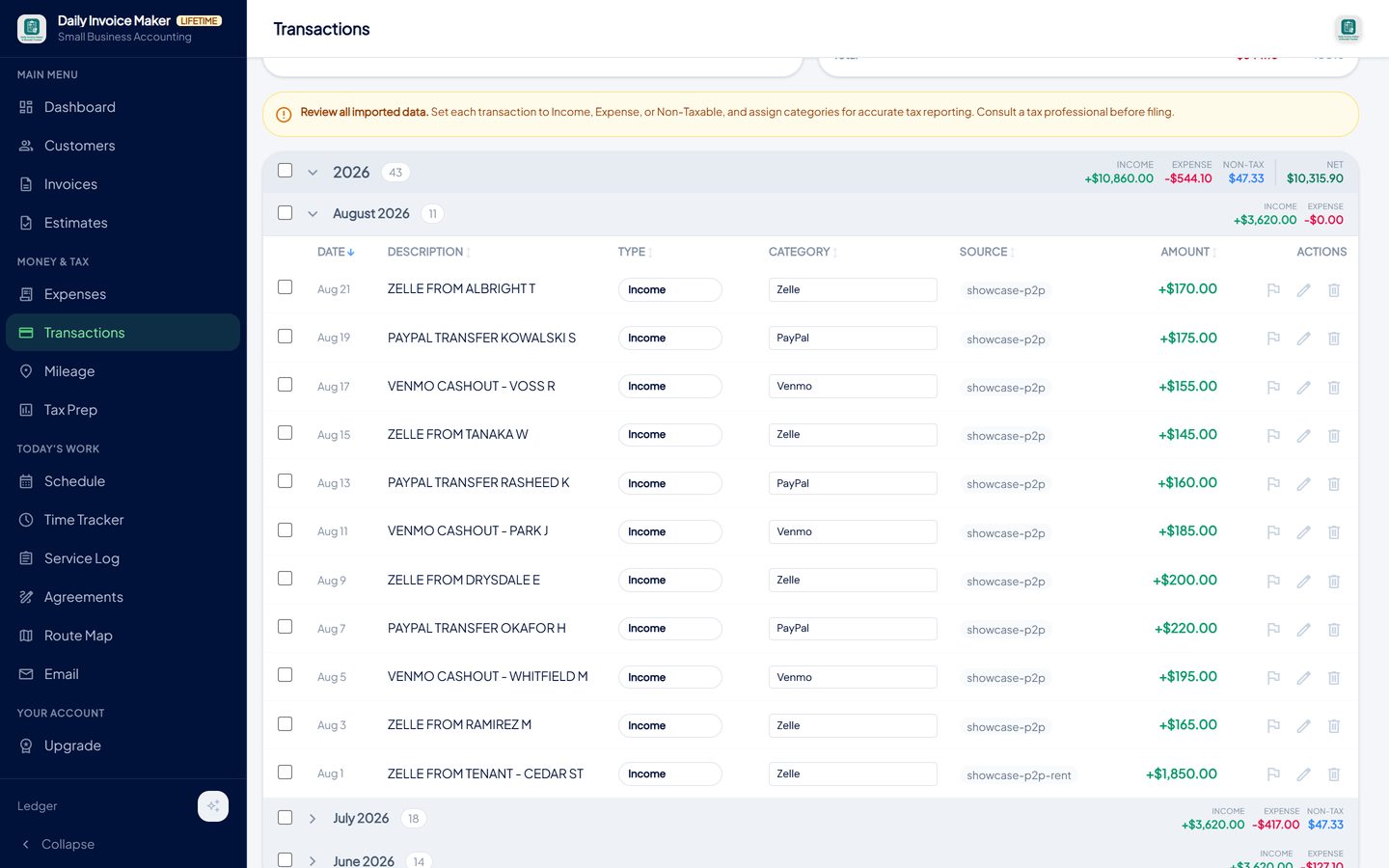
Every imported entry shows the statement it came from; a details view shows the original bank line. -
See where the money went, by category and by business
The category panel splits income, expenses and non-taxable movements by category with a percentage of the total, and can group them by business. A category that is suddenly a third of spending is visible in a glance, which is how a ledger catches a problem before the bank does.
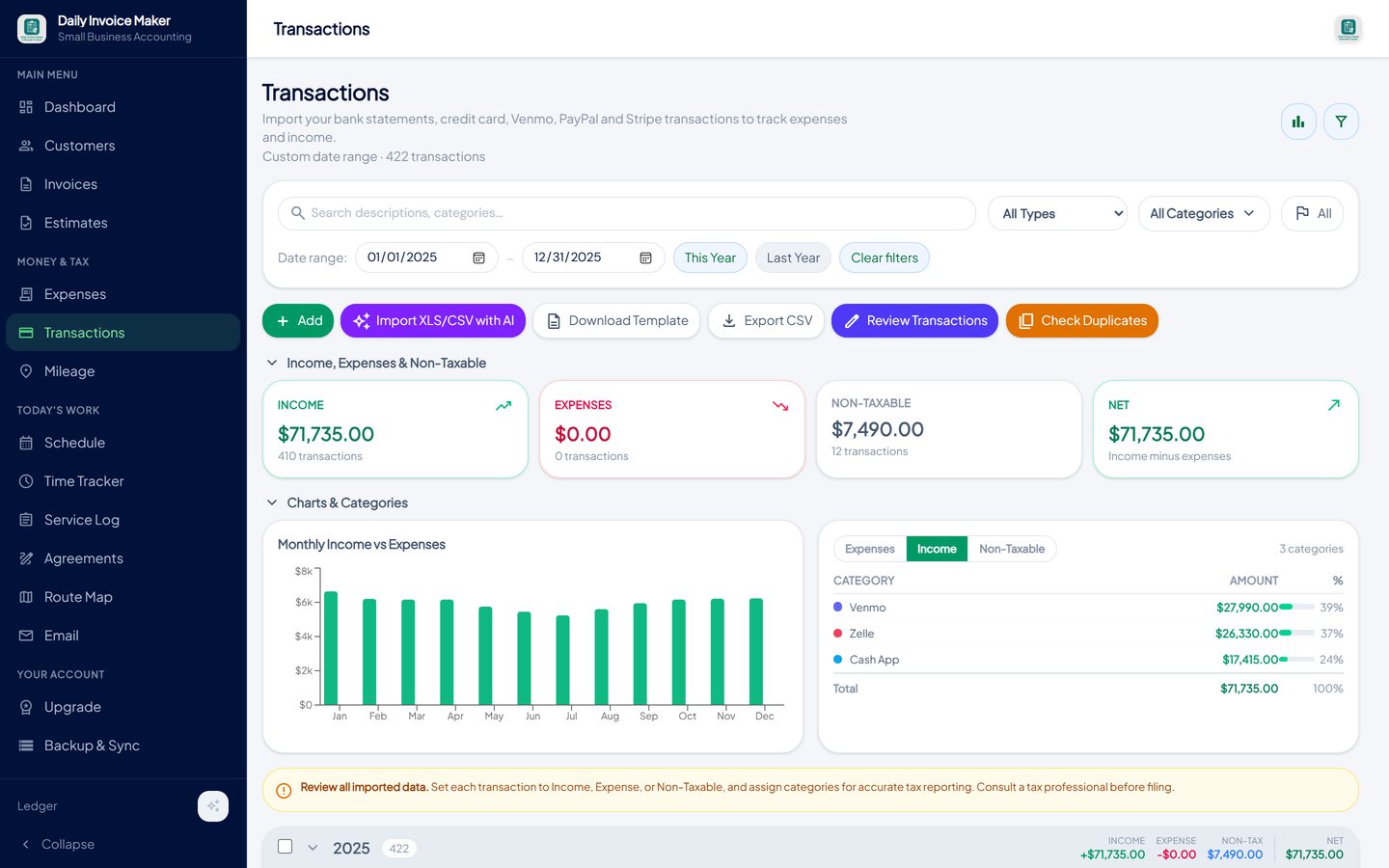
Income and expenses by category with percentages, per business, so the ledger answers 'where did it go?' at a glance. -
Reconcile against paid invoices and receipts
Tax Prep pairs receipts with the statement lines that describe the same purchase and offers to exclude the duplicates, and its income-source rule stops a paid invoice and its bank deposit both counting. That is the monthly reconciliation, with the arithmetic done for you.
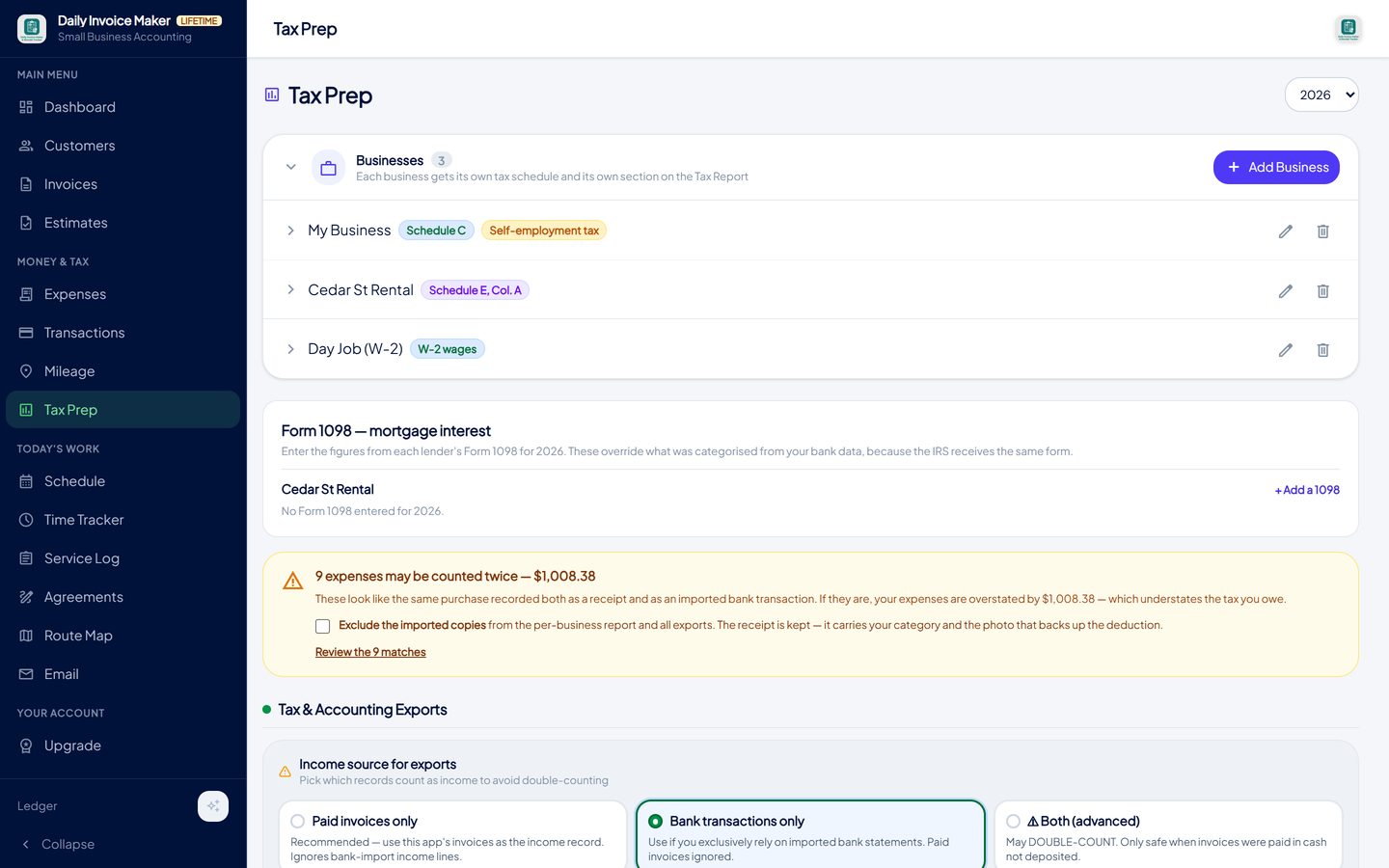
Receipts matched to statement lines are listed with the amount at stake; the copies are excluded with one checkbox. -
Read the year and export it
Because every entry carried a category from the day it was recorded, the ledger's totals are the tax form's lines. Export a Schedule C summary PDF for an accountant, a TurboTax Desktop file, or QuickBooks and CSV for a bookkeeper, per business.
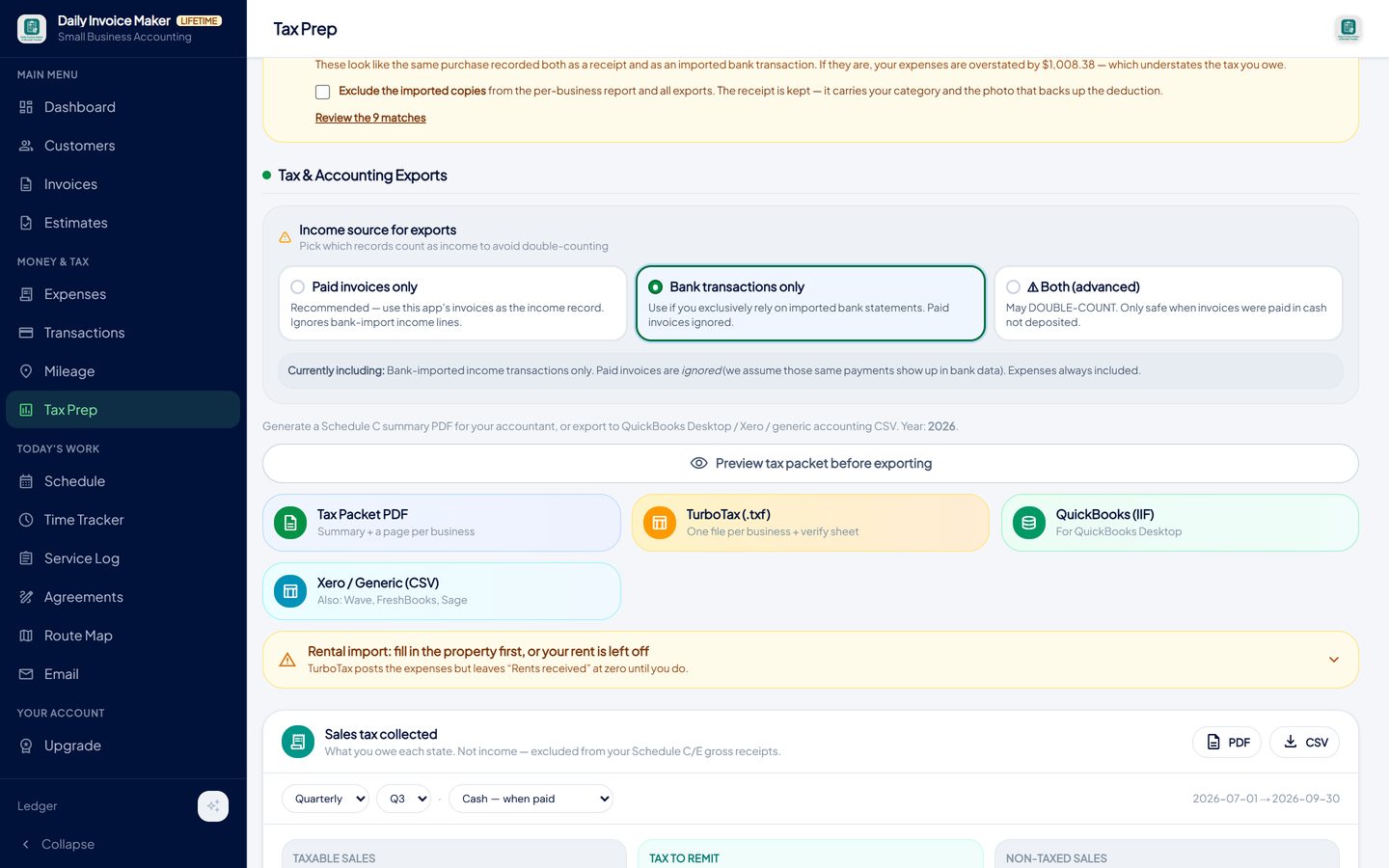
The ledger's categories are Schedule C lines; the year exports as a PDF summary, a TurboTax file, or QuickBooks and CSV.
What else is in the app
Cash-book ledger
Date, description, amount, type, category, business, source: nothing more, nothing missing.
Statement import, 16 formats
Banks, cards, PayPal, Venmo, Cash App, Stripe, Square, OFX and PayPal PDF, with review before entry.
Receipts attached
Scan a receipt and the entry is created with the image stored.
Duplicate checks
Double-imported statements and receipt-versus-statement pairs are found and resolved.
Books per business
A trade and a rental in the same app, reported on their own schedules.
Local and offline
Windows, Mac, Linux and Android. The ledger stays on your devices; Google Drive sync included.
Try it on your own books
The free demo is the full app for your first 7 invoices, 7 customers and 7 expenses — no account, no card. It runs 100% offline on Windows, Mac and Linux: $149.99 once, or $5.99 a month if you would rather not commit. The Android app is a separate Google Play purchase.
Questions
Is this double-entry bookkeeping?
No, deliberately. It is a cash book: single-entry income and expenses with categories, reconciled monthly against the bank. That is what a sole proprietor's tax form requires, and it is what most small service businesses need.
Can I import my existing ledger from a spreadsheet?
Yes. A generic CSV with date, description and amount columns imports through the same review screen as a bank statement, and the app provides a template to download.
How do I record money I moved between my own accounts?
Mark it non-taxable. It shows in the non-taxable total and is excluded from income and expenses, so transfers, loan drawdowns and personal spending never reach the tax figures.
Does it keep a running balance like a paper cash book?
It keeps running totals of income, expenses, non-taxable movements and net for any date range, by month on the chart, and by category and business in the panels. It is not a bank-balance tracker; the bank statement remains the record of your balance.
Can I export the ledger?
Yes, as CSV at any time, and at year end as a Schedule C summary PDF, a TurboTax file, or QuickBooks and generic CSV exports.
Is there a free version?
The free demo is the full app with a seven-invoice limit and a sample watermark on invoice PDFs; the ledger, statement import and receipt scanner are included. Paid plans are $5.99 a month or $149.99 once.
The short version
A small business ledger is a cash book with five columns and a monthly reconciliation. Software should remove the arithmetic and the retyping, not add a chart of accounts. Keep the entries current, mark transfers as what they are, reconcile monthly, and the tax return is the ledger's totals. Daily Invoice Maker's free demo lets you import last month's statement and see the ledger fill.
Related guides

Expense Tracker Guide
How to track business income and expenses so the numbers are right all year: categories that match the tax form, receipts attached, statements imported and…

Small Business Accounting
The accounting a one-person or family business really needs: a profit and loss you can read monthly, invoices as the income record, categorised expenses, sales tax…

Schedule E Tracker
What Schedule E asks a landlord for, line by line: rents, the expense lines, mortgage interest from Form 1098, depreciation and mixed-use allocation.
How to keep track of unpaid invoices · All guides · Quick how-to answers · Training guide for the app