Guides · Tax season
Schedule E tracker: rental income and expenses, kept ready for the form
Schedule E is where rental income goes on your Form 1040. It looks simple: rents in, expenses out, one column per property. The difficulty is that a rental's biggest numbers, the mortgage, the roof, the months you used the place yourself, are exactly the ones the form treats differently from how they appear in your bank account.
This guide explains what the form wants, the records a Schedule E tracker has to keep during the year, and the traps that produce a plausible-looking wrong answer. Then it shows the same tracking in Daily Invoice Maker, which keeps a rental in its own set of books beside a trade business.

What Schedule E is, and what it is not
Schedule E, Supplemental Income and Loss, reports income from rental real estate, royalties, partnerships, S corporations, estates and trusts. For most people it is Part I: one to three rental properties in columns A, B and C, each with its own rents, expenses and net figure.
Two things distinguish it from Schedule C. First, rental income is generally not subject to self-employment tax. Filing a rental inside a Schedule C business, which a single set of books invites you to do, pays 15.3% on income that does not owe it. Second, Schedule E is usually passive income, so a loss is limited: with active participation you can deduct up to $25,000 of rental loss against other income, phased out between $100,000 and $150,000 of adjusted gross income, and the rest carries forward.
If you provide substantial services to tenants, such as a short-term rental with daily cleaning and meals, the activity may belong on Schedule C instead. Ordinary long-term rentals, and most short-term ones where you only provide the space, stay on Schedule E.
The Schedule E lines, and what to capture for each
| Line | What goes there | What to record during the year |
|---|---|---|
| 3 Rents received | All rent paid to you, including late fees and any part of a security deposit you kept | Every payment with the date and tenant; deposits held are not income until kept |
| 5 Advertising | Listing fees, signs, photos | Receipts |
| 6 Auto and travel | Trips to the property for management, at the standard rate or actual costs | A mileage log with dates and purpose |
| 7 Cleaning and maintenance | Turnover cleaning, lawn, pest control, gutters | Invoices from the provider |
| 8 Commissions | Leasing commissions paid to an agent | Agent statements |
| 9 Insurance | Landlord policy, umbrella share, flood | Premium receipts; mortgage insurance premiums also belong here |
| 10 Legal and professional | Attorney, accountant, eviction costs | Invoices |
| 11 Management fees | Property manager's percentage and fees | Manager statements |
| 12 Mortgage interest | Interest paid to banks, from Form 1098 box 1 | The 1098; never the whole payment |
| 13 Other interest | Interest on other loans for the property | Lender statements |
| 14 Repairs | Fixing what is there: a leak, a broken appliance, paint | Receipts with what was repaired (improvements go to depreciation, not here) |
| 15 Supplies | Small items: filters, bulbs, smoke-detector batteries | Receipts |
| 16 Taxes | Property tax; state and local taxes on the rental | Tax bills (escrowed tax paid through the mortgage still counts, from the 1098 or the escrow statement) |
| 17 Utilities | Any utility you pay rather than the tenant | Bills |
| 18 Depreciation | The building (not the land) over 27.5 years; improvements over their own schedules | Purchase price, land allocation, date placed in service, cost of each improvement |
| 19 Other | HOA dues, bank fees, anything legitimate without a line | Receipts and a description |
Two items look like expenses and are not: the principal portion of the mortgage payment, and improvements. A new roof, a replacement HVAC system or a kitchen remodel is capitalised and depreciated, not deducted in the year you paid for it. A tracker needs a way to mark those so they do not land on line 14.
The mortgage: the number most often wrong
Your bank shows one monthly payment. The IRS sees three things in it: interest (deductible on line 12), principal (not deductible), and escrow for taxes and insurance (deductible on lines 16 and 9, but only when the servicer actually pays them out). A tracker that categorises by payee will file the entire payment under "Mortgage" and, unless it stops you, deduct all of it.
The lender's Form 1098 settles the interest figure: box 1 is the interest paid, box 5 any mortgage insurance premiums, and the IRS receives the same form, so it is the figure to use. Property tax paid through escrow is often shown on the same statement, but taxes you paid directly never appear on a 1098, so the interest can override the bank-derived figure while taxes have to be checked, not replaced.
If the same loan was sold or refinanced during the year you will receive more than one 1098. Both count; a tracker needs room for several per property per year.
Mixed use: when you also use the property yourself
A vacation home you rent for part of the year and use yourself for the rest is a mixed-use property. Expenses must be split between rental and personal use, and only the rental share goes on Schedule E; the personal share of mortgage interest and property tax may go on Schedule A instead.
The split is normally by days: rental days divided by total days used. The denominator is days actually used for either purpose, not days in the year and not days merely available for rent. Counting available days understates the rental share and costs deductions. If personal use exceeds the greater of 14 days or 10% of rental days, the property is treated as a residence and rental losses are limited further.
Record the days as they happen. A calendar reconstructed in April is the weakest evidence you can offer for an allocation that changes every line on the form.
What a Schedule E tracker has to do
- Keep the rental in its own books. Rents and rental expenses never mix with a trade business or with personal spending, so the form's column is simply the book's total.
- Categorise in Schedule E's own lines. Repairs and improvements are different lines with different tax treatment; management fees and commissions are different lines; the tracker should know the form's vocabulary.
- Record rent as it arrives, from wherever it arrives. Zelle, bank transfer, a payment platform, a cheque. Import the statements and mark each deposit as rent for the right property.
- Hold the Form 1098 figures and use them. Interest from the 1098 should override the bank-derived estimate; mortgage insurance from box 5 should be added to insurance.
- Flag a whole mortgage payment in a deductible category. This is the single biggest source of overstated rental deductions and the tracker should refuse to let it pass quietly.
- Carry the allocation percentage for a mixed-use property and apply it to the shared expenses.
- Produce the year per property, ready for the form's column, and for import into tax software where the codes exist.
Records, deposits and depreciation
A security deposit is not income when you receive it, because you may have to return it. It becomes income in the year you keep any of it for unpaid rent or damage. Advance rent, on the other hand, is income when received, however many months it covers.
Depreciation needs a record that outlives any single year: the purchase price, the allocation between land (never depreciable) and building, the date the property was placed in service, and the cost and date of every improvement. Keep those with the property's books permanently, because they are also what determine the gain when you sell.
Everything else, keep at least three years after filing, six if there is any chance income was under-reported by more than 25%.
This guide is general information about record-keeping and tax forms, not tax or legal advice. Rules change and situations differ; confirm anything that affects your return with a tax professional or the IRS instructions for the form.
Step by step
How Daily Invoice Maker handles it
Daily Invoice Maker is a small-business accounting app that keeps several sets of books side by side: a Schedule C trade, a Schedule E rental and W-2 wages, each reported on its own schedule and never merged. Here is the rental path with a fictional property called Cedar St Rental.
-
Set the rental up as a Schedule E book
In Tax Prep → Businesses, add the property as a Schedule E book and choose its column (A, B or C). From then on every rent deposit and expense you assign to it stays in that book, the Schedule E categories replace the trade categories, and the app knows this income is not subject to self-employment tax.
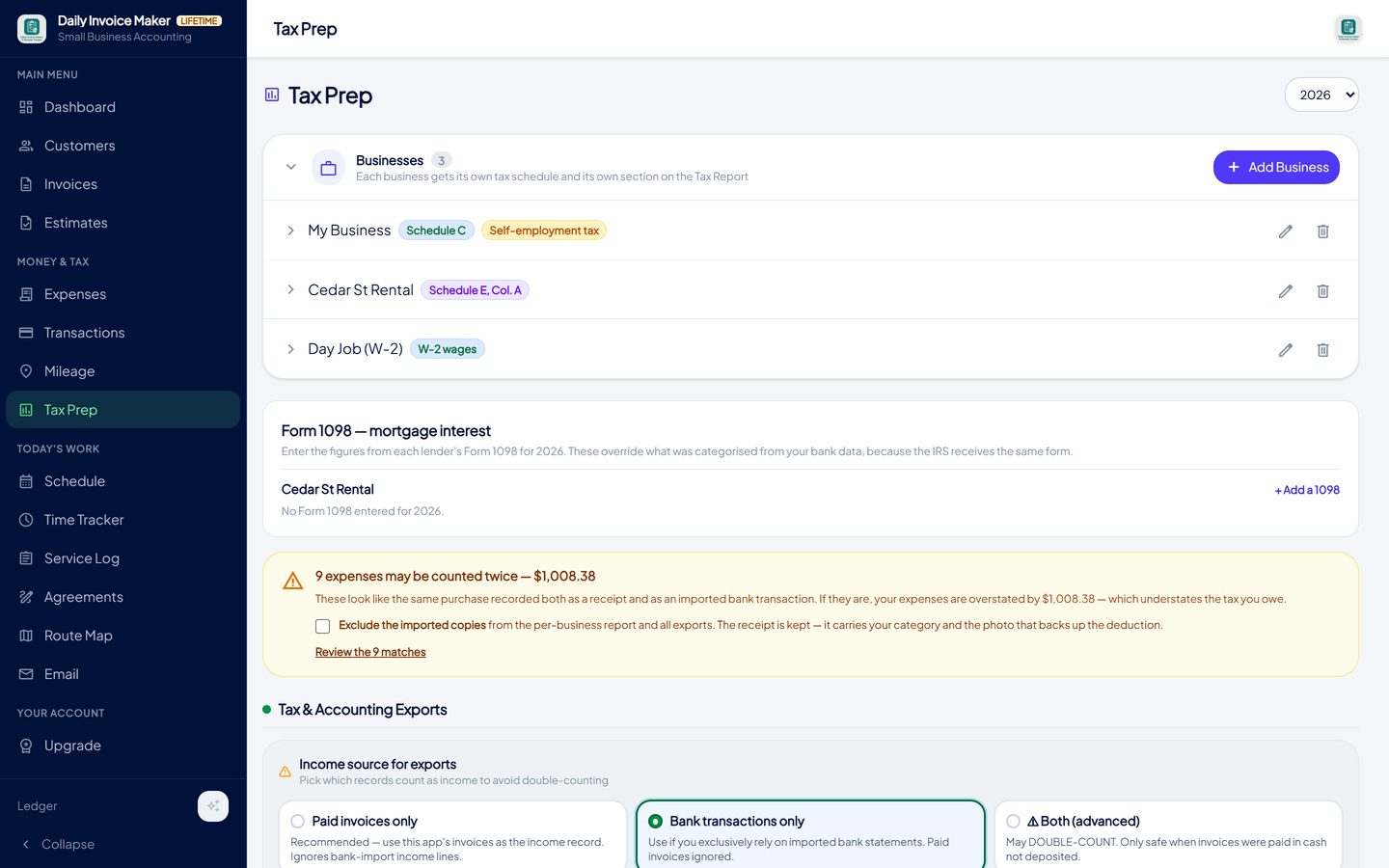
The rental is its own business, tagged Schedule E and assigned a column. Rental income is kept out of the self-employment tax base automatically. -
Import the bank statement and mark each deposit as rent
Import the account the rent lands in. On the review screen each line is marked income, taxable expense or non-taxable and assigned to a business, so the tenant's transfer becomes rent for Cedar St and the truck fuel stays with the pool business. Transfers between your own accounts are marked non-taxable and never reach line 3.
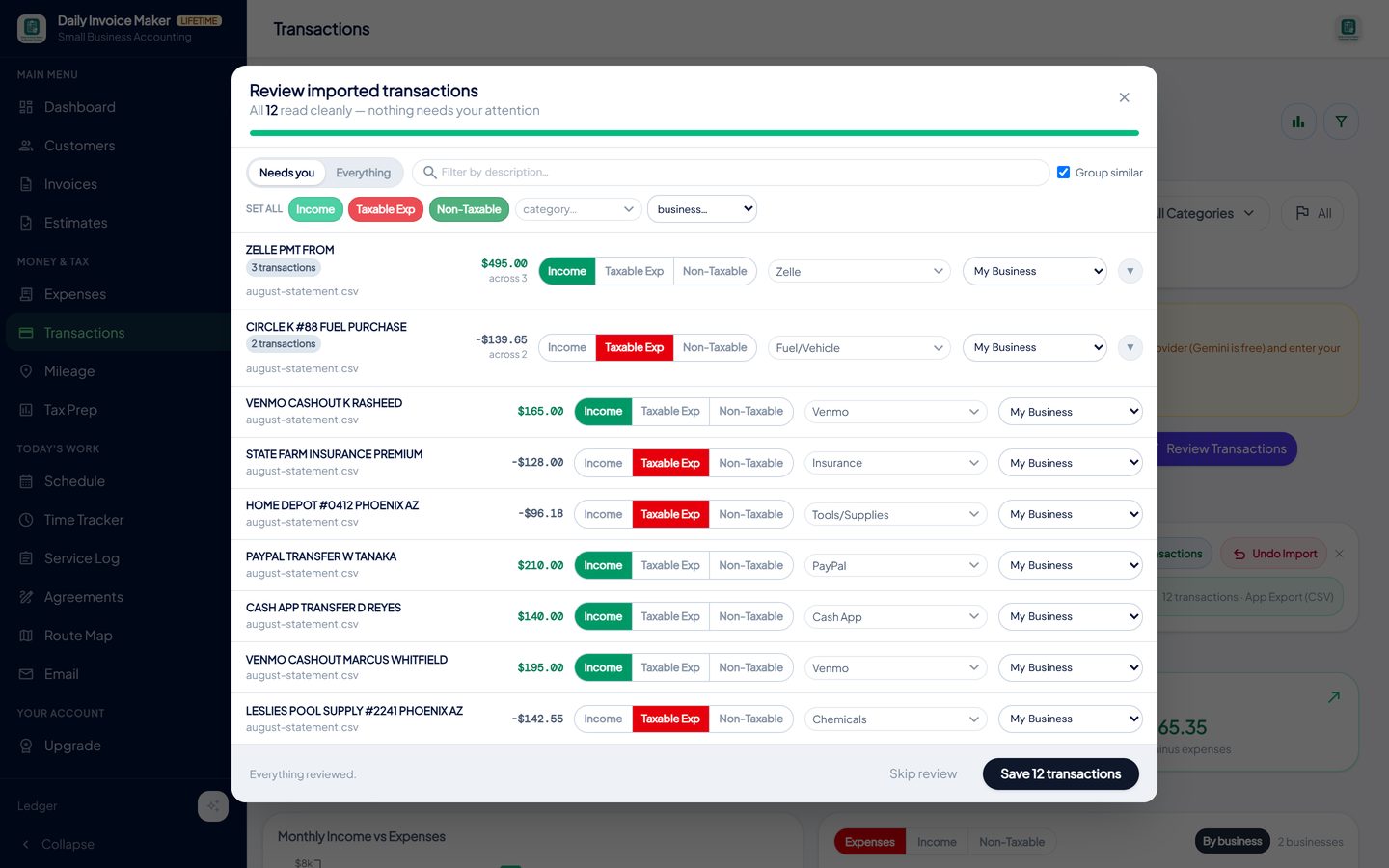
Each imported line gets a type, a category and a business. Rent deposits go to the rental book; the trade's lines go to the trade. -
Enter the lender's Form 1098
When the lender's Form 1098 arrives, type the boxes into the panel for the property. Box 1 interest overrides what was estimated from the bank payments, box 5 mortgage insurance is added to insurance, and property taxes only warn rather than overwrite, because taxes paid directly never show on a 1098. A bare "Mortgage" category is flagged so you split principal from interest instead of deducting the payment whole.
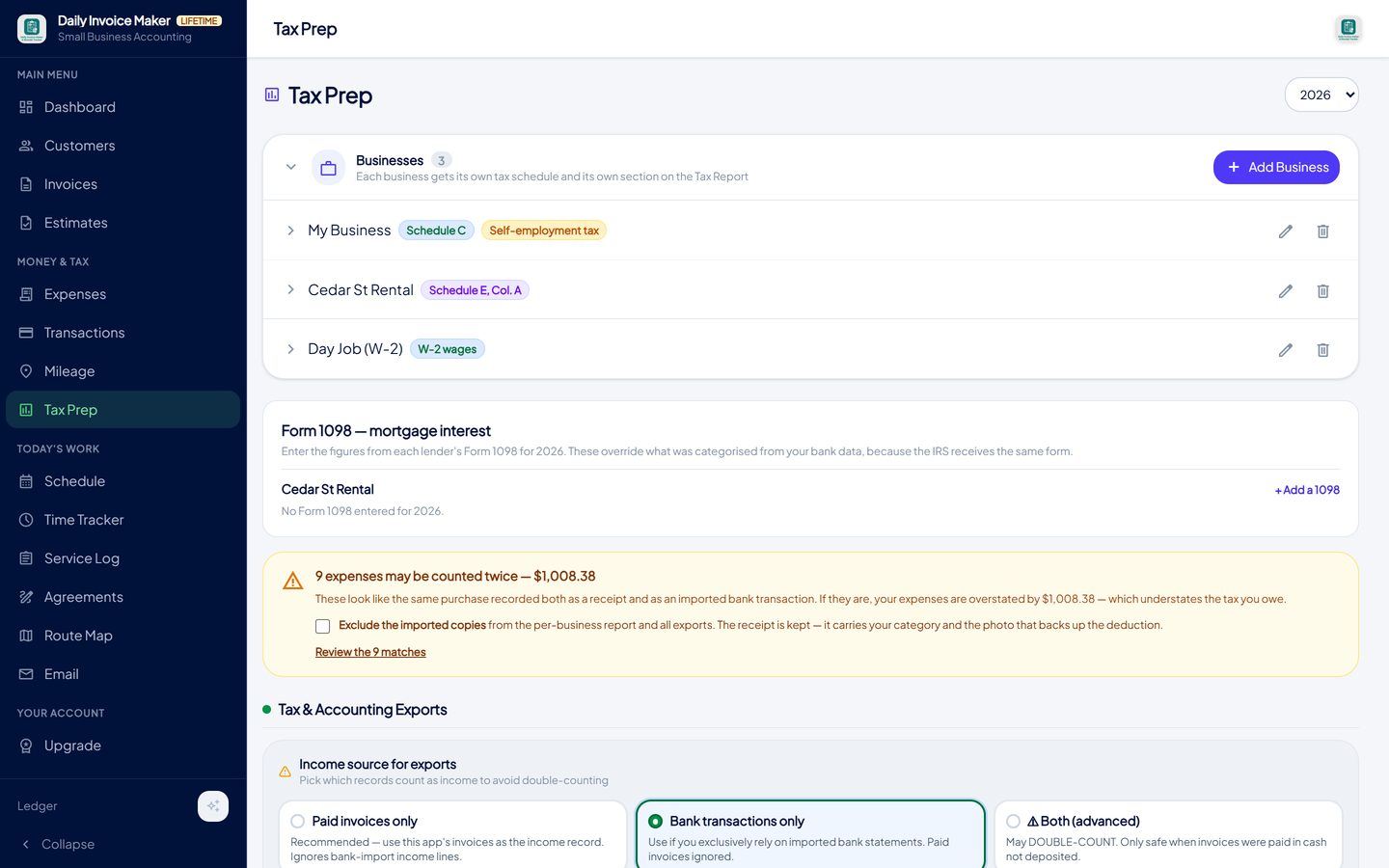
The 1098 boxes override the bank-derived interest figure. A refinanced or sold loan can have more than one 1098 in a year. -
Watch the rental's figures build separately from the trade
The by-business report shows the rental's rents received, expenses and net profit on their own, next to the trade's Schedule C figures. The totals are deliberately not combined into one net profit, because the two file on different forms, and the self-employment tax base at the top of the packet excludes the rental entirely.
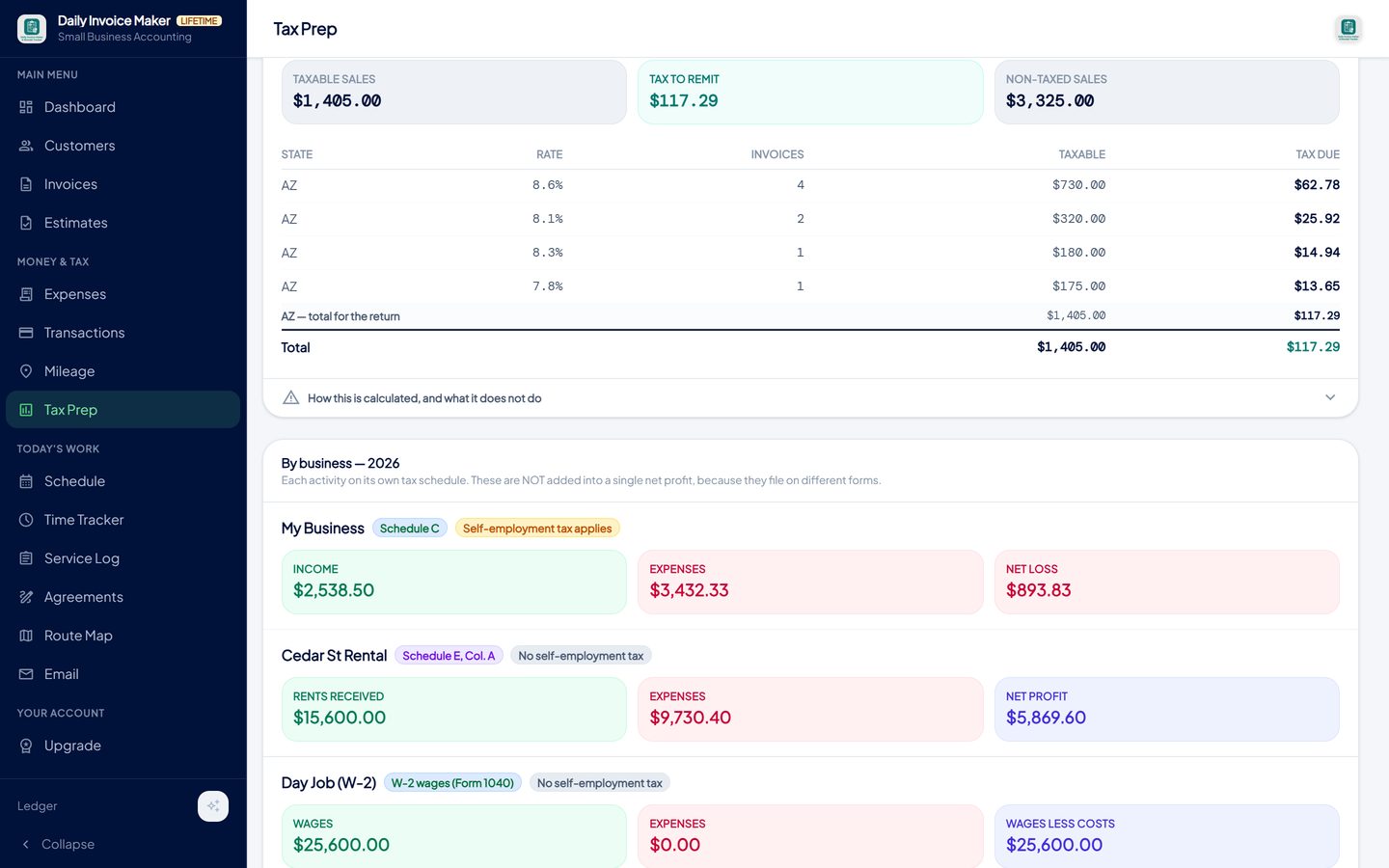
Rents received, expenses and net profit for the rental in its own block, beside the trade's Schedule C figures and the day job's wages. -
Export the Schedule E figures
The Tax Packet PDF gives your preparer a page for the rental in Schedule E line order. The TurboTax (.txf) export writes the rental to its own file using the Schedule E code block and the property's column, separate from the trade's Schedule C file. The on-screen reminder is there for a reason: TurboTax imports the expenses but leaves "rents received" at zero until you enter the property type and address on its worksheet.
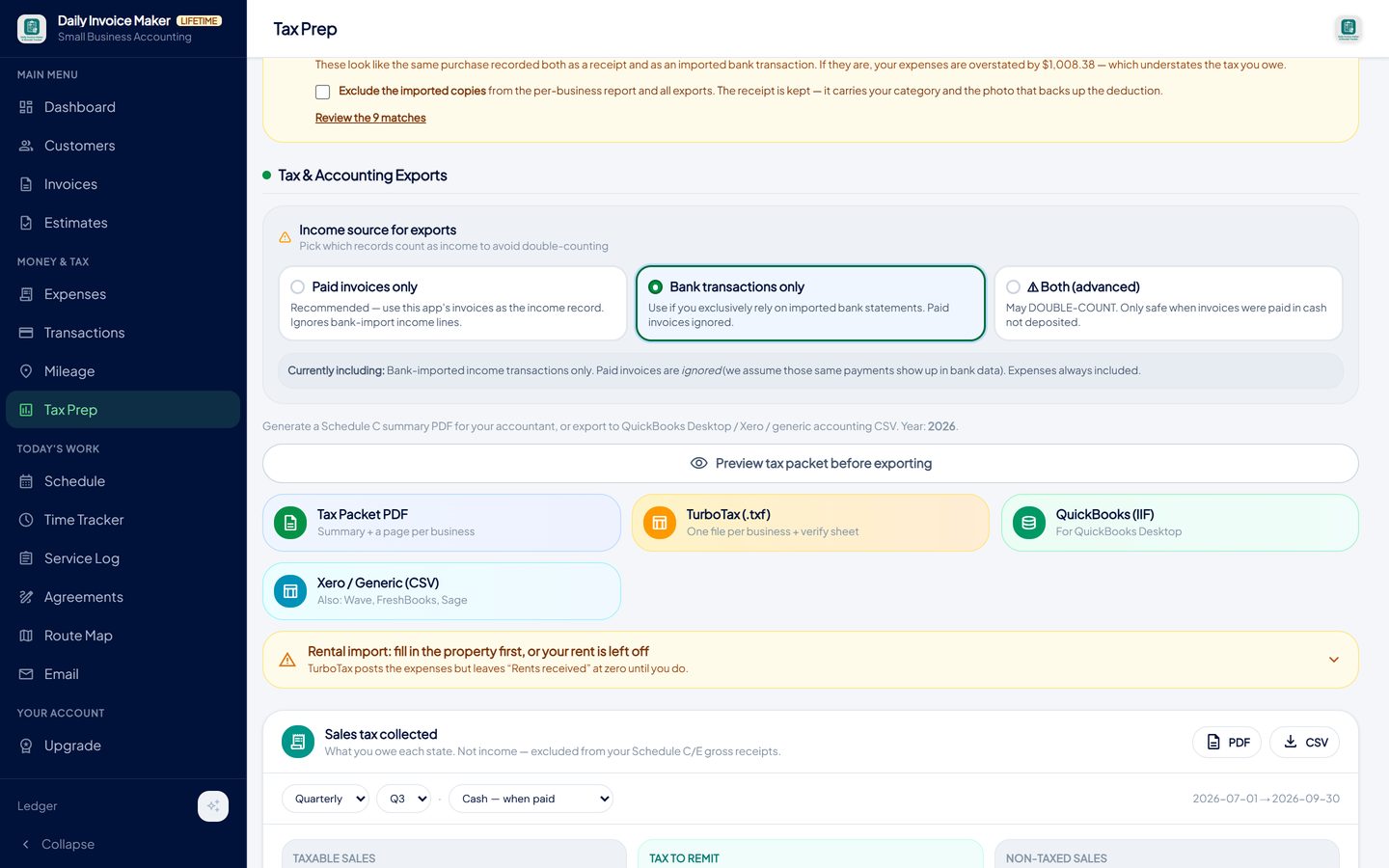
The TurboTax export writes the rental to its own file with Schedule E codes, and reminds you that TurboTax leaves rent at zero until the property is described. -
Check the packet's methodology page
The first page of the packet lists each activity, the schedule it files on and its net figure, then shows the self-employment tax base with the rental excluded and says why. It ends with a plain statement that this is a summary, not a return, and that a CPA or enrolled agent should review before filing.
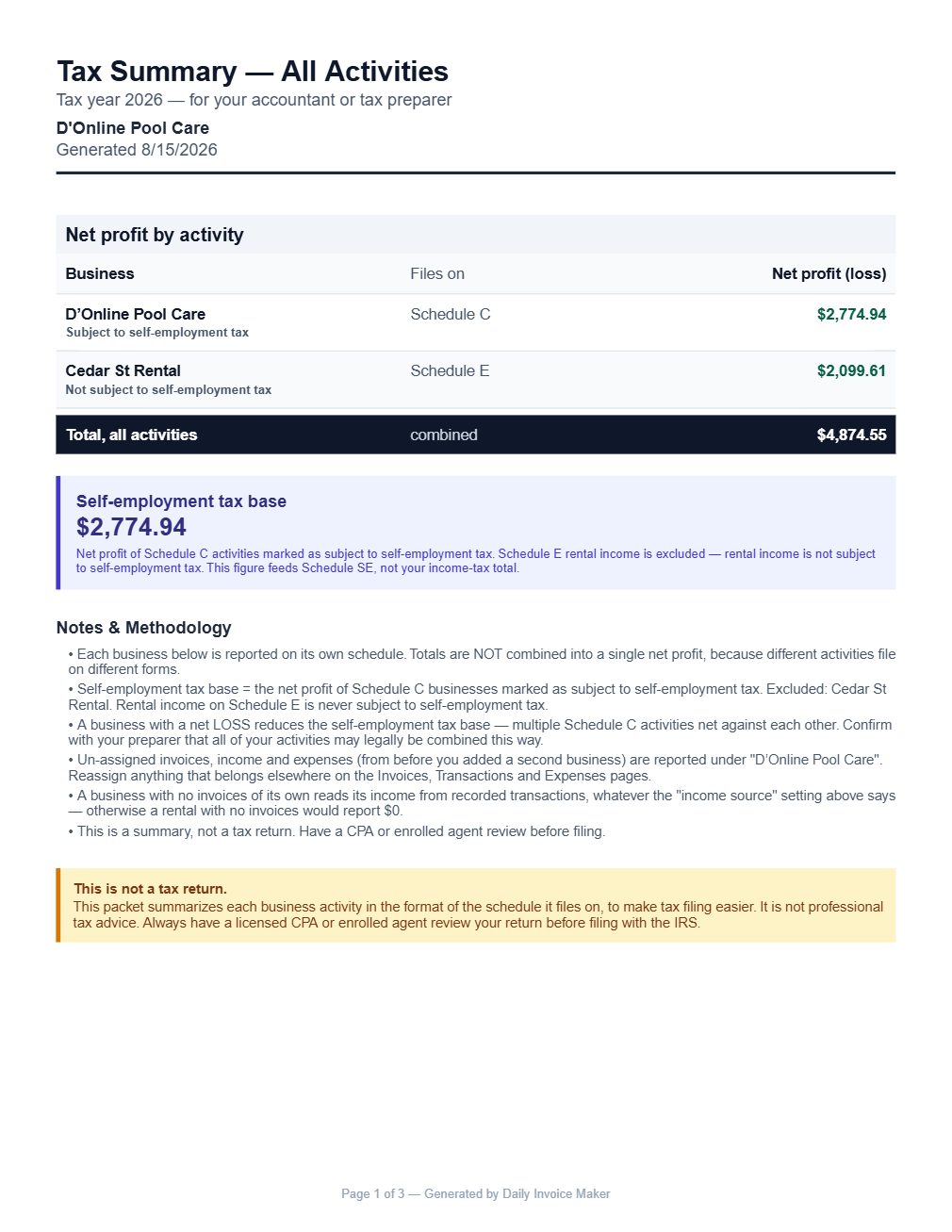
The packet states which schedule each activity files on and that the rental is excluded from self-employment tax.
What else is in the app
Books per property and per business
Schedule E columns A, B and C beside a Schedule C trade and W-2 wages, never merged.
Statement import
Bank, card and payment-platform statements imported and reviewed line by line, with rent assigned to the right property.
Form 1098 panel
Interest overrides the bank estimate, mortgage insurance is added, taxes are checked. More than one 1098 per year is fine.
Mortgage split warning
A whole payment sitting in a deductible category is flagged before it reaches the form.
Receipts attached
Repair and supply receipts photographed and stored with the expense.
Local data, every platform
Windows, Mac, Linux and Android. Your books stay on your devices; Google Drive sync is included.
Try it on your own books
The free demo is the full app for your first 7 invoices, 7 customers and 7 expenses — no account, no card. It runs 100% offline on Windows, Mac and Linux: $149.99 once, or $5.99 a month if you would rather not commit. The Android app is a separate Google Play purchase.
Questions
Is rental income subject to self-employment tax?
Ordinary rental income reported on Schedule E is not. The exception is a rental where you provide substantial services to tenants, which can make it a business reported on Schedule C. Keeping the rental in its own Schedule E book is what stops it being taxed as self-employment income by mistake.
Can I deduct my whole mortgage payment?
No. Only the interest, reported on line 12 from the lender's Form 1098, plus any mortgage insurance premiums (box 5) on the insurance line. Principal is repayment of a loan, not an expense, and the building is recovered through depreciation instead.
Is a security deposit income?
Not when you receive it, because you may have to return it. If you keep part of it at the end of the tenancy for unpaid rent or damage, that part is income in the year you keep it.
What is the difference between a repair and an improvement?
A repair keeps the property in its current condition: fixing a leak, replacing a broken window pane, repainting. It is deducted on line 14. An improvement adds value or extends the life of the property: a new roof, a remodel, a replacement furnace. It is capitalised and depreciated over its own recovery period.
How do I handle a property I also use myself?
Split every shared expense by rental days over total days used, applying the same percentage consistently, and put only the rental share on Schedule E. Keep a calendar of both kinds of use as the year goes; a reconstructed one is weak evidence.
Will the TurboTax file import my rent?
The expenses import immediately. Rent posts to line 3 only after you describe the property (type and address) on TurboTax's Schedule E worksheet, so check line 3 before trusting the result. The export shows this reminder on screen for that reason.
Where is the data kept?
On your own computer or phone; nothing is uploaded to our servers. Google Drive sync, included with the paid plans, copies your books to your own Drive account for your other devices.
The short version
Schedule E goes wrong in three predictable places: the mortgage payment deducted whole, improvements deducted as repairs, and a rental merged into a trade's books where it pays tax it does not owe. A tracker that keeps the property in its own book, holds the Form 1098 figures, and flags the mortgage line prevents all three. Daily Invoice Maker's free demo includes the multi-business Tax Prep section, so you can set up your rental and see the report on your own numbers.
Related guides

Tax Prep Guide
How to prepare self-employed taxes without a lost weekend: what your preparer or TurboTax needs, how a TXF export works, and the checks that stop double counting.

Simple Ledger Guide
What a small business ledger actually needs to record, why a cash book beats double entry for a sole proprietor, how to keep it reconciled, and how a bookkeeping app…

Small Business Accounting
The accounting a one-person or family business really needs: a profit and loss you can read monthly, invoices as the income record, categorised expenses, sales tax…
What invoicing software actually costs over five years · All guides · Quick how-to answers · Training guide for the app