Skip to content

Free · no signup · no email

Free Contractor Invoice Template

A general-purpose contractor invoice that suits any trade — labor, materials, progress billing and change orders. Fill it in, print or save as a PDF, free.

Fill it in below, or download it: PDF version of the contractor invoice template Word version of the contractor invoice template Excel version of the contractor invoice template

Click any field to type over it.
Contractor Co.
123 Main Street
Your City, ST 00000
(555) 555-5555 · you@yourbusiness.com
INVOICE
Invoice #1001
DateNov 21, 2026
DueDec 5, 2026
Bill to
Customer Name
456 Oak Avenue
Your City, ST 00000
Description Qty Rate Amount
Labor — crew, per hour 16 68.00 0.00
Materials — per attached receipts 1 1,240.75 0.00
Equipment rental — 3 days 3 145.00 0.00
Subtotal0.00
Tax 0%0.00
Total due0.00
Notes / payment terms
Payment due within 30 days per contract terms. Retainage per agreement. Change orders billed separately.
Nothing you type here is sent anywhere or saved — it lives in this browser tab only. Close the tab and it is gone. Use Print / Save as PDF to keep a copy.

Download the contractor invoice template

The same invoice as a file you keep: a fillable PDF, a Word document and an Excel sheet. One page, US Letter size. No email address needed.

  • PDF: type into the fields and tick the payment methods you accept, then save a copy for each invoice. Totals are typed in; or print it blank and fill it in by hand.
  • Word: type over the [brackets] and add your logo. Totals are typed in.
  • Excel: fill the shaded cells. Line amounts, subtotal, tax, total and balance due calculate themselves. Save as PDF to send.
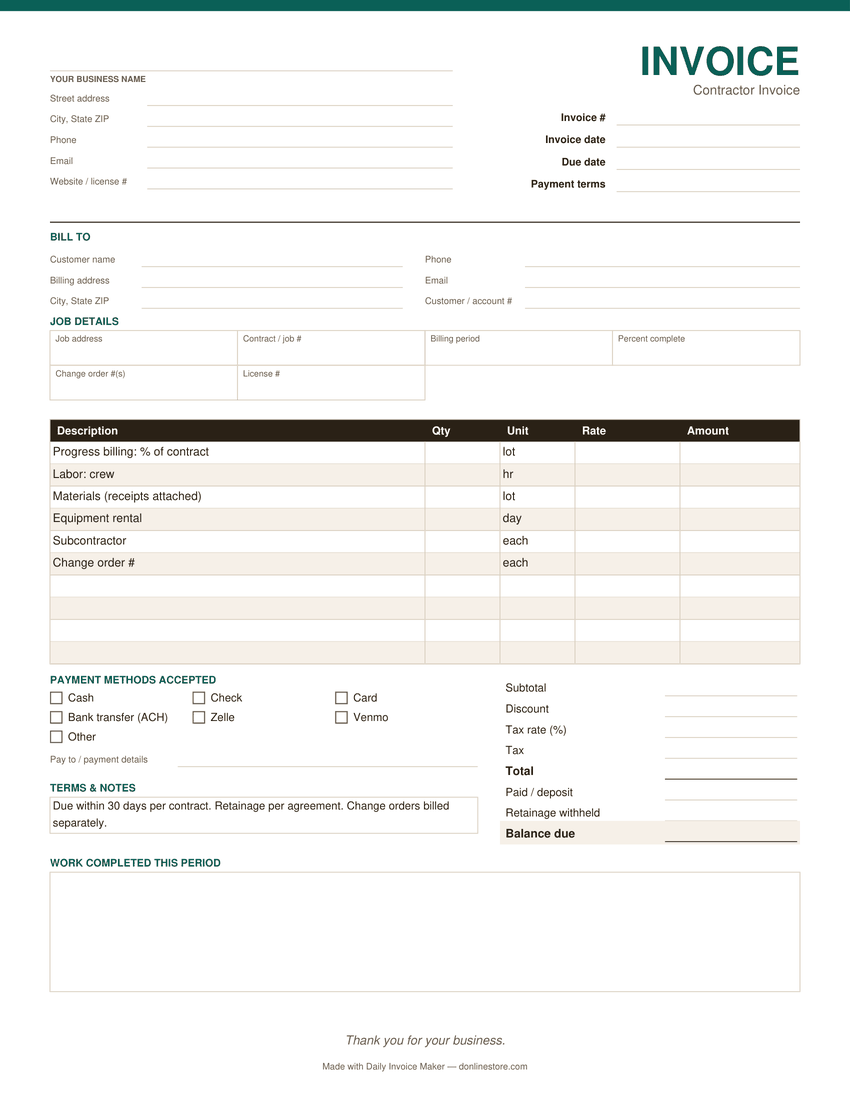
Preview of the blank contractor invoice template: business and customer details, job details, line items, payment methods and totals
The PDF version. Word and Excel have the same sections.

What belongs on a contractor invoice

Contract or job reference

Tie every invoice to the job or contract number. On any project with more than a few invoices it is the only way either side reconstructs what was billed against what.

Progress billing basis

State whether you are billing a percentage of completion, a milestone, or time and materials. Ambiguity here delays payment more than the amount ever does.

Change orders as separate lines

Never fold a change order into the base contract line. Separated and referenced by number, it gets paid; buried, it triggers a full review of the invoice.

Retainage withheld

If the contract holds retainage, show the percentage and running total. Invoices that ignore retainage get rewritten by the customer's accounts team.

Licence, insurance and bond

Contractor licence, and on commercial work insurance and bond details. Many general contractors will not process a sub's invoice without them.

Lien notice where required

Some states require preliminary notice language on contractor invoices. Check your state — the deadlines are short and missing them forfeits real rights.

Common contractor invoicing mistakes

  • Folding a change order into the base contract line. Bill each change order on its own line with its number, so the base contract total never moves.
  • Forgetting to show retainage. If the customer holds back a percentage, show it on every progress invoice so the final retainage bill is no surprise.
  • Missing lien-notice deadlines. Where your state requires a preliminary notice, the clock starts with the work, not the invoice.

Payment terms that work

Net 30 is common for contractors billing businesses and general contractors, often with retainage held until completion. Homeowner projects usually run on a deposit, progress payments tied to milestones and a final payment. Put the contract or job number on every invoice.

Watch it work

The same invoice, without typing it out

Tired of filling these in by hand?

Daily Invoice Maker fills them in for you. Your customers, rates and usual line items are saved, so the next contractor invoice is a few clicks, numbered for you and emailed as a finished PDF. It tracks who has paid and who is overdue, and sends a payment reminder from the overdue list when you choose to.

  • Runs on Windows, Mac and Linux, works offline
  • Your customer list stays on your computer
  • $149.95 once, $59.99 for a year, or $5.95 a month
Try the free demo See pricing

Free demo: no account and no card; it covers 7 invoices, 7 customers and 7 expenses, with a watermark on PDFs · 30-day money-back guarantee on purchase

Questions

Is this contractor invoice template free?

Yes. No signup and no email required — fill it in on this page and print or save it as a PDF as often as you like, or download it as a PDF, Word or Excel file.

Can I use it for progress billing?

Yes. Add a line describing the milestone or percentage complete, and note the basis in the terms. Stating the basis explicitly is what gets a progress invoice approved quickly.

How should change orders appear?

As their own lines, referencing the change order number. Folding extra work into the original contract line is the fastest way to have an entire invoice disputed.

Does it handle retainage?

You can add a retainage line manually. If your contracts routinely hold retainage, the Daily Invoice Maker app tracks it per job rather than leaving it to arithmetic on each invoice.

Is my information saved anywhere?

No. Everything is local to your browser tab and is never transmitted or stored. Print or save the PDF before you close the tab.