Skip to content

Free · no signup · no email

Free Plumbing Invoice Template

Fill it in below, print it or save it as a PDF, and send it before you leave the driveway. No account, no email, and nothing you type leaves this page.

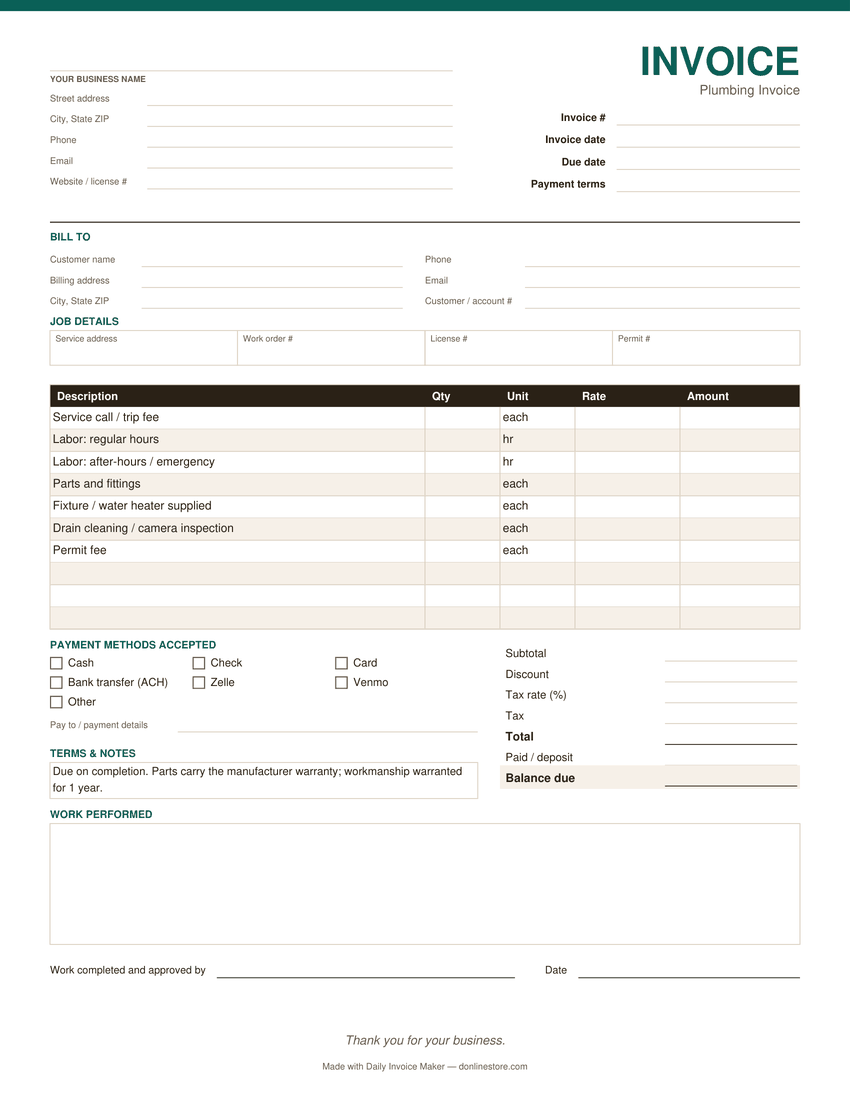
Fill it in below, or download it: PDF version of the plumbing invoice template Word version of the plumbing invoice template Excel version of the plumbing invoice template

Click any field to type over it.
Plumbing Co.
123 Main Street
Your City, ST 00000
(555) 555-5555 · you@yourbusiness.com
INVOICE
Invoice #1001
DateNov 21, 2026
DueDec 5, 2026
Bill to
Customer Name
456 Oak Avenue
Your City, ST 00000
Description Qty Rate Amount
Service call — diagnosis and first 30 minutes 1 95.00 0.00
Labor — additional hours 1.5 110.00 0.00
Parts — supply stop valve and braided connector 2 18.50 0.00
Subtotal0.00
Tax 0%0.00
Total due0.00
Notes / payment terms
Payment due within 14 days. Parts carry the manufacturer warranty; labor is guaranteed for 90 days.
Nothing you type here is sent anywhere or saved — it lives in this browser tab only. Close the tab and it is gone. Use Print / Save as PDF to keep a copy.

Download the plumbing invoice template

The same invoice as a file you keep: a fillable PDF, a Word document and an Excel sheet. One page, US Letter size. No email address needed.

  • PDF: type into the fields and tick the payment methods you accept, then save a copy for each invoice. Totals are typed in; or print it blank and fill it in by hand.
  • Word: type over the [brackets] and add your logo. Totals are typed in.
  • Excel: fill the shaded cells. Line amounts, subtotal, tax, total and balance due calculate themselves. Save as PDF to send.
Preview of the blank plumbing invoice template: business and customer details, job details, line items, payment methods and totals
The PDF version. Word and Excel have the same sections.

What belongs on a plumbing invoice

The service call fee, itemised

Plumbers get argued with over the callout more than anything else. Show it as its own line with what it covers — diagnosis plus the first half hour — so it reads as work done, not a charge for turning up.

Parts separated from labor

Split materials from hours. A customer who can see the valve cost $18.50 and the labor cost $110 argues far less than one looking at a single figure of $147.

Licence number

Most states require your plumbing licence number on customer paperwork. Put it in the notes or under your business name — it also quietly signals you are not a handyman with a wrench.

What you warranted

State the warranty on parts and labor in writing. It prevents the call six months later where the customer remembers a guarantee you never gave.

Emergency or after-hours rate

If the job was out of hours, show the premium as a separate line rather than a higher hourly rate. Buried premiums cause disputes; visible ones rarely do.

How to pay, and by when

Name the methods you accept and a due date. “Due on receipt” is vaguer than it sounds — an actual date gets paid sooner.

Common plumbing invoicing mistakes

  • Not writing down what you found. "Replaced corroded shutoff under kitchen sink" protects you if the customer later disputes the need.
  • Skipping the signature on emergency jobs. A quick "work completed and approved" signature ends most disputes before they start.
  • Forgetting to say what the warranty covers: parts by the manufacturer, your workmanship for a stated period.

Payment terms that work

Homeowner jobs are typically due on completion. Contractors and property managers usually run Net 30 with a PO or job number on the invoice. Larger jobs often take a deposit up front; show it on the final invoice as "Paid / deposit" so the balance due is clear.

Watch it work

The same invoice, without typing it out

Tired of filling these in by hand?

Daily Invoice Maker fills them in for you. Your customers, rates and usual line items are saved, so the next plumbing invoice is a few clicks, numbered for you and emailed as a finished PDF. It tracks who has paid and who is overdue, and sends a payment reminder from the overdue list when you choose to.

  • Runs on Windows, Mac and Linux, works offline
  • Your customer list stays on your computer
  • $149.95 once, $59.99 for a year, or $5.95 a month
Try the free demo See pricing

See how it works for plumbing →

Free demo: no account and no card; it covers 7 invoices, 7 customers and 7 expenses, with a watermark on PDFs · 30-day money-back guarantee on purchase

Questions

Is this plumbing invoice template really free?

Yes. Fill it in, print it or save it as a PDF, and use it for as many jobs as you like. There is no signup and no email required, and you can also download it as a PDF, Word or Excel file. It is a plain web page.

Where does the information I type go?

Nowhere. Everything you type stays in your browser tab and is never sent to a server or saved. Close the tab and it is gone, which is why you should print or save the PDF before you leave.

How do I save it as a PDF?

Click Print / Save as PDF and choose “Save as PDF” as the destination in your browser's print dialog. That works in Chrome, Edge, Safari and Firefox on Windows, Mac and Linux.

Should a plumbing invoice include the licence number?

In most states, yes — contractor and plumbing licence numbers are commonly required on customer-facing paperwork. Check your own state board, and add yours under the business name or in the notes.

What if I send invoices every week?

A template stops paying for itself quickly once you are invoicing regularly, because you retype the same customers and rates every time. Daily Invoice Maker keeps customers, rates and invoice numbers on file, works offline, and costs $149.95 once rather than a monthly fee.