Skip to content

Free · no signup · no email

Free Mobile Detailing Invoice Template

For mobile detailers: the vehicle, the package, the add-ons customers upgrade to and the travel fee. Fill it in below and print it, or download it as a PDF, Word or Excel file. Free, no signup.

Fill it in below, or download it: PDF version of the mobile detailing invoice template Word version of the mobile detailing invoice template Excel version of the mobile detailing invoice template

Click any field to type over it.
Mobile Detailing Co.
123 Main Street
Your City, ST 00000
(555) 555-5555 · you@yourbusiness.com
INVOICE
Invoice #1001
DateNov 12, 2026
DueNov 26, 2026
Bill to
Customer Name
456 Oak Avenue
Your City, ST 00000
Description Qty Rate Amount
Full detail package — exterior wash, interior vacuum and wipe-down 1 180.00 0.00
Clay bar and paint sealant 1 85.00 0.00
Pet hair removal, per hour 1 45.00 0.00
Mobile / travel fee 1 15.00 0.00
Subtotal0.00
Tax 0%0.00
Total due0.00
Notes / payment terms
Vehicle: year, make, model, color, plate. Condition noted before service. Payment due on completion.
Nothing you type here is sent anywhere or saved — it lives in this browser tab only. Close the tab and it is gone. Use Print / Save as PDF to keep a copy.

Download the mobile detailing invoice template

The same invoice as a file you keep: a fillable PDF, a Word document and an Excel sheet. One page, US Letter size. No email address needed.

  • PDF: type into the fields and tick the payment methods you accept, then save a copy for each invoice. Totals are typed in; or print it blank and fill it in by hand.
  • Word: type over the [brackets] and add your logo. Totals are typed in.
  • Excel: fill the shaded cells. Line amounts, subtotal, tax, total and balance due calculate themselves. Save as PDF to send.
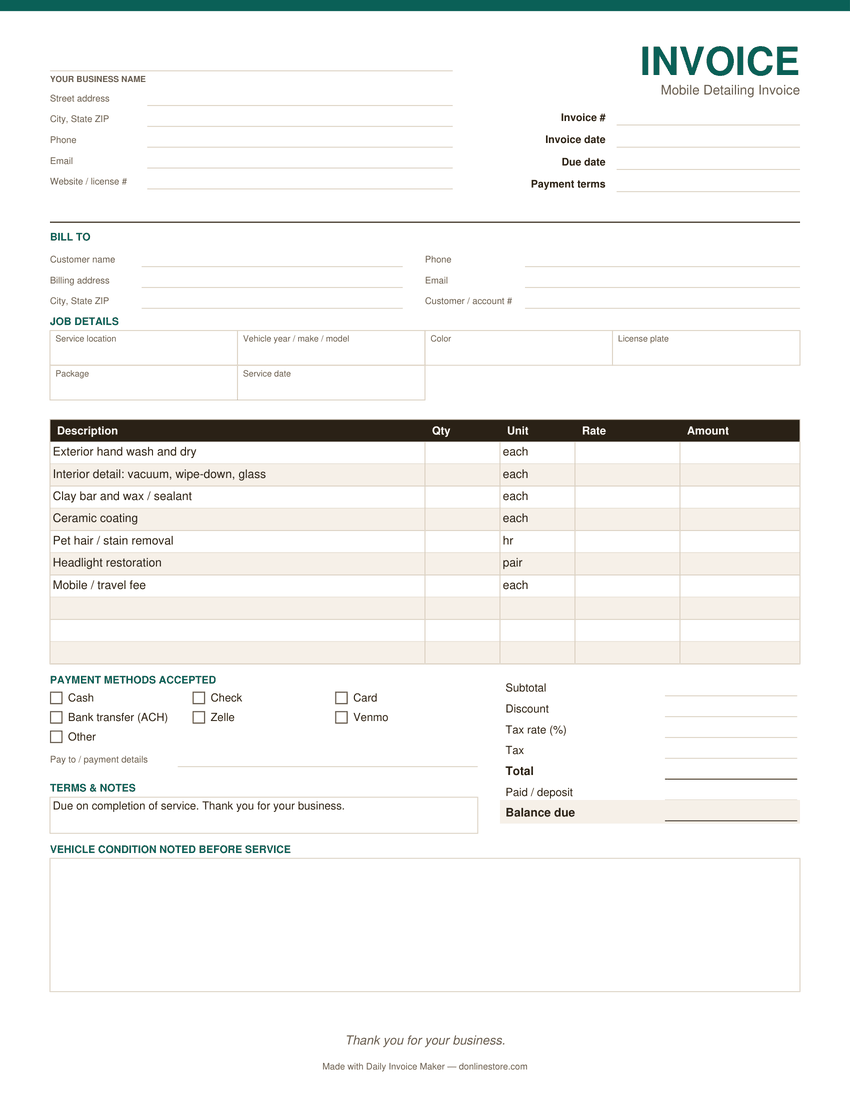
Preview of the blank mobile detailing invoice template: business and customer details, job details, line items, payment methods and totals
The PDF version. Word and Excel have the same sections.

What belongs on a mobile detailing invoice

The vehicle

Year, make, model, color and plate. Fleet and multi-car customers need to know which car each charge was for.

The package, then the add-ons

Name the package, then list clay bar, ceramic coating or pet-hair removal separately. Upsells read as choices, not padding.

Condition before you started

Scratches, chips, stains and curb rash, noted before the work. It is the best protection against “that scratch wasn’t there before”.

Travel or mobile fee

If you charge for coming to the customer, show it. Hidden in the package price, it makes your prices look higher than a shop’s.

Hourly work where the time varies

Pet hair and heavy stains vary from car to car. Billing them by the hour is fairer than a guess.

How to pay

Card, cash or payment app, printed on the invoice. Customers paying in a driveway want the details in front of them.

Common mobile detailing invoicing mistakes

  • Skipping the pre-service condition notes. Photos plus a line on the invoice settle most damage claims.
  • Doing an upgrade without asking. Get a yes before the extra work, then put it on its own line.
  • One price for a fleet visit. List each vehicle so the business can match the invoice to its records.

Payment terms that work

Retail customers usually pay when the job is done, by card or a payment app. Fleet and dealership work is often billed weekly or monthly on Net 15 or Net 30. For ceramic coatings and other long jobs, a deposit when booking protects your time.

Watch it work

The same invoice, without typing it out

Tired of filling these in by hand?

Daily Invoice Maker fills them in for you. Your customers, rates and usual line items are saved, so the next mobile detailing invoice is a few clicks, numbered for you and emailed as a finished PDF. It tracks who has paid and who is overdue, and sends a payment reminder from the overdue list when you choose to.

  • Runs on Windows, Mac and Linux, works offline
  • Your customer list stays on your computer
  • $149.95 once, $59.99 for a year, or $5.95 a month
Try the free demo See pricing

See how it works for mobile detailing →

Free demo: no account and no card; it covers 7 invoices, 7 customers and 7 expenses, with a watermark on PDFs · 30-day money-back guarantee on purchase

Questions

Is this detailing invoice template free?

Yes — unlimited use, no signup and no email. Fill it in on this page and print or save it as a PDF, or download it as a PDF, Word or Excel file.

What should a car detailing invoice include?

Your business details, the customer, the vehicle (year, make, model, color, plate), the package and each add-on with its price, any travel fee, tax if your state charges it on detailing, the total and how to pay.

Should I charge a travel fee for mobile detailing?

Many mobile detailers charge one outside a home area, either flat or per mile. If you do, show it on its own line so customers can compare your prices fairly.

Can I list several cars on one invoice?

Yes. Use one line per vehicle and service, and put the vehicle in the description, for example “2019 F-150, full detail”.

Is there a faster way for regular customers?

Daily Invoice Maker keeps each customer, vehicle and package on file, so a repeat detail is a few clicks, and it tracks who has paid. It works offline on Windows, Mac and Linux.