Skip to content

Free · no signup · no email

Free Auto Repair Invoice Template

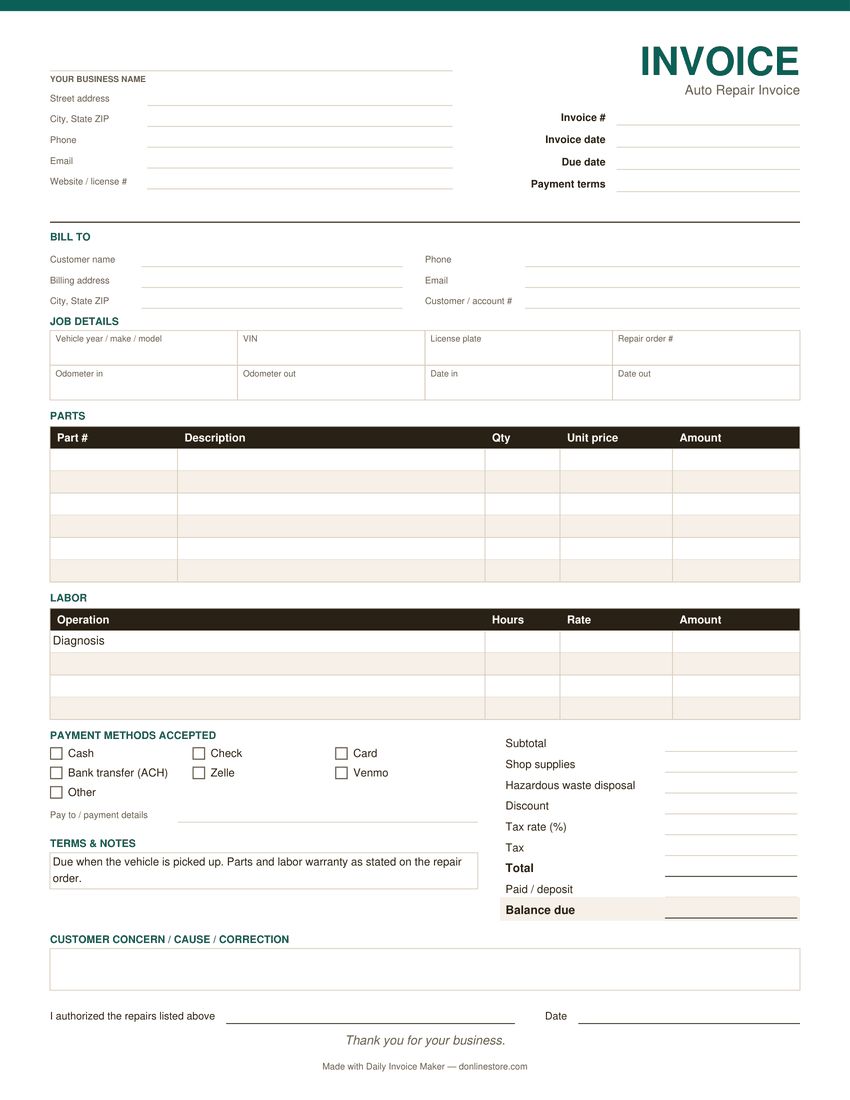
For repair shops and mobile mechanics: parts with part numbers, labor by the hour, shop supplies and the vehicle details. Fill it in below and print it, or download it as a PDF, Word or Excel file. Free, no signup.

Fill it in below, or download it: PDF version of the auto repair invoice template Word version of the auto repair invoice template Excel version of the auto repair invoice template

Click any field to type over it.
Auto Repair Co.
123 Main Street
Your City, ST 00000
(555) 555-5555 · you@yourbusiness.com
INVOICE
Invoice #1001
DateNov 12, 2026
DueNov 26, 2026
Bill to
Customer Name
456 Oak Avenue
Your City, ST 00000
Description Qty Rate Amount
Diagnosis — check engine light, scan and road test (labor hours) 1 120.00 0.00
Front brake pads, part # ________ 1 64.50 0.00
Front brake rotors, part # ________ 2 58.00 0.00
Labor — replace front pads and rotors (hours) 1.5 120.00 0.00
Shop supplies 1 12.00 0.00
Subtotal0.00
Tax 0%0.00
Total due0.00
Notes / payment terms
Vehicle: year/make/model, VIN, odometer in/out. Parts are new unless noted. Payment due at pickup.
Nothing you type here is sent anywhere or saved — it lives in this browser tab only. Close the tab and it is gone. Use Print / Save as PDF to keep a copy.

Download the auto repair invoice template

The same invoice as a file you keep: a fillable PDF, a Word document and an Excel sheet. One page, US Letter size. No email address needed.

  • PDF: type into the fields and tick the payment methods you accept, then save a copy for each invoice. Totals are typed in; or print it blank and fill it in by hand.
  • Word: type over the [brackets] and add your logo. Totals are typed in.
  • Excel: fill the shaded cells. Line amounts, subtotal, tax, total and balance due calculate themselves. Save as PDF to send.
Preview of the blank auto repair invoice template: business and customer details, job details, line items, payment methods and totals
The PDF version. Word and Excel have the same sections.

What belongs on a auto repair invoice

Parts with part numbers

Part number, description, quantity and price for each part. Say whether each part is new, used or rebuilt; several states require it.

Labor by operation

One line per operation with hours and rate. It is how customers compare quotes and how you defend the bill.

Vehicle and mileage

Year, make, model, VIN, plate and odometer in and out. Warranty claims and comebacks depend on it.

Concern, cause and correction

What the customer reported, what you found, what you did. Two lines that make the invoice readable to someone who was not there.

Shop supplies and disposal

If you charge them, show them as separate lines rather than inflating parts or labor.

Authorization

A signature or recorded approval for the work, especially anything added after the first estimate.

Common auto repair invoicing mistakes

  • Doing work beyond the estimate without recorded approval. Many states have rules about this; get the yes first and note it.
  • Missing the odometer reading. It is the one number every warranty claim asks for.
  • Not offering the replaced parts back. Some states require it; it is good practice everywhere.

Payment terms that work

Repairs are normally paid when the vehicle is picked up. Fleet and commercial accounts often run Net 15 or Net 30 with a PO number. Print your parts and labor warranty on the invoice, and state your storage policy for vehicles left after the work is done.

Watch it work

The same invoice, without typing it out

Tired of filling these in by hand?

Daily Invoice Maker fills them in for you. Your customers, rates and usual line items are saved, so the next auto repair invoice is a few clicks, numbered for you and emailed as a finished PDF. It tracks who has paid and who is overdue, and sends a payment reminder from the overdue list when you choose to.

  • Runs on Windows, Mac and Linux, works offline
  • Your customer list stays on your computer
  • $149.95 once, $59.99 for a year, or $5.95 a month
Try the free demo See pricing

See how it works for auto repair →

Free demo: no account and no card; it covers 7 invoices, 7 customers and 7 expenses, with a watermark on PDFs · 30-day money-back guarantee on purchase

Questions

Is this auto repair invoice template free?

Yes — unlimited use, no signup and no email. Fill it in on this page and print or save it as a PDF, or download it as a PDF, Word or Excel file. The downloads have separate Parts and Labor tables.

What has to be on an auto repair invoice?

Requirements vary by state. A typical repair invoice lists the shop, the customer, the vehicle with VIN and odometer reading, each part with whether it is new, used or rebuilt, each labor operation, fees, tax and the total. Check your state’s auto repair rules for anything extra.

How do I charge shop supplies?

As a separate line, either a flat amount or a percentage of labor with a cap. The Excel and PDF downloads have a Shop supplies line in the totals.

Does the Excel version total parts and labor together?

Yes. The Parts and Labor tables each calculate their line amounts, and the subtotal adds both before shop supplies, disposal, discount and tax.

Is there a faster way?

Daily Invoice Maker keeps customers, vehicles, parts and labor rates on file, turns estimates into invoices and tracks who has paid. It works offline on Windows, Mac and Linux.