Skip to content

Free · no signup · no email

Free Small Business Invoice Template

A clean, general-purpose invoice for any small business or freelancer. Fill it in below and print it, or download it as a fillable PDF, a Word document or an Excel sheet that adds itself up. Free, no signup.

Fill it in below, or download it: PDF version of the small business invoice template Word version of the small business invoice template Excel version of the small business invoice template

Click any field to type over it.
Small Business Co.
123 Main Street
Your City, ST 00000
(555) 555-5555 · you@yourbusiness.com
INVOICE
Invoice #1001
DateNov 12, 2026
DueNov 26, 2026
Bill to
Customer Name
456 Oak Avenue
Your City, ST 00000
Description Qty Rate Amount
Service or product — describe what, when and how much 1 250.00 0.00
Hourly work — dates and hours 4 60.00 0.00
Materials or expenses billed at cost 1 35.00 0.00
Subtotal0.00
Tax 0%0.00
Total due0.00
Notes / payment terms
Payment due within 30 days. Please include the invoice number with your payment. Thank you for your business.
Nothing you type here is sent anywhere or saved — it lives in this browser tab only. Close the tab and it is gone. Use Print / Save as PDF to keep a copy.

Download the small business invoice template

The same invoice as a file you keep: a fillable PDF, a Word document and an Excel sheet. One page, US Letter size. No email address needed.

  • PDF: type into the fields and tick the payment methods you accept, then save a copy for each invoice. Totals are typed in; or print it blank and fill it in by hand.
  • Word: type over the [brackets] and add your logo. Totals are typed in.
  • Excel: fill the shaded cells. Line amounts, subtotal, tax, total and balance due calculate themselves. Save as PDF to send.
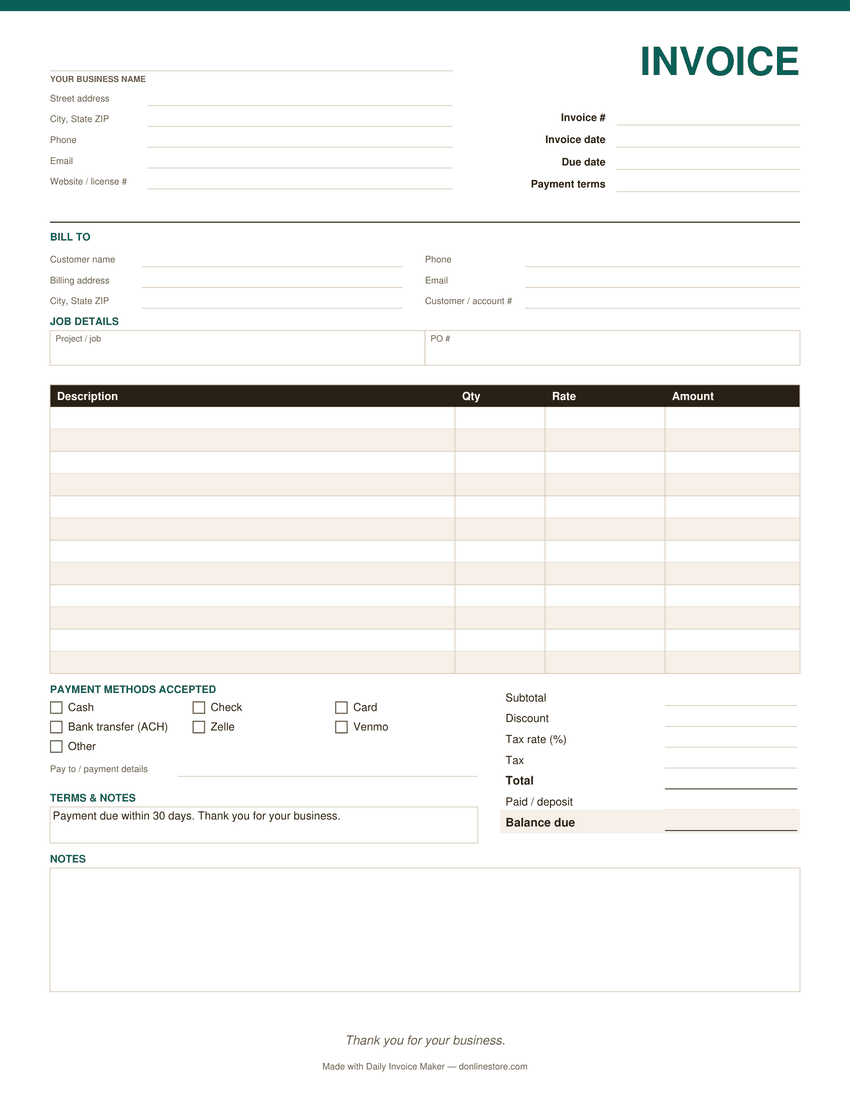
Preview of the blank small business invoice template: business and customer details, job details, line items, payment methods and totals
The PDF version. Word and Excel have the same sections.

What belongs on a small business invoice

A unique invoice number

Number invoices in order and never reuse one. It is how you, your customer and your accountant refer to the same bill.

Invoice date and due date

Both, not just one. “Due within 30 days” is easier to forget than a date.

A clear description per line

What, when and how much: “Website updates, March 3–7, 12 hours”. Vague lines are a common reason invoices sit unpaid.

How to pay

Every method you accept, with the details: who checks are payable to, your Zelle or bank details, a card link.

The customer’s reference

A PO number or project name. Businesses often cannot pay an invoice that does not quote their reference.

Sales tax, if you charge it

The rate and the amount on their own line. Whether your service is taxable depends on your state.

Common small business invoicing mistakes

  • Sending the invoice weeks after the work. The sooner it arrives, the sooner it is paid.
  • Changing the invoice numbering scheme midway. Pick one and keep it.
  • Forgetting to record what was paid. A part-payment that is not on the next invoice turns into an argument.

Payment terms that work

Net 30 is the common default between businesses; Net 14 or due on receipt is common with individuals. Whatever you choose, print the due date itself, list the payment methods, and if you charge a late fee, state it on every invoice.

Watch it work

The same invoice, without typing it out

Tired of filling these in by hand?

Daily Invoice Maker fills them in for you. Your customers, rates and usual line items are saved, so the next small business invoice is a few clicks, numbered for you and emailed as a finished PDF. It tracks who has paid and who is overdue, and sends a payment reminder from the overdue list when you choose to.

  • Runs on Windows, Mac and Linux, works offline
  • Your customer list stays on your computer
  • $149.95 once, $59.99 for a year, or $5.95 a month
Try the free demo See pricing

Free demo: no account and no card; it covers 7 invoices, 7 customers and 7 expenses, with a watermark on PDFs · 30-day money-back guarantee on purchase

Questions

Is this invoice template really free?

Yes. Fill it in here, or download the PDF, Word or Excel file and use it as often as you like. No account and no email address are needed.

Which format should I download?

Excel if you want the totals calculated for you. Word if you want to change the layout or add a logo. The PDF if you want to type into a fixed form, or print it blank and fill it in by hand.

Can I use it as a freelancer?

Yes. Use the lines for your deliverables or hours, and the Project / job field for the client’s project name.

Does the template store my customer list?

No. The page holds what you type only until you close the tab, and the downloaded files stay on your computer.

Is there a faster way once I invoice every week?

Daily Invoice Maker keeps customers and rates on file, numbers invoices, emails the PDF and tracks who has paid. It works offline on Windows, Mac and Linux.