Guides · Tax season
Schedule C tax tracker: keep your books ready for the form all year
Schedule C is the form where a sole proprietor, single-member LLC, freelancer or gig worker reports business income and expenses. It is also the form that turns a shoebox of receipts into a lost weekend every March.
This guide explains what the form asks for and what a tracker has to record during the year so the numbers are simply there in April. Then it shows how Daily Invoice Maker does it, screen by screen.

What Schedule C is, and who has to file it
Schedule C, Profit or Loss From Business, is attached to your Form 1040. You file one if you ran a business as a sole proprietor or a single-member LLC that has not elected to be taxed as a corporation. That includes most contractors, cleaners, landscapers, consultants, rideshare and delivery drivers, Etsy sellers and anyone paid on a 1099-NEC instead of a W-2.
The form has a simple shape. Part I is income: gross receipts, returns, cost of goods sold, and the gross profit that results. Part II is expenses, split into about twenty named lines. Subtract expenses from gross profit and you reach line 31, net profit or loss. That single number then goes two places: to Schedule 1 of your 1040, where it is taxed as ordinary income, and to Schedule SE, where it is taxed a second time for Social Security and Medicare.
Two businesses means two Schedule Cs. A pool route and a rental property do not share a form: the rental goes on Schedule E and is not subject to self-employment tax. Two unrelated trades each get their own Schedule C. A tracker that can only hold one set of books will merge things that must stay apart.
You must file if your net earnings from self-employment were $400 or more, and you report all business income whether or not anyone sent you a form for it. The 1099 forms clients issue are for the IRS's benefit, not a definition of what counts.
The Schedule C lines that need a running record
Most of the pain of Schedule C comes from Part II. The form does not want "expenses"; it wants expenses sorted into its own categories. If you sort as you go, the form fills itself. If you sort in April, every receipt has to be re-read. These are the lines that matter for a typical service business:
| Line | What goes there | What to capture during the year |
|---|---|---|
| 8 Advertising | Ads, website, business cards, listing fees | Vendor and date; the receipt or card statement line |
| 9 Car and truck | Standard mileage or actual costs | A contemporaneous mileage log: date, miles, purpose |
| 11 Contract labor | Subcontractors and helpers you paid | Who, how much, and a W-9 so you can issue their 1099 |
| 13 Depreciation | Equipment and vehicles written off over time or under Section 179 | Purchase date, cost, and what it is used for |
| 15 Insurance | Liability, commercial auto, equipment cover (not health) | Premium receipts; health premiums go on Schedule 1 instead |
| 17 Legal and professional | Accountant, attorney, tax software | Invoices from the professional |
| 18 Office expense | Postage, small office items, software subscriptions | Receipts; note anything mixed with personal use |
| 20 Rent or lease | Equipment rentals, a shop or storage unit | Lease and payment records |
| 21 Repairs and maintenance | Fixing tools, equipment and business vehicles | Receipts with what was repaired |
| 22 Supplies | Chemicals, parts, consumables used on jobs | Receipts; this is usually the biggest pile |
| 23 Taxes and licenses | Business licences, permits, the employer share of payroll taxes | Payment confirmations |
| 24a / 24b Travel and meals | Overnight travel; meals at 50% | Where, why, who; meals need the business purpose |
| 25 Utilities | Business phone and internet share, shop utilities | Bills and the business-use percentage |
| 27a Other | Anything legitimate that fits no named line | A description on Part V of the form |
| 30 Home office | Simplified method: $5 per square foot up to 300 sq ft | The square footage and that the space is used regularly and exclusively |
Notice what is not on the list. The principal part of a loan or truck payment is not an expense. Money you paid yourself is not an expense. Sales tax you collected from customers and sent to the state is not income. A tracker that treats every outflow as a deduction and every deposit as revenue will overstate both, and the two errors do not cancel.
Gross receipts: what counts and what does not
Line 1 is gross receipts, everything you were paid for your work during the year, on a cash basis: the money counts when it reaches you, not when you sent the invoice. For a service business that means paid invoices, plus any direct payments that never went through an invoice, such as a Zelle from a regular customer or a Cash App payment for a one-off job.
Three kinds of deposits are commonly mistaken for income:
- Transfers between your own accounts, including moving money from PayPal or Venmo to your bank. The income was earned once, when the customer paid.
- Loans, refunds and reimbursements. Borrowed money and returned deposits are not receipts.
- Sales tax collected. If your state requires you to charge sales tax, the tax portion of a paid invoice belongs to the state. Only the price of the work is yours.
The opposite mistake is just as common: income recorded twice. Suppose you mark an invoice paid in your app and import the bank statement that shows the same deposit. Add both and you have reported the job twice. A tracker needs a rule for which record is the source of income, and it needs to apply that rule consistently across the whole year.
Platforms such as Venmo, PayPal and Cash App issue Form 1099-K when your business payments cross the reporting threshold, which Congress reset to $20,000 and 200 transactions from 2025. The form changes what the platform reports, not what you owe: the income is taxable whether or not a form arrives.
What a Schedule C tracker has to do during the year
The word "tracker" hides a lot of work. A spreadsheet can hold the numbers, but the numbers are the easy part. These are the jobs that decide whether April is calm:
- Categorise on the way in. Every expense gets a Schedule C category the day it happens, when you still remember what the purchase was for. Sorting 600 receipts in March means re-reading 600 receipts.
- Keep the evidence attached. The IRS can ask for the receipt behind any line. A photo of the receipt stored with the expense record is worth more than a total in a spreadsheet, and thermal-paper receipts fade within a year.
- Separate business from personal. A dedicated business account and card make this nearly automatic. If you cannot manage that, the tracker has to let you mark personal lines on an imported statement so they never reach the form.
- Reconcile against the bank monthly. Once a month, check that the income in your records matches the deposits in your account, and decide which record wins when they disagree. This is when you find the deposit you forgot to invoice and the expense you paid twice.
- Log mileage as it happens. The IRS does not accept a year-end estimate for line 9. It wants a log kept at or near the time of the trip, with the date, miles and business purpose. Reconstructed logs are the first thing challenged in an audit.
- Set aside for quarterly estimates. Self-employed people pay as they go. A tracker that shows year-to-date net profit tells you what to send on each due date instead of surprising you in April.
The mistakes that cost the most
- Counting the whole mortgage or truck payment
- Only the interest is deductible; principal is not. Both arrive as one bank line, so a tracker that categorises by vendor will deduct the whole thing unless you split it.
- Double-counting expenses
- You photograph a receipt at the store and later import the card statement that shows the same purchase. Two records, one expense. A good tracker finds the pairs; a spreadsheet cannot.
- No mileage log
- At the standard rate (70 cents a mile for 2025; the IRS announces each year's rate in December), 8,000 business miles is a $5,600 deduction. Most people who skip the log are skipping a four-figure deduction.
- Mixing two businesses
- A side rental filed inside a Schedule C business pays self-employment tax it does not owe. Keep separate books from the first entry.
- Missing the smaller lines
- The business share of your phone plan, the home-office simplified deduction, software subscriptions, licence renewals. Individually small, together a few hundred dollars of tax.
Quarterly estimated taxes and the 2027 filing calendar
Because nobody withholds tax from a self-employed person's income, the IRS expects four estimated payments during the year using Form 1040-ES. For tax year 2026 they fall on April 15, June 15 and September 15, 2026, and January 15, 2027, with the return itself due April 15, 2027 (October 15 with an extension, though the tax is still due in April).
The safe-harbour rule protects you from an underpayment penalty if your estimates total at least 100% of last year's tax (110% if your adjusted gross income was over $150,000), or 90% of this year's. Knowing your net profit to date at each deadline is what makes that calculation possible.
Self-employment tax is 15.3% of 92.35% of net profit: 12.4% for Social Security up to the annual wage base and 2.9% for Medicare with no cap. Half of it is deductible on Schedule 1. Many self-employed people also qualify for the 20% qualified business income deduction, which was made permanent by the 2025 tax law. Neither figure changes what you track; both depend on line 31 being right.
When to bring in a professional
A well-kept tracker handles the ordinary case. Get help when the form stops being ordinary: you have employees and payroll, you carry inventory and need cost of goods sold, you bought equipment worth depreciating over several years, you have both a Schedule C business and a Schedule E rental, or you are unsure whether an LLC should elect S-corporation treatment. In every one of those cases the professional will still want the year's records organised by category with receipts attached, so the tracker is not wasted; it is what makes the professional's time cheap.
This guide is general information about record-keeping and tax forms, not tax or legal advice. Rules change and situations differ; confirm anything that affects your return with a tax professional or the IRS instructions for the form.
Step by step
How Daily Invoice Maker handles it
Daily Invoice Maker is a desktop and mobile app for small service businesses. It was built around invoices, but its Tax Prep section is a Schedule C tracker in the sense above: it categorises as you go, keeps receipts attached, reconciles against the bank, logs mileage, and produces the year's figures in the form's own categories. Here is the flow with a fictional pool-service company.
-
Set up each business as its own set of books
Open Tax Prep and add each business. The pool route is a Schedule C book marked as subject to self-employment tax; the owner's rental property is a separate Schedule E book. From then on every expense and transaction is assigned to a book, so the two never mix and each gets its own page in the year-end report.
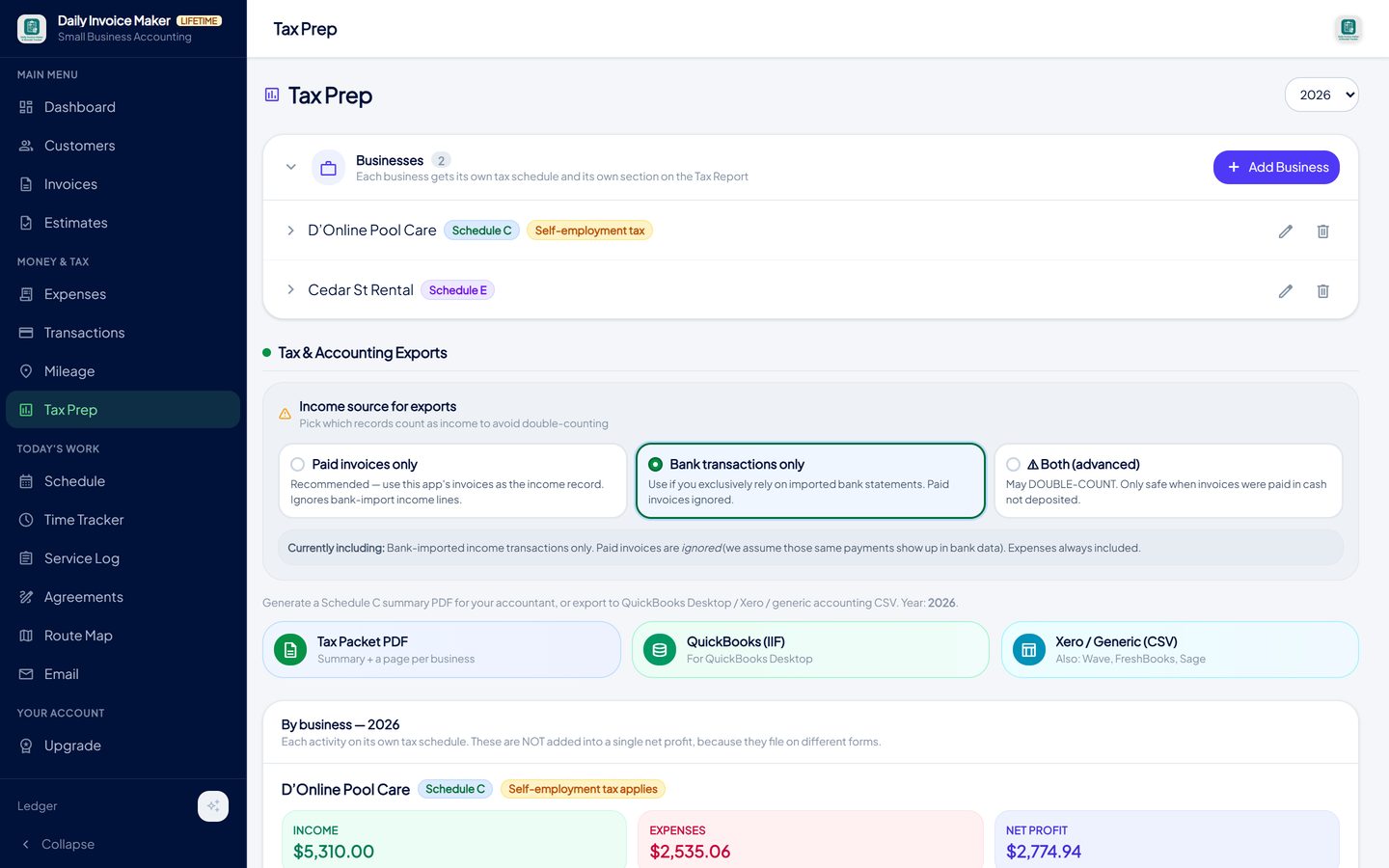
Tax Prep → Businesses. Each business is tagged with the schedule it files on; a Schedule C business carries the self-employment tax badge. -
Record income the way you actually get paid
Invoices you mark paid are income. So are deposits on an imported bank, PayPal, Venmo or Cash App statement, and the app reads the common statement formats directly. On import, every line gets a type (income, taxable expense, non-taxable transfer), a category and a business. Transfers between your own accounts are marked non-taxable so they never reach gross receipts.
To stop the same job counting twice, Tax Prep has an income source switch: count paid invoices, or count bank deposits, but not both unless you knowingly choose it.
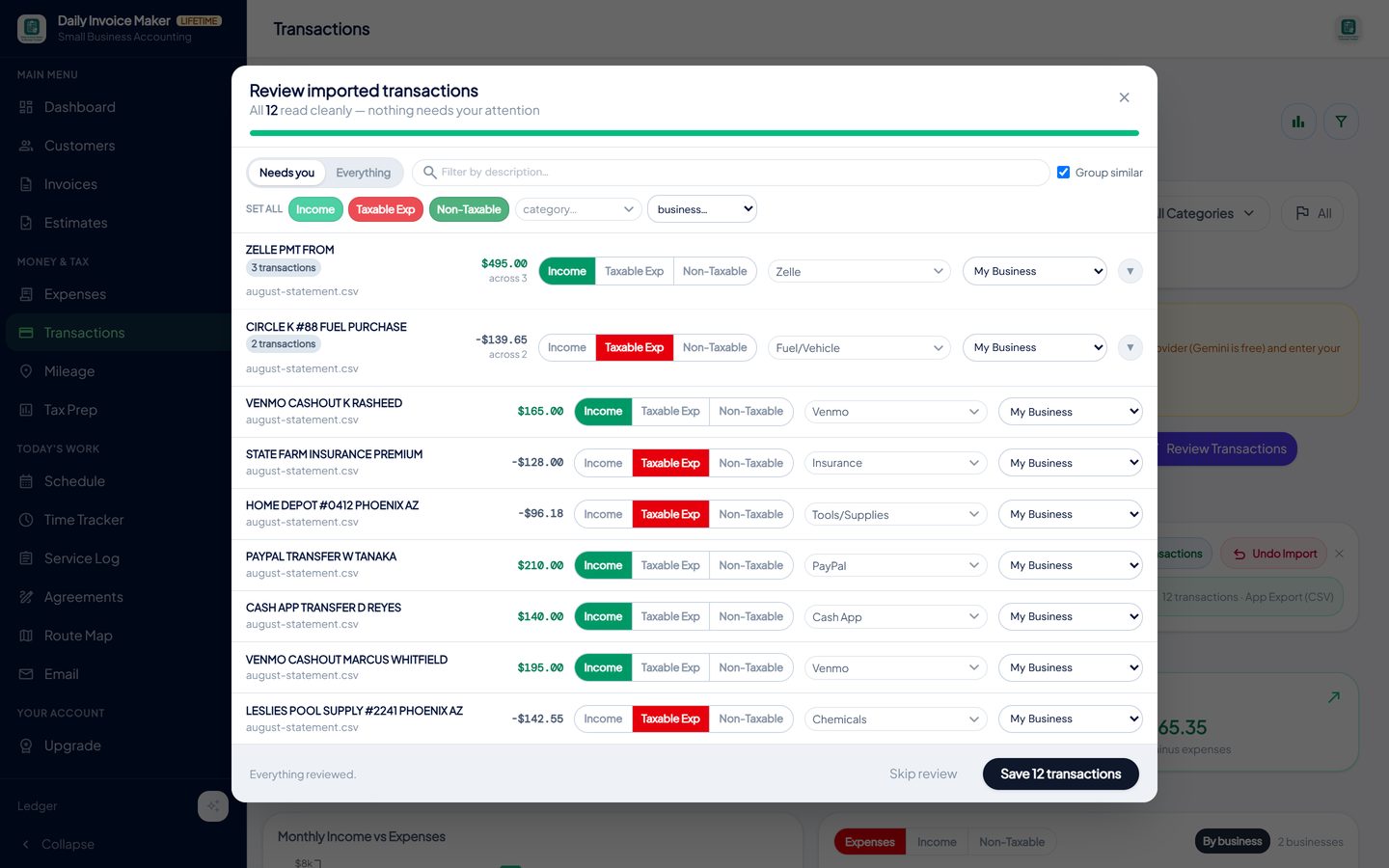
Importing a statement: each line is marked income, taxable expense or non-taxable, given a Schedule C category, and assigned to a business. -
Log every expense with the receipt attached
Snap the receipt with the phone or drop the image on the desktop app. The scanner reads the store, date and total and proposes a category; you confirm and the photo is stored with the record. When the card statement is imported later, the app spots the receipt and the statement line that describe the same purchase and offers to exclude the duplicate, keeping the receipt because it carries the photo and your category.
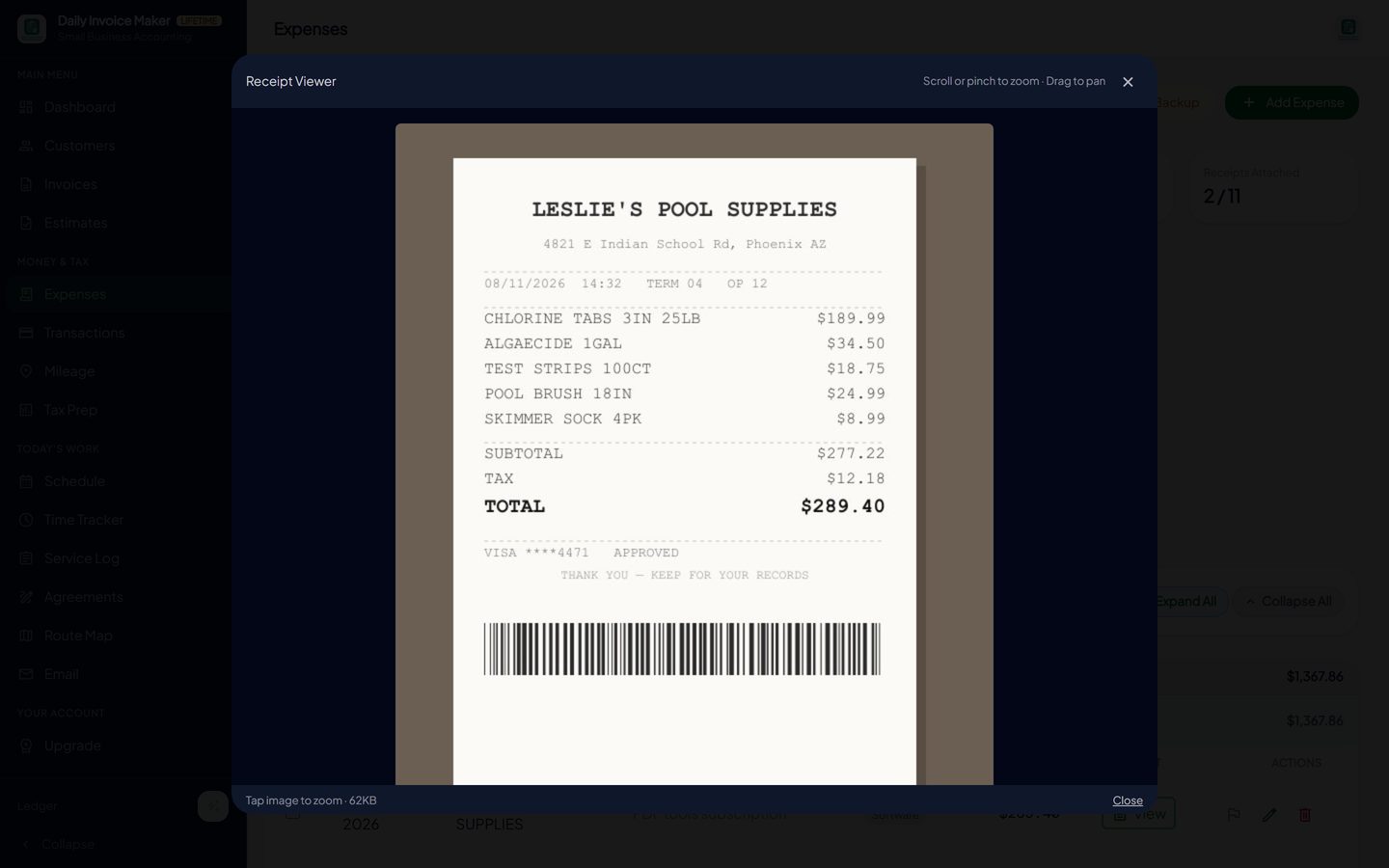
The receipt stays with the expense. The AI scanner reads the merchant, date and total from the photo and suggests a category. -
Keep the mileage log at the time of the trip
Start a trip from the phone, photograph the odometer, and the app records the reading; or type the miles by hand. Each entry carries the date, distance and route, which is exactly what the IRS asks for on line 9. The deduction is calculated at the current standard rate and included in the Schedule C figures automatically.
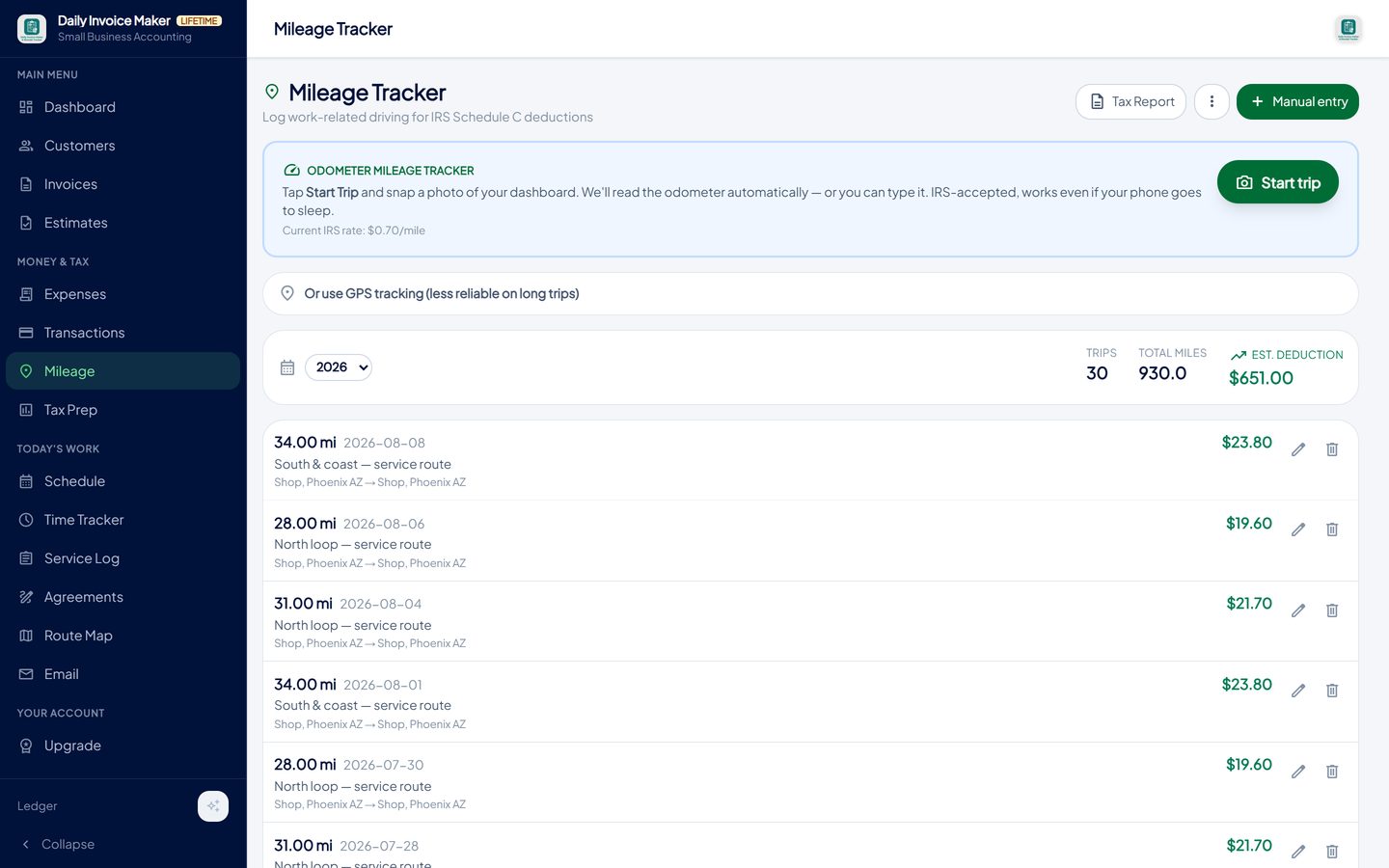
Trips are logged with date, distance and purpose; the year's total and the deduction at the current IRS rate sit at the top. -
Watch the form fill itself during the year
Tax Prep shows income, expenses and net profit per business at any point in the year, so you know what to send with each quarterly estimate. It also runs the checks a spreadsheet cannot: a bare "Mortgage" category is flagged so you split principal from interest, and receipts that match imported bank lines are listed for review with one box to exclude the copies.
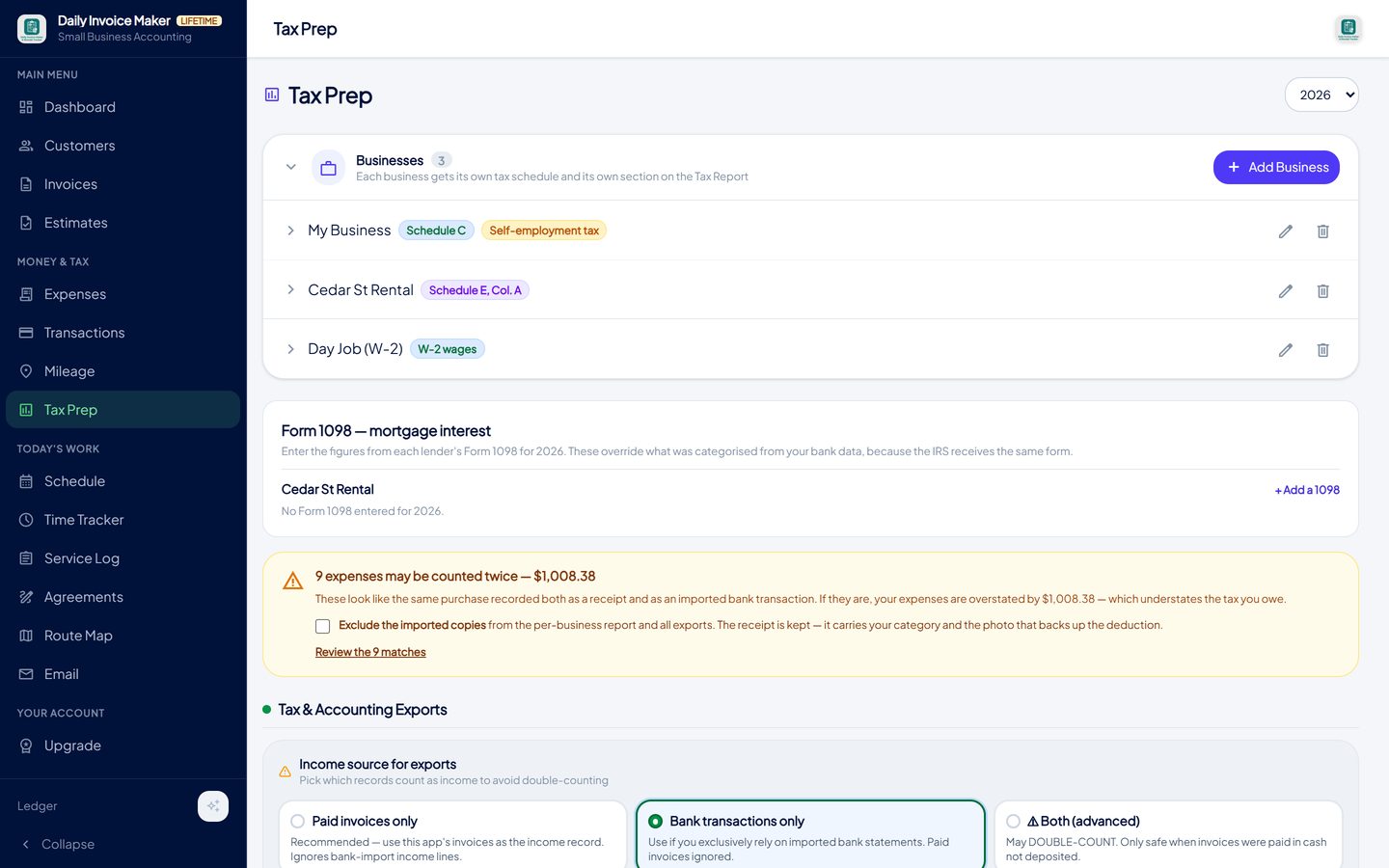
The duplicate check found nine expenses recorded both as receipts and as imported bank lines, and offers to exclude the copies. -
Download the Schedule C figures for your preparer or your tax software
When the year closes, export. The Tax Packet PDF is a Schedule C summary, one page per business, laid out in the form's line categories for an accountant. The TurboTax (.txf) export produces one file per business that TurboTax Desktop imports straight onto the right schedule, with a verification sheet listing anything that needs a manual check. QuickBooks and generic CSV exports are there for people who hand their books to a bookkeeper.
The app does not file your return, and it says so. What it does is arrive at April with line 31 already known.
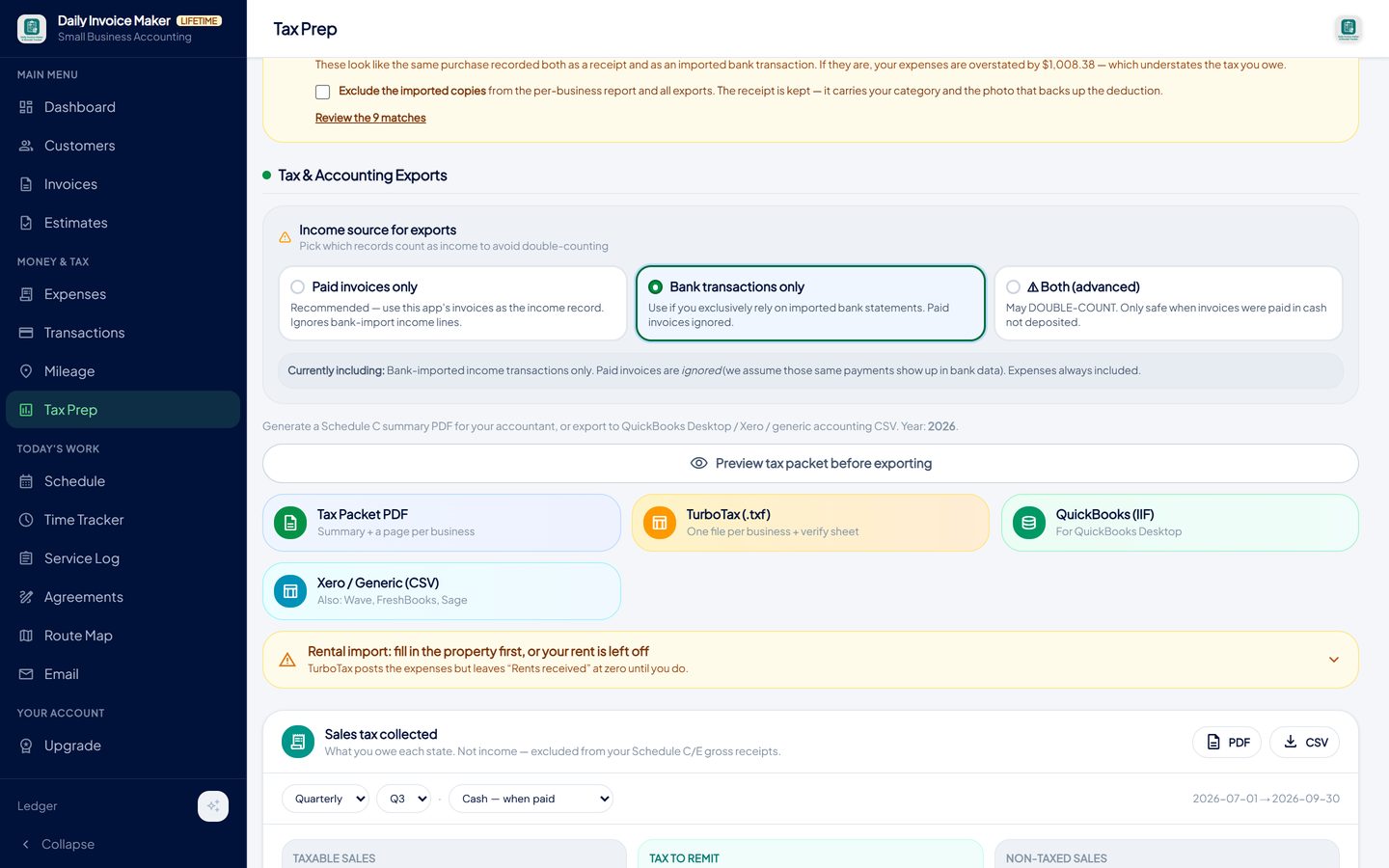
One click each: a Schedule C summary for an accountant, a TurboTax import file per business, or a QuickBooks or generic CSV export.
What else is in the app
Invoices and estimates
Create, send and track invoices; convert an accepted estimate to an invoice in one step. Paid invoices feed gross receipts.
Receipt scanner
Photograph a receipt and the AI reads merchant, date and total. The image stays attached to the expense as evidence.
Bank and P2P statement import
Chase, Bank of America, Wells Fargo, Amex, Capital One, PayPal, Venmo, Cash App, Stripe, Square, OFX and more.
Separate books per business
Schedule C, Schedule E and W-2 books side by side, each reported on its own schedule, never merged.
Mileage tracker
Odometer-photo or manual trips with date, distance and purpose, totalled at the IRS rate.
Offline, on your own computer
Windows, Mac and Linux desktop plus Android. Your data stays on your devices; Google Drive sync between them is included.
Try it on your own books
The free demo is the full app for your first 7 invoices, 7 customers and 7 expenses — no account, no card. It runs 100% offline on Windows, Mac and Linux: $149.99 once, or $5.99 a month if you would rather not commit. The Android app is a separate Google Play purchase.
Questions
Do I have to file Schedule C if I only earned a little on the side?
If your net earnings from self-employment were $400 or more, yes, and you owe self-employment tax on them. Below $400 you still report the income on your return; you just do not owe Schedule SE tax. Either way, keep the records: a $350 side income with $900 of legitimate expenses is a loss you may be able to use.
Can I put two businesses on one Schedule C?
Not if they are genuinely different activities. Each business gets its own Schedule C, and a rental property goes on Schedule E instead. Keeping separate books from the start is far easier than untangling one combined ledger in April.
My customers pay through Venmo and Cash App. Is that income?
Yes. Payment for work is income no matter how it arrives. The platforms only issue Form 1099-K above a reporting threshold, which was reset to $20,000 and 200 transactions from 2025, but the threshold decides what the platform reports, not what you owe.
Does Daily Invoice Maker file my taxes?
No. It keeps the records and produces the year's figures in Schedule C categories, as a PDF summary for an accountant or as a TurboTax import file. Filing is done in your tax software or by your preparer.
What about a rental property?
Rental income and expenses belong on Schedule E and are not subject to self-employment tax. In the app you set the property up as a Schedule E book; it gets its own report and its own TurboTax file, and the app reminds you that TurboTax needs the property described before the rent figures post.
How long do I keep the receipts?
At least three years from the date you file, which is how long the IRS normally has to examine a return. Six years if you under-reported income by more than 25%, and seven for claims involving worthless securities or bad debt. Photos attached to the expense records survive far better than thermal paper in a folder.
Is my financial data uploaded to your servers?
No. The app stores everything on your own computer or phone. If you turn on Google Drive sync, the copy goes to your own Google Drive account so your other devices can read it; it does not pass through ours.
The short version
Schedule C is not hard; it is tedious, and the tedium is entirely a function of when you sort the records. Sort them on the day they happen, keep the receipt with the entry, reconcile monthly, and log miles as you drive, and the form is a printout. Daily Invoice Maker is one way to do that; the free demo lets you try the Tax Prep workflow on your own numbers before you decide.
Related guides

Write-Off Tracker Guide
The small business tax deductions most self-employed people miss, the records the IRS expects for each one, and how a tax write-off tracker captures them during the year.

Tax Prep Guide
How to prepare self-employed taxes without a lost weekend: what your preparer or TurboTax needs, how a TXF export works, and the checks that stop double counting.

Self-Employed Accounting
The accounting a sole proprietor or independent contractor actually needs: cash-basis books, a monthly reconciliation routine, quarterly estimates, self-employment…
How to track mileage between jobs for taxes · QuickBooks alternative that you pay for once · All guides · Quick how-to answers · Training guide for the app