Guides · Tax season
Self-employed accounting: what a sole proprietor actually has to keep, and when
Nobody starts a business because they wanted to do the books. But a sole proprietor is the business's whole accounting department, and the department's output is not a set of financial statements; it is a correct tax return, paid on time in four instalments, with the evidence to back it.
This guide is the minimum that does that job: which records, what routine, which deadlines, and what to hand over at year end. Then it shows the routine inside Daily Invoice Maker, an independent contractor's invoicing and tax app that keeps it all in one place.

What self-employed accounting has to produce
Corporate accounting exists to inform investors and lenders. Sole-proprietor accounting exists to answer four questions, and everything you keep should serve one of them:
- How much did the business earn this year? Gross receipts, on a cash basis, per business.
- What did it cost to earn it? Expenses by Schedule C category, each with evidence.
- How much tax do I owe, and when? Income tax plus self-employment tax, paid quarterly.
- Who owes me money right now? Unpaid invoices, so cash keeps arriving.
Notice what is missing: a balance sheet, accrual adjustments, a general ledger with debits and credits. A sole proprietor with no inventory and no employees does not need them, and software built for companies that do will make you maintain them anyway.
The structure: three records and a boundary
The boundary first. Open a separate bank account and card for the business and run everything through them. It is the single change that makes the rest of this page easy. Without it, every statement has to be picked through to separate the business from the groceries, and every personal line that slips through is a deduction you were not entitled to.
Inside that boundary there are three records:
- The income record: invoices
- Every job gets an invoice, even when the customer pays on the spot. The invoice is what says who paid, for what, when, and whether sales tax was part of it. Paid invoices, totalled, are your gross receipts. Unpaid ones are your receivables.
- The expense record: receipts with categories
- Every purchase gets a Schedule C category and, wherever possible, a photo of the receipt attached, on the day. Card statements are imported to catch what was never photographed.
- The mileage log
- Date, miles, purpose, recorded as you drive. For a contractor who visits customers it is often the second-largest deduction after materials.
If you run more than one activity, say a trade and a rental property, each needs its own set of these three records, because they file on different forms with different tax treatment.
The monthly routine
The books stay small if they are touched monthly. An hour at the start of each month, with the previous month's statements, covers it:
- Import the bank and card statements. Mark each line: income, taxable expense, or non-taxable (transfers between your own accounts, loan principal, personal). Give expenses a category.
- Reconcile income. Every deposit should match a paid invoice or be explained. A deposit with no invoice is either a job you forgot to bill properly or money that is not income; find out which.
- Resolve duplicates. Receipts photographed during the month will match card lines you just imported. Keep the receipt, drop the duplicate.
- Chase what is owed. Look at overdue invoices and send reminders. Cash flow is an accounting problem before it is a sales problem.
- Read the profit figure. Income minus expenses, year to date. That number, times roughly a quarter to a third depending on your bracket, is what you should have set aside for tax.
The reason this takes an hour and not a weekend is that the categorising happened during the month, at the counter and in the truck. The monthly session is a check, not a reconstruction.
Self-employment tax, estimates and the deductions specific to you
An employee's Social Security and Medicare are split with the employer. A sole proprietor pays both halves as self-employment tax: 15.3% of 92.35% of net profit, made up of 12.4% Social Security up to the annual wage base and 2.9% Medicare with no cap. It is calculated on Schedule SE and added to your income tax, and half of it is deductible on Schedule 1.
Because nothing is withheld, the IRS expects four estimated payments a year, due April 15, June 15, September 15 and January 15, using Form 1040-ES. Pay at least last year's total tax (110% of it if your AGI was over $150,000), or 90% of this year's, and there is no penalty.
Three deductions belong to the self-employed specifically, and none of them appears on Schedule C:
- Half of self-employment tax, on Schedule 1.
- Health insurance premiums for you and your family, if you are not eligible for an employer plan, also on Schedule 1.
- Retirement contributions to a SEP-IRA or solo 401(k), which can be large: up to 25% of net self-employment earnings for a SEP.
And most sole proprietors qualify for the 20% qualified business income deduction, which the 2025 tax law made permanent. All four depend on one number: net profit from the books.
Year end: what to hand over
Whether you file yourself or use a preparer, year end is a handover of the same package: gross receipts per business, expenses by Schedule C line with the entries behind them, the mileage total and log, the 1099-NEC and 1099-K forms clients and platforms sent you, the 1098 from any lender, the estimated payments you made and when, and last year's return. For a rental, the same per property on Schedule E lines.
A preparer will accept a folder of statements and charge you for the hours it takes to turn them into that package. Software that has been categorising all year produces it as a report. That is the whole economic case for keeping the books as you go: the work is the same either way, but doing it on the day is a few seconds per entry and doing it in April is a project.
Sole proprietor, LLC or S corporation?
A single-member LLC changes your legal liability but not your accounting: it is still taxed as a sole proprietorship on Schedule C, and everything above applies unchanged. An S-corporation election changes the accounting substantially, because you become an employee of your own company: payroll, a reasonable salary, a corporate return, and books that a preparer will insist on. It can save self-employment tax once profit is comfortably above what a reasonable salary would be, but it costs real money and time to run. Decide with a professional, on a year of clean Schedule C numbers, rather than on a guess.
This guide is general information about record-keeping and tax forms, not tax or legal advice. Rules change and situations differ; confirm anything that affects your return with a tax professional or the IRS instructions for the form.
Step by step
How Daily Invoice Maker handles it
Daily Invoice Maker is an independent contractor's invoicing and tax app for Windows, Mac, Linux and Android. The three records above are its three main screens, the monthly routine is its import-and-review flow, and the year-end package is its Tax Prep export. Here is the routine with a fictional service business.
-
Start from the dashboard: income, expenses and profit, year to date
The dashboard answers the four questions on one screen: income, expenses and net profit for the year (or any range), what is outstanding, how many invoices were paid, and a link straight to Tax Prep. The net profit figure is what you set tax aside against each quarter.
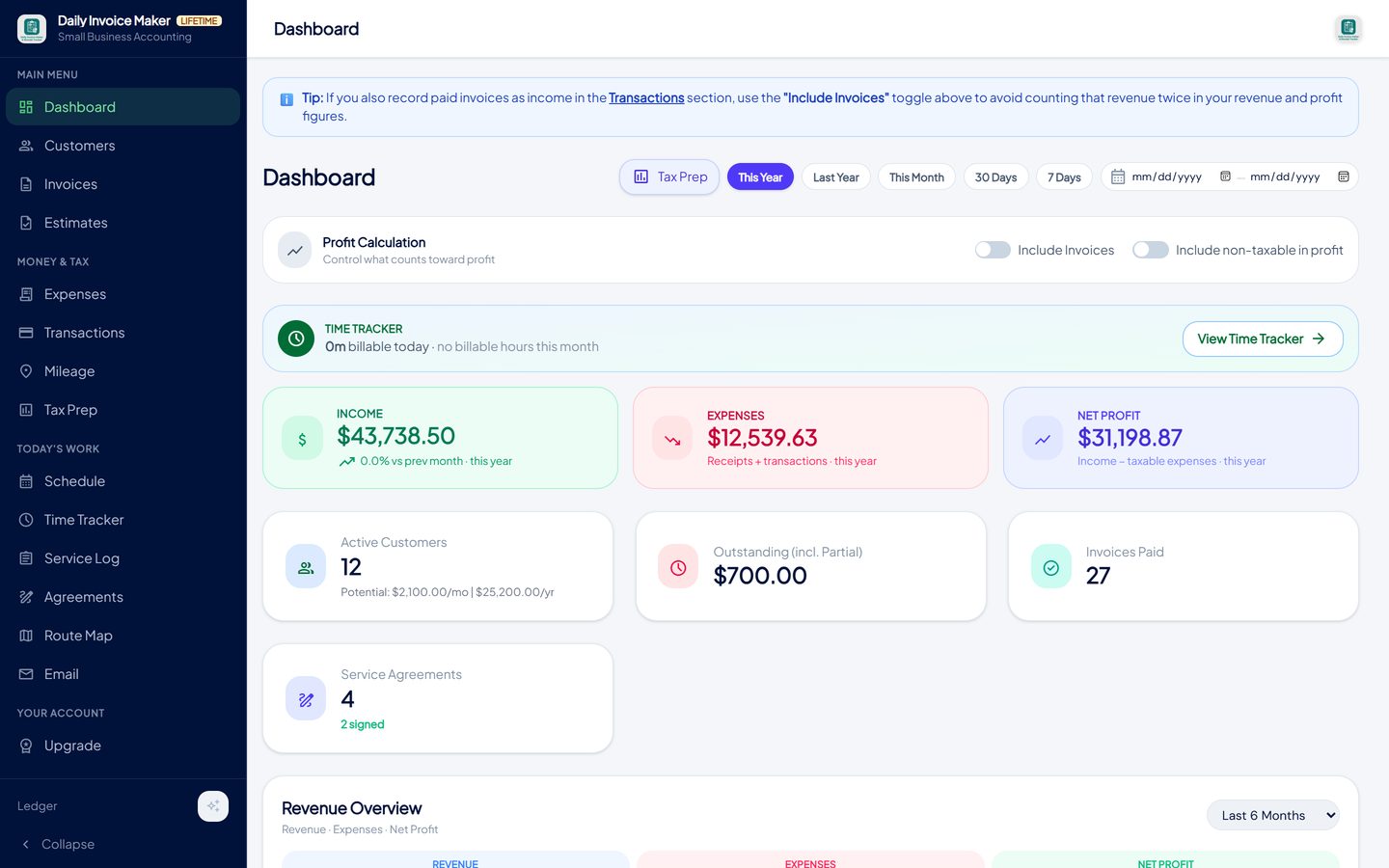
Income, expenses and net profit for the period, with the outstanding balance and paid-invoice count beside them. -
Invoice every job, so paid invoices are the income record
Create the invoice from the estimate or from scratch, send it by email or text, and mark it paid when the money arrives (partial payments are recorded too). Sales tax on the invoice is tracked separately and kept out of income. The list is also your receivables: sent and overdue invoices are the money to chase.
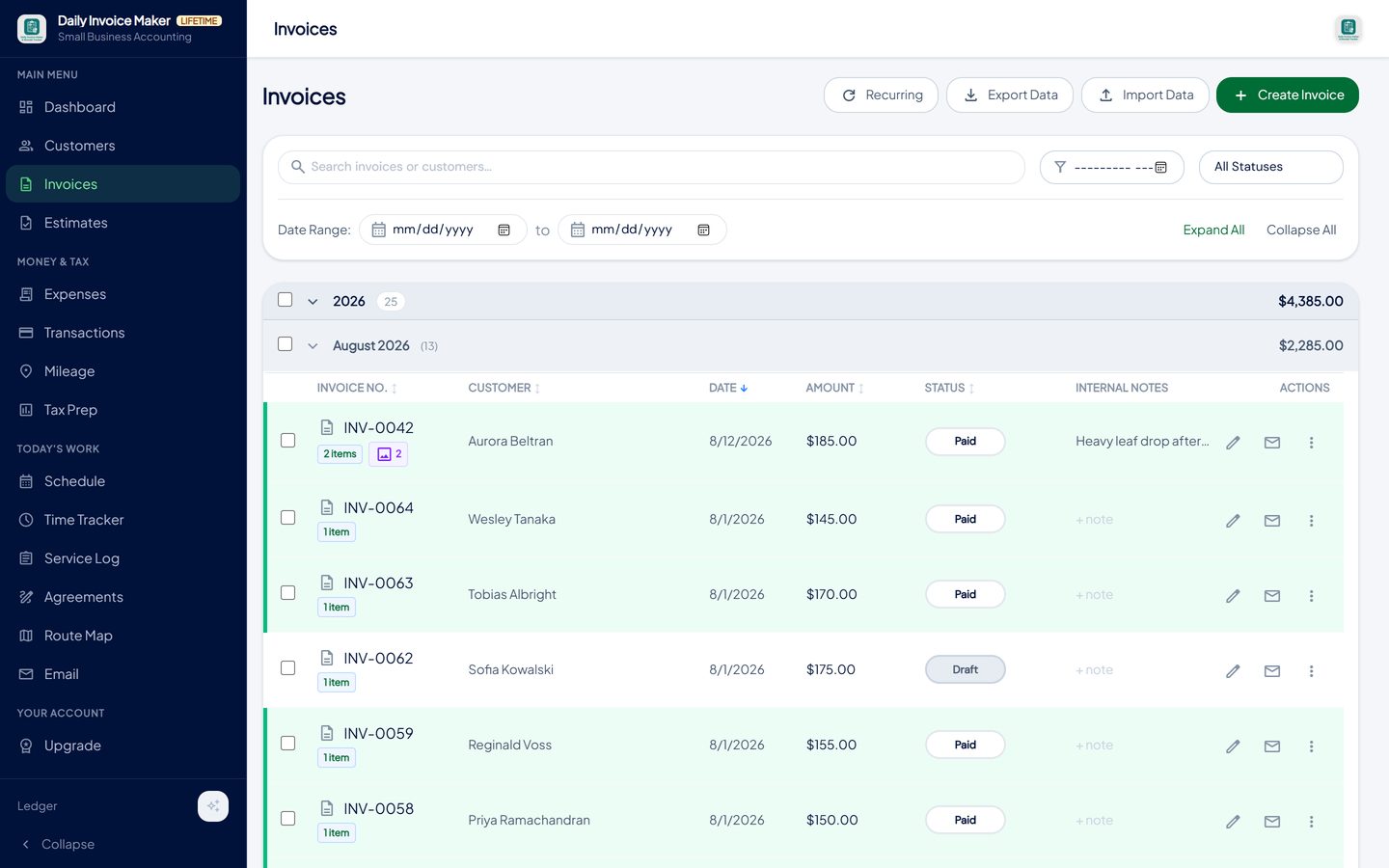
Every job gets an invoice; the status shows what is paid, sent or overdue, and paid invoices total to gross receipts. -
Import the month's statements and mark every line
Import the bank, card or payment-platform statement (Chase, Bank of America, Wells Fargo, Amex, Capital One, PayPal, Venmo, Cash App, Stripe, Square and more) and review it in one pass. Similar lines are grouped, rows that need a decision come first, and each gets income / taxable expense / non-taxable, a category and a business. Undo the whole import with one button if the file was wrong.
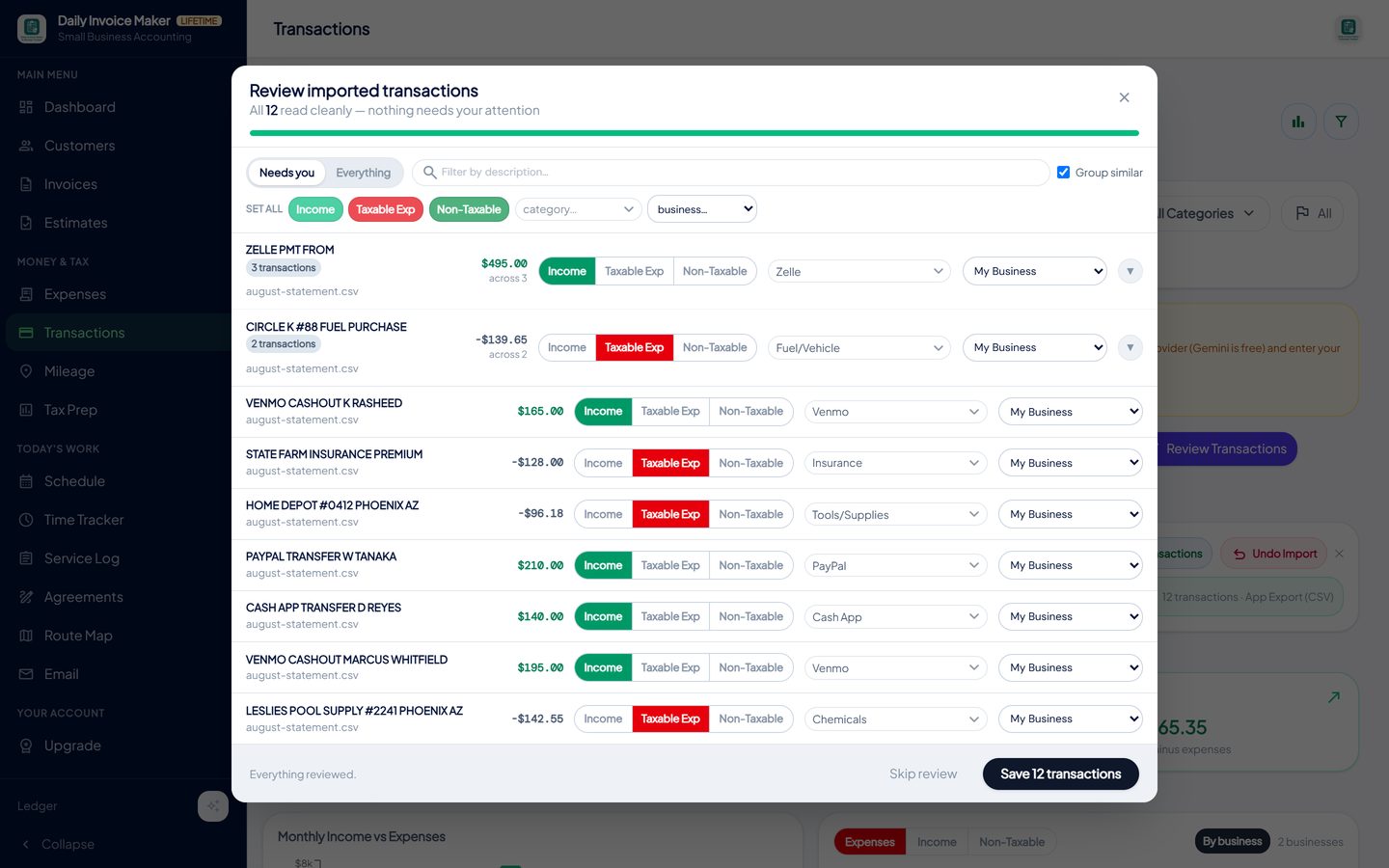
One pass through the month: type, category and business on each line. Rows that need a decision are shown first; the rest were read cleanly. -
Keep receipts attached and let the app find duplicates
Receipts photographed during the month already have their category. When the statement import arrives, the Tax Prep duplicate check matches receipts to the card lines that describe the same purchase and offers to exclude the copies, keeping the receipt and its photo.

Expenses with the receipt attached and a category on every row; the tiles show this week, this month and year to date. -
Read the tax position at each quarterly deadline
Tax Prep keeps each activity on its own schedule, applies one income rule for the year, and shows income, expenses and net profit per business at any point, which is what you need on April 15, June 15, September 15 and January 15 to size the estimated payment.
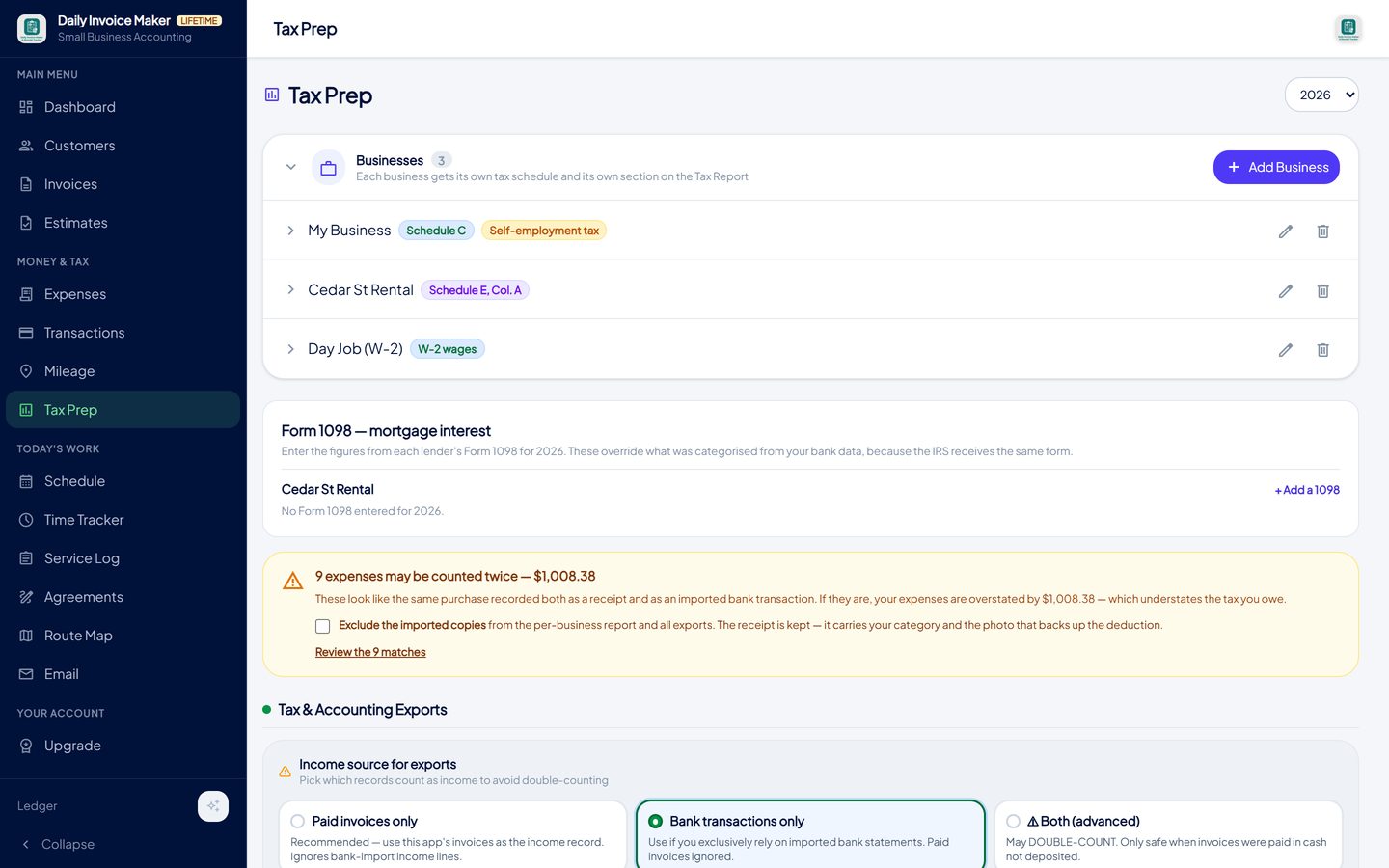
Each activity on its own schedule. The per-business report below it shows income, expenses and net profit to date. -
Hand over the year
At year end, export the package: a Tax Packet PDF in Schedule C line order for an accountant, a TurboTax Desktop import file per business, or QuickBooks and generic CSV exports for a bookkeeper. The app does not file the return; it makes the handover a download instead of a reconstruction.
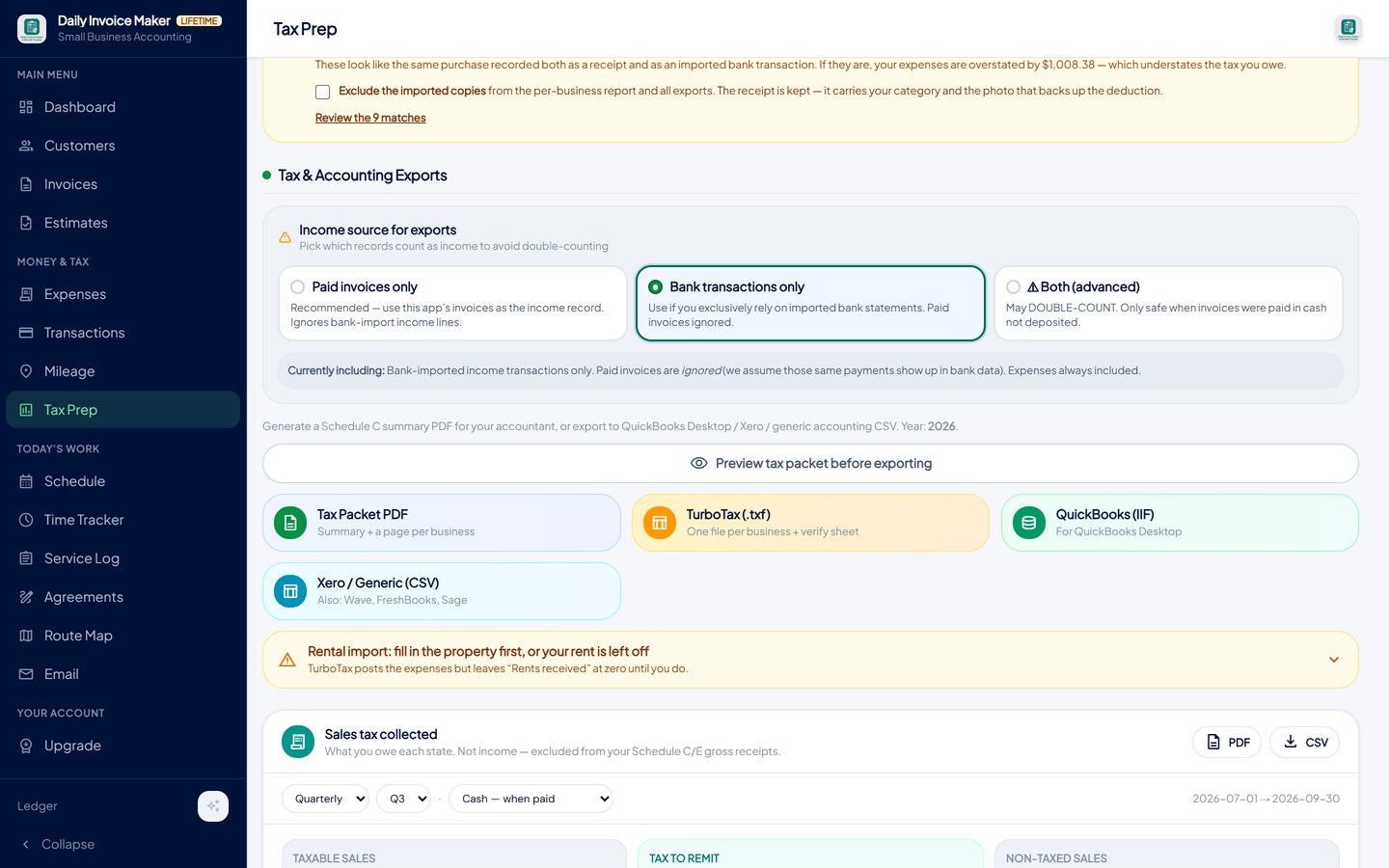
A Schedule C summary for the preparer, a TurboTax import file, or QuickBooks and CSV exports for a bookkeeper.
What else is in the app
Invoices, estimates and reminders
Estimates convert to invoices; overdue invoices are visible and resendable from the dashboard.
AI receipt scanner
Merchant, date and total read from a photo; the image stays with the expense.
Statement import, 16 formats
Banks, cards, PayPal, Venmo, Cash App, Stripe, Square, OFX and PayPal PDF statements.
Books per activity
Schedule C, Schedule E and W-2 books reported separately; the self-employment tax base excludes what it should.
Mileage tracker
Odometer-photo or manual trips at the IRS rate, inside the same records.
Your data, your device
Nothing uploaded to our servers. Windows, Mac, Linux and Android; Google Drive sync between them is included.
Try it on your own books
The free demo is the full app for your first 7 invoices, 7 customers and 7 expenses — no account, no card. It runs 100% offline on Windows, Mac and Linux: $149.99 once, or $5.99 a month if you would rather not commit. The Android app is a separate Google Play purchase.
Questions
Do I need double-entry bookkeeping as a sole proprietor?
Not for tax purposes. A cash-basis record of income and categorised expenses, reconciled against the bank, is what Schedule C requires. Double-entry books matter when you need a balance sheet for a lender or investor, or when you incorporate.
How much should I set aside for tax?
A common rule of thumb is 25% to 30% of net profit, covering self-employment tax (15.3% of 92.35% of profit) plus income tax at your bracket. Your year-to-date net profit, read monthly, is the base for that estimate; the safe harbour based on last year's tax tells you the minimum to send each quarter to avoid a penalty.
I get paid through Venmo, Zelle and Cash App. How do I account for that?
Invoice the job anyway, so the income record exists, then import the platform's statement and mark the deposits as income against the right business. The Tax Prep income rule stops the invoice and the deposit both counting. Whether a platform sends you a 1099-K depends on its reporting threshold; the income is taxable either way.
Can I keep a rental property in the same app?
Yes, as its own Schedule E book, reported separately and excluded from self-employment tax. Two trades can also be kept as two Schedule C books.
Does the app do payroll or an S-corporation return?
No. It is built for sole proprietors and single-member LLCs filing Schedule C and E. If you elect S-corporation treatment you will need payroll and a corporate return handled elsewhere; the app's records still feed your preparer.
Is there a subscription?
Either. $5.99 a month, or $149.99 once for a lifetime licence. Google Drive sync between your devices is included with both, and the free demo is the full app with a seven-invoice limit and a sample watermark.
The short version
Self-employed accounting is a boundary (a separate account), three records (invoices, categorised receipts, a mileage log) and a monthly hour of reconciliation. Keep it that simple and the quarterly estimates, the self-employment tax and the April return are outputs of the system rather than projects. Daily Invoice Maker's free demo lets you run the routine on your own business before paying for anything.
Related guides

Schedule C Tracker
What Schedule C asks for, line by line, and how to keep a running record of income, expenses and mileage all year so the form takes minutes, not a weekend.

Expense Tracker Guide
How to track business income and expenses so the numbers are right all year: categories that match the tax form, receipts attached, statements imported and…

Invoice Maker Guide
What every invoice must contain, the payment terms that get you paid faster, why a real invoice maker beats a one-off generator, and how paid invoices become your…
How to keep track of unpaid invoices · QuickBooks alternative that you pay for once · All guides · Quick how-to answers · Training guide for the app